


Development

Parsing RTSM(Real-Time SQL Monitor) XML Reports
In the previous part, I forgot to mention one important detail: if you want to export or extract RTSM (Real-Time SQL Monitoring) reports directly in XML format for further analysis, you can simply use the following functions:
dbms_sql_monitor.report_sql_monitor_xml()ordbms_sqltune.report_sql_monitor_xml()— for reports still present ingv$sql_monitor.dbms_auto_report.report_repository_detail_xml()— for reports already stored in history (AWR), underdba_hist_reports.
To format these XML reports into TEXT, HTML, or Active HTML, you can use:
dbms_report.format_report(
    report      IN xmltype,
    format_name IN varchar2
)
Setting format_name => 'ACTIVE' produces the Active HTML version.
The Main Topic: How to Parse RTSM XML Reports
Starting with Oracle 19.16, table SQL_MACROs became available, enabling a very elegant way to encapsulate XML parsing logic inside SQL macros.
For convenience, I updated the package PKG_RTSM and added the following SQL macro functions to parse various sections of an RTSM XML report:
- function rtsm_xml_macro_report_info(xmldata xmltype) return varchar2 SQL_MACRO;
- function rtsm_xml_macro_plan_info(xmldata xmltype) return varchar2 SQL_MACRO;
- function rtsm_xml_macro_plan_ops(xmldata xmltype) return varchar2 SQL_MACRO;
- function rtsm_xml_macro_plan_monitor(xmldata xmltype) return varchar2 SQL_MACRO;
(These declarations can be found in the package header in the uploaded source file pkg_rtsm.)
This means you can use them directly in SQL, for example:
select *
from pkg_rtsm.rtsm_xml_macro_plan_ops(:YOUR_XML_REPORT) ops;
rtsm_xml_macro_report_info
Returns the main metadata of the RTSM report, such as:
sql_id,sql_exec_id,sql_exec_startrep_date,inst_count,cpu_corescon_name, platform information, optimizer environment- SQL text, execution statistics, activity samples, and more
In addition, the function exposes two extremely useful columns:
DBMS_REPORT.FORMAT_REPORT(XMLDATA,'TEXT'  )  as RTSM_REPORT_TEXT
DBMS_REPORT.FORMAT_REPORT(XMLDATA,'ACTIVE') as RTSM_REPORT_ACTIVE
These allow you to obtain the formatted TEXT or Active HTML version of the report directly from SQL without extra steps.
This logic is fully visible in the macro implementation in the package body.
2.rtsm_xml_macro_plan_info
Returns essential information about the execution plan, including:
has_user_tabdb_versionparse_schema- Full (adaptive) PHV and normal final plan hash value (
plan_hash_full,plan_hash,plan_hash_2) peeked_bindsxplan_statsqb_registryoutline_datahint_usage
This macro extracts the <other_xml> block attached to the root plan operation (id="1").
rtsm_xml_macro_plan_ops
Returns the full list of plan operations, including:
- operation id, name, options, depth, position
- object information
- cardinality, bytes, cost
- I/O and CPU cost
- access and filter predicates
This essentially exposes the plan as a SQL-friendly dataset.
4.rtsm_xml_macro_plan_monitor
This is the most important macro for analyzing performance metrics.
It returns all operations from the plan monitor section, together with all runtime statistics, including:
- starts, cardinality, memory usage, temp usage
- I/O operations and spilled data
- CPU and I/O optimizer estimates
- Monitoring timestamps (
first_active,last_active) - Activity samples by class (CPU, User I/O, Cluster, etc.)
Most importantly, it computes:
ROUND(100 * RATIO_TO_REPORT(NVL(wait_samples_total,0)) OVER (), 3)
    AS TIME_SPENT_PERCENTAGE
This is an analogue of “Activity%” in the Active HTML report — showing what percentage of sampled activity belongs to each plan step.
The full implementation, with all xmltable parsing logic, is available in the uploaded code file pkg_rtsm.
You can download the latest version of the package here:
https://github.com/xtender/xt_scripts/blob/master/rtsm/parsing/pkg_rtsm.sql
Parsing Real-Time SQL Monitor (RTSM) ACTIVE Reports Stored as HTML
When you work with a large number of Real-Time SQL Monitor (RTSM) reports in the ACTIVE format (the interactive HTML report with JavaScript), it quickly becomes inconvenient to open them one by one in a browser. Very often you want to load them into the database, store them, index them, and analyze them in bulk.
Some RTSM reports are easy to process — for example, those exported directly from EM often contain a plain XML payload that can be extracted and parsed with XMLTABLE().
But most ACTIVE reports do not store XML directly.
Instead, they embed a base64-encoded and zlib-compressed XML document inside a <report> element.
These reports typically look like this:
<html>
 <head>
  <meta http-equiv="Content-Type" content="text/html; charset=utf-8"/>
  <script ...>
     var version = "19.0.0.0.0";
     ...
  </script>
 </head>
 <body onload="sendXML();">
  <script id="fxtmodel" type="text/xml">
   <!--FXTMODEL-->
   <report db_version="19.0.0.0.0" ... encode="base64" compress="zlib">
     <report_id><![CDATA[/orarep/sqlmonitor/main?...]]></report_id>
       eAHtXXtz2ki2/38+hVZ1a2LvTQwS4pXB1GJDEnYc8ALOJHdrSyVA2GwAYRCOfT/9
       ...
       ffUHVA==
   </report>
   <!--FXTMODEL-->
  </script>
 </body>
</html>
At first glance it’s obvious what needs to be done:
- Extract the base64 block
- Decode it
- Decompress it with zlib
- Get the original XML
<sql_monitor_report>...</sql_monitor_report>
And indeed — if the database had a built-in zlib decompressor, this would be trivial.
Unfortunately, Oracle does NOT provide a native zlib inflate function.
UTL_COMPRESScannot be used — it expects Oracle’s proprietary LZ container format, not a standard zlib stream.- There is no PL/SQL API for raw zlib/DEFLATE decompression.
- XMLType, DBMS_CRYPTO, XDB APIs also cannot decompress zlib.
Because the RTSM report contains a real zlib stream (zlib header + DEFLATE + Adler-32), Oracle simply cannot decompress it natively.
Solution: use Java stored procedureThe only reliable way to decompress standard zlib inside the database is to use Java.
A minimal working implementation looks like this:
InflaterInputStream inflaterIn = new InflaterInputStream(in);
InflaterInputStream with default constructor expects exactly the same format that RTSM uses.
I created a tiny Java helper ZlibHelper that inflates the BLOB directly into another BLOB.
It lives in the database, requires no external libraries, and works in all Oracle versions that support Java stored procedures.
Source code: https://github.com/xtender/xt_scripts/blob/master/rtsm/parsing/ZlibHelper.sql
PL/SQL API: PKG_RTSM
On top of the Java inflater I wrote a small PL/SQL package that:
- Extracts and cleans the base64 block
- Decodes it into a BLOB
- Calls Java to decompress it
- Returns the resulting XML as CLOB
- Optionally parses it with
XMLTYPE
Package here:
pkg_rtsm.sql
https://github.com/xtender/xt_scripts/blob/master/rtsm/parsing/pkg_rtsm.sql
This allows you to do things like:
xml:=xmltype(pkg_rtsm.rtsm_html_to_xml(:blob_rtsm));
Or load many reports, store them in a table, and analyze execution statistics across hundreds of SQL executions.
Spermatikos Logos


stikhar iz rossii

The blood of the martyrs is the seed of the Church.
This present moment
I sat upon the shore
MacIntyre, Memory Eternal
There are a handful of living thinkers that have made me re-think fundamental presuppositions that I held consciously (or not) for some time in my early life. Each, in his own way, a genius - but in particular a genius in re-shaping the conceptualization of an intellectual space for me. Until yesterday they were in no particular order, Noam Chomsky, David Bentley Hart, John Milbank, Michael Hudson, Alain de Benoist and Alasdair MacIntyre. We recently lost Rene Girard. Now MacIntyre is no longer with us. His precise analytics, pulling insights from thinkers ranging from Aristotle to Marx, was rarely matched in the contemporary world. The hammer blow that After Virtue was to so many of my assumptions and beliefs is hard to describe - my entire view of the modern project, especially around ethics, was undone. But it was also his wisdom about the human animal and what really mattered in terms of being a human being that set him apart.
Oracle Telegram Bot
For the Oracle performance tuning and troubleshooting Telegram channel https://t.me/ora_perf, I developed a simple helpful Telegram bot. It simplifies common Oracle database tasks directly within Telegram.
Here’s what the bot can do:
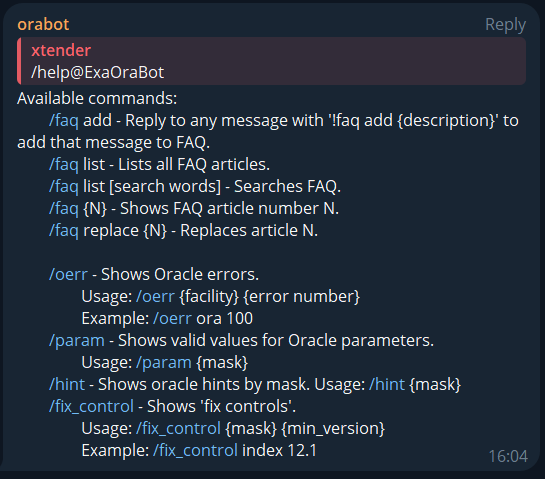 FAQ Management
- /faq add: Reply with
!faq add {description}to save a message. - /faq list: Lists all FAQ articles.
- /faq list [search words]: Search FAQ by keywords.
- /faq {N}: Shows FAQ article number N.
- /faq replace {N}: Updates FAQ article N.
/oerr: Shows details of Oracle errors
/oerr ora 29024

29024, 00000, "Certificate validation failure"
// *Cause:  The certificate sent by the other side could not be validated. This may occur if
//          the certificate has expired, has been revoked, or is invalid for another reason.
// *Action: Check the certificate to determine whether it is valid. Obtain a new certificate,
//          alert the sender that the certificate has failed, or resend.
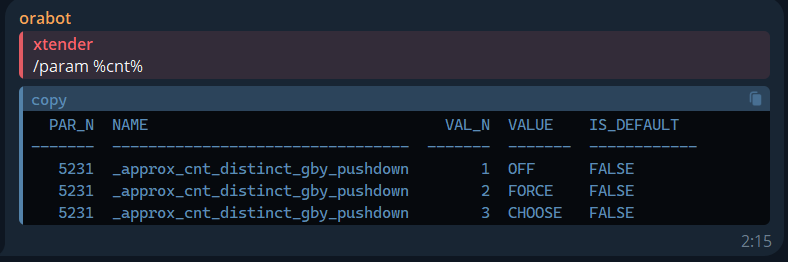
 Oracle Parameter Search
/param: Finds Oracle parameters by mask.
/param %cnt%

  PAR_N  NAME                                 VAL_N  VALUE    IS_DEFAULT
-------  ---------------------------------  -------  -------  ------------
   5231  _approx_cnt_distinct_gby_pushdown        1  OFF      FALSE
   5231  _approx_cnt_distinct_gby_pushdown        2  FORCE    FALSE
   5231  _approx_cnt_distinct_gby_pushdown        3  CHOOSE   FALSE
 Oracle Hints
/hint: Lists Oracle hints by mask
/hint 19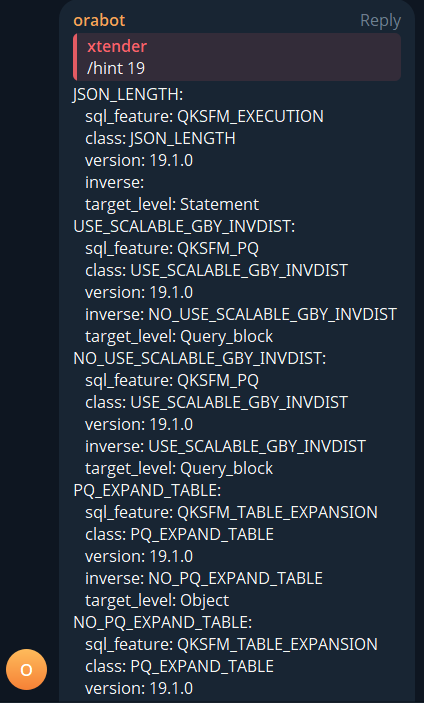
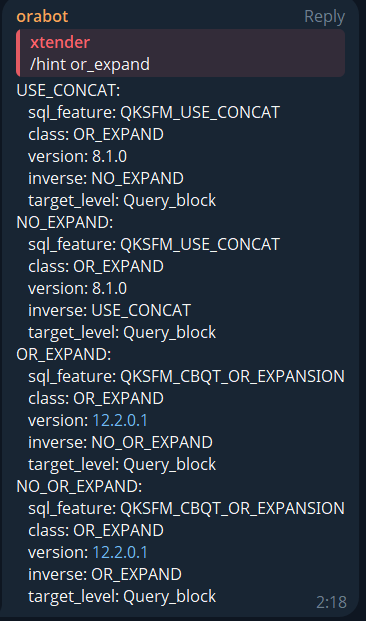 Oracle Fix Controls
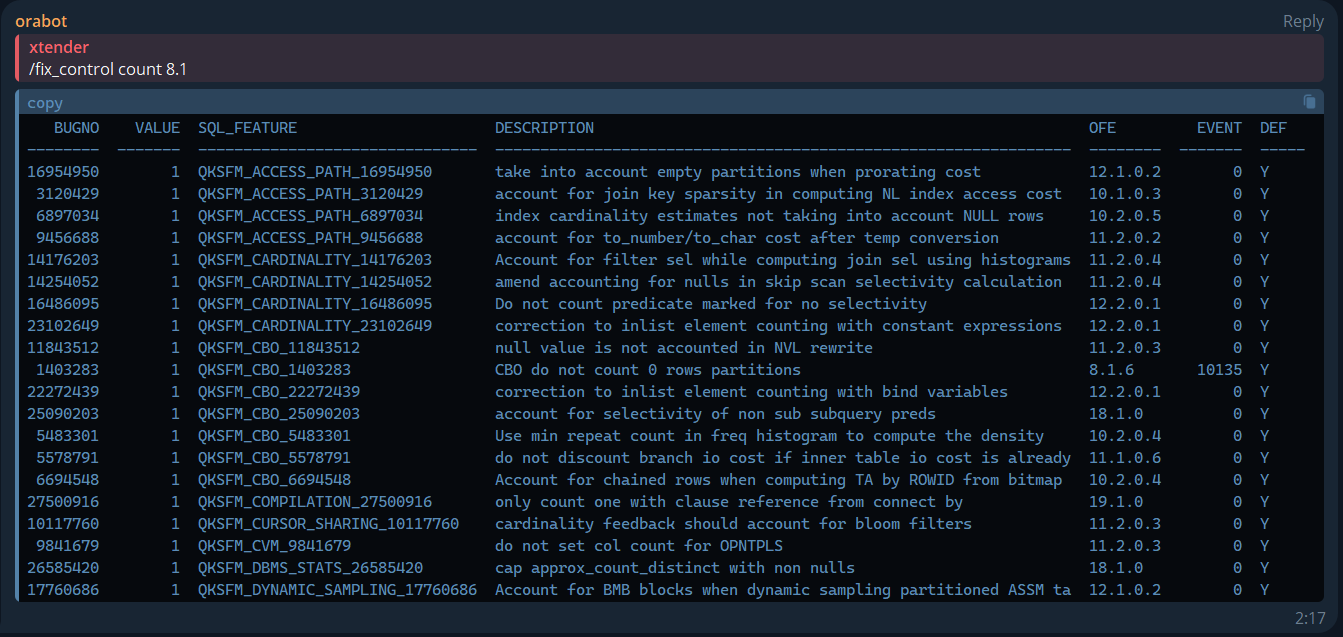
/fix_control: Lists fix controls by keyword and version.
/fix_control count 8.1
   BUGNO    VALUE  SQL_FEATURE                      DESCRIPTION                                                       OFE         EVENT  DEF
--------  -------  -------------------------------  ----------------------------------------------------------------  --------  -------  -----
16954950        1  QKSFM_ACCESS_PATH_16954950       take into account empty partitions when prorating cost            12.1.0.2        0  Y
 3120429        1  QKSFM_ACCESS_PATH_3120429        account for join key sparsity in computing NL index access cost   10.1.0.3        0  Y
 6897034        1  QKSFM_ACCESS_PATH_6897034        index cardinality estimates not taking into account NULL rows     10.2.0.5        0  Y
 9456688        1  QKSFM_ACCESS_PATH_9456688        account for to_number/to_char cost after temp conversion          11.2.0.2        0  Y
14176203        1  QKSFM_CARDINALITY_14176203       Account for filter sel while computing join sel using histograms  11.2.0.4        0  Y
14254052        1  QKSFM_CARDINALITY_14254052       amend accounting for nulls in skip scan selectivity calculation   11.2.0.4        0  Y
16486095        1  QKSFM_CARDINALITY_16486095       Do not count predicate marked for no selectivity                  12.2.0.1        0  Y
23102649        1  QKSFM_CARDINALITY_23102649       correction to inlist element counting with constant expressions   12.2.0.1        0  Y
11843512        1  QKSFM_CBO_11843512               null value is not accounted in NVL rewrite                        11.2.0.3        0  Y
 1403283        1  QKSFM_CBO_1403283                CBO do not count 0 rows partitions                                8.1.6       10135  Y
22272439        1  QKSFM_CBO_22272439               correction to inlist element counting with bind variables         12.2.0.1        0  Y
25090203        1  QKSFM_CBO_25090203               account for selectivity of non sub subquery preds                 18.1.0          0  Y
 5483301        1  QKSFM_CBO_5483301                Use min repeat count in freq histogram to compute the density     10.2.0.4        0  Y
 5578791        1  QKSFM_CBO_5578791                do not discount branch io cost if inner table io cost is already  11.1.0.6        0  Y
 6694548        1  QKSFM_CBO_6694548                Account for chained rows when computing TA by ROWID from bitmap   10.2.0.4        0  Y
27500916        1  QKSFM_COMPILATION_27500916       only count one with clause reference from connect by              19.1.0          0  Y
10117760        1  QKSFM_CURSOR_SHARING_10117760    cardinality feedback should account for bloom filters             11.2.0.3        0  Y
 9841679        1  QKSFM_CVM_9841679                do not set col count for OPNTPLS                                  11.2.0.3        0  Y
26585420        1  QKSFM_DBMS_STATS_26585420        cap approx_count_distinct with non nulls                          18.1.0          0  Y
17760686        1  QKSFM_DYNAMIC_SAMPLING_17760686  Account for BMB blocks when dynamic sampling partitioned ASSM ta  12.1.0.2        0  Y
This bot helps streamline database maintenance and troubleshooting tasks. Join ora_perf to try it and share your feedback!

Partition Pruning and Global Indexes
There is a common misconception that partition pruning does not help in the case of global indexes and only works with local indexes or full table scans (FTS).
It is understandable how this misconception arose: indeed, when operations like PARTITION RANGE ITERATOR, PARTITION RANGE SINGLE, etc., appear in execution plans, partition pruning becomes strongly associated with local indexes and FTS.
It is also clear why this is the most noticeable case: the exclusion of partitions in PARTITION RANGE ITERATOR operations is hard to miss, especially since there is a dedicated line for it in the execution plan.
However, this is not all that partition pruning can do. In fact, this way of thinking is not entirely valid, and I will demonstrate this with some simple examples.
Table SetupLet’s assume we have a table tpart consisting of 3 partitions with the following columns:
pkey– the partitioning key. For simplicity, we will store only1,2, and3, with each value corresponding to a separate partition.notkey– a column for testing the global index, filled sequentially from 1 to 3000.padding– a long column used to make table block accesses more noticeable.
create table tpart (pkey int, notkey int,padding varchar2(4000))
  partition by range(pkey)
  (
     partition p1 values less than (2)
    ,partition p2 values less than (3)
    ,partition p3 values less than (4)
  );
We insert 3,000 rows into the table so that:
- Partition
p1contains1,000rows withpkey=1andnotkeyvalues from1to1000. - Partition
p2contains1,000rows withpkey=2andnotkeyvalues from1001to2000. - Partition
p3contains1,000rows withpkey=3andnotkeyvalues from2001to3000.
insert into tpart(pkey,notkey,padding)
  select ceil(n/1000) pkey, n, rpad('x',4000,'x') from xmltable('1 to 3000' columns n int path '.');
commit;

SQL> select pkey,min(notkey),max(notkey) from tpart group by pkey order by 1;

      PKEY MIN(NOTKEY) MAX(NOTKEY)
---------- ----------- -----------
         1           1        1000
         2        1001        2000
         3        2001        3000
We start with a simple query that applies partition pruning. It should return nothing, since notkey values between 2500-2600 are in the third partition (pkey=3), but we explicitly specify pkey=1:
select count(*) from tpart where notkey between 2500 and 2600 and pkey=1;

SQL> select count(*) from tpart where notkey between 2500 and 2600 and pkey=1;

  COUNT(*)
----------
         0

SQL> select * from dbms_xplan.display_cursor('','','allstats last +predicate');

PLAN_TABLE_OUTPUT
-------------------------------------------------------------------------------------------
SQL_ID  0qzh3zxgpc65z, child number 0
-------------------------------------
select count(*) from tpart where notkey between 2500 and 2600 and pkey=1

Plan hash value: 3052279832

-------------------------------------------------------------------------------------------
| Id  | Operation               | Name  | Starts | E-Rows | A-Rows |   A-Time   | Buffers |
-------------------------------------------------------------------------------------------
|   0 | SELECT STATEMENT        |       |      1 |        |      1 |00:00:00.01 |    1007 |
|   1 |  SORT AGGREGATE         |       |      1 |      1 |      1 |00:00:00.01 |    1007 |
|   2 |   PARTITION RANGE SINGLE|       |      1 |      1 |      0 |00:00:00.01 |    1007 |
|*  3 |    TABLE ACCESS FULL    | TPART |      1 |      1 |      0 |00:00:00.01 |    1007 |
-------------------------------------------------------------------------------------------

Predicate Information (identified by operation id):
---------------------------------------------------

   3 - filter(("NOTKEY">=2500 AND "NOTKEY"<=2600 AND "PKEY"=1))
Here, we can clearly see that partition pruning worked due to the PARTITION RANGE SINGLE operation.
Now, let’s create a global index on notkey (without including the partitioning key) and repeat the query:
SQL> create index ix_tpart on tpart(notkey);

Index created.

SQL> select count(*) from tpart where notkey between 2500 and 2600 and pkey=1;

  COUNT(*)
----------
         0

1 row selected.

SQL> select * from dbms_xplan.display_cursor('','','allstats last +predicate');

PLAN_TABLE_OUTPUT
---------------------------------------------------------------------------------------------------------------------------
SQL_ID  0qzh3zxgpc65z, child number 0
-------------------------------------
select count(*) from tpart where notkey between 2500 and 2600 and pkey=1

Plan hash value: 494535298

---------------------------------------------------------------------------------------------------------------------------
| Id  | Operation                                   | Name     | Starts | E-Rows | A-Rows |   A-Time   | Buffers | Reads  |
---------------------------------------------------------------------------------------------------------------------------
|   0 | SELECT STATEMENT                            |          |      1 |        |      1 |00:00:00.01 |       2 |      1 |
|   1 |  SORT AGGREGATE                             |          |      1 |      1 |      1 |00:00:00.01 |       2 |      1 |
|*  2 |   TABLE ACCESS BY GLOBAL INDEX ROWID BATCHED| TPART    |      1 |      1 |      0 |00:00:00.01 |       2 |      1 |
|*  3 |    INDEX RANGE SCAN                         | IX_TPART |      1 |    102 |    101 |00:00:00.01 |       2 |      1 |
---------------------------------------------------------------------------------------------------------------------------

Predicate Information (identified by operation id):
---------------------------------------------------

   2 - filter("PKEY"=1)
   3 - access("NOTKEY">=2500 AND "NOTKEY"<=2600)
Here’s the key observation: the Buffers column for the second row remains 2, meaning there were no logical reads from the table despite that the execution plan suggests that here we had to access and filter out 101 rows from the partition by the filter predicate “filter(PKEY=1)”.
To verify, let’s run the same query with pkey=3:
select count(*) from tpart where notkey between 2500 and 2600 and pkey=3

Plan hash value: 494535298

------------------------------------------------------------------------------------------------------------------
| Id  | Operation                                   | Name     | Starts | E-Rows | A-Rows |   A-Time   | Buffers |
------------------------------------------------------------------------------------------------------------------
|   0 | SELECT STATEMENT                            |          |      1 |        |      1 |00:00:00.01 |     103 |
|   1 |  SORT AGGREGATE                             |          |      1 |      1 |      1 |00:00:00.01 |     103 |
|*  2 |   TABLE ACCESS BY GLOBAL INDEX ROWID BATCHED| TPART    |      1 |    102 |    101 |00:00:00.01 |     103 |
|*  3 |    INDEX RANGE SCAN                         | IX_TPART |      1 |    102 |    101 |00:00:00.01 |       2 |
------------------------------------------------------------------------------------------------------------------

Predicate Information (identified by operation id):
---------------------------------------------------

   2 - filter("PKEY"=3)
   3 - access("NOTKEY">=2500 AND "NOTKEY"<=2600)
Here, it is clearly visible that accessing 101 rows from the table required 101 logical reads.
Overall, it immediately becomes apparent that in the previous example with pkey=1, partition pruning worked and helped us avoid approximately 100 LIO to partition blocks. However, to make this even more evident, let’s modify the predicate "pkey=1" to a more complex equivalent that disables partition pruning: pkey=pkey/pkey.
SQL> select count(*) from tpart where notkey between 2500 and 2600 and pkey=pkey/pkey;

  COUNT(*)
----------
         0

1 row selected.

SQL> select * from dbms_xplan.display_cursor('','','allstats last +predicate');

PLAN_TABLE_OUTPUT
------------------------------------------------------------------------------------------------------------------
SQL_ID  0q59p4akv4cm0, child number 0
-------------------------------------
select count(*) from tpart where notkey between 2500 and 2600 and pkey=pkey/pkey

Plan hash value: 4115825992

------------------------------------------------------------------------------------------------------------------
| Id  | Operation                                   | Name     | Starts | E-Rows | A-Rows |   A-Time   | Buffers |
------------------------------------------------------------------------------------------------------------------
|   0 | SELECT STATEMENT                            |          |      1 |        |      1 |00:00:00.01 |     103 |
|   1 |  SORT AGGREGATE                             |          |      1 |      1 |      1 |00:00:00.01 |     103 |
|*  2 |   TABLE ACCESS BY GLOBAL INDEX ROWID BATCHED| TPART    |      1 |     34 |      0 |00:00:00.01 |     103 |
|*  3 |    INDEX RANGE SCAN                         | IX_TPART |      1 |    102 |    101 |00:00:00.01 |       2 |
------------------------------------------------------------------------------------------------------------------

Predicate Information (identified by operation id):
---------------------------------------------------

   2 - filter("PKEY"="PKEY"/"PKEY")
   3 - access("NOTKEY">=2500 AND "NOTKEY"<=2600)
And voilà! Here we see 101 logical reads from the table in exactly the same query but with partition pruning disabled.
For clarity, let’s compare:
select count(*) from tpart where notkey between 2500 and 2600 and pkey=1;         = 2 LIO
select count(*) from tpart where notkey between 2500 and 2600 and pkey=pkey/pkey; = 103 LIO
In fact, this could have been easily noticed if I had used format=ALL or ADVANCED, or at least included +predicate (that’s why I always suggest to use format=>’advanced -qbregistry’):
SQL> select count(*) from tpart where notkey between 2500 and 2600 and pkey=2;

  COUNT(*)
----------
         0

SQL> select * from dbms_xplan.display_cursor('','','allstats last +predicate +partition');

PLAN_TABLE_OUTPUT
----------------------------------------------------------------------------------------------------------------------------------
SQL_ID  fw7yx554pvv4n, child number 0
-------------------------------------
select count(*) from tpart where notkey between 2500 and 2600 and pkey=2

Plan hash value: 494535298

----------------------------------------------------------------------------------------------------------------------------------
| Id  | Operation                                   | Name     | Starts | E-Rows | Pstart| Pstop | A-Rows |   A-Time   | Buffers |
----------------------------------------------------------------------------------------------------------------------------------
|   0 | SELECT STATEMENT                            |          |      1 |        |       |       |      1 |00:00:00.01 |       2 |
|   1 |  SORT AGGREGATE                             |          |      1 |      1 |       |       |      1 |00:00:00.01 |       2 |
|*  2 |   TABLE ACCESS BY GLOBAL INDEX ROWID BATCHED| TPART    |      1 |      1 |     2 |     2 |      0 |00:00:00.01 |       2 |
|*  3 |    INDEX RANGE SCAN                         | IX_TPART |      1 |    102 |       |       |    101 |00:00:00.01 |       2 |
----------------------------------------------------------------------------------------------------------------------------------

Predicate Information (identified by operation id):
---------------------------------------------------

   2 - filter("PKEY"=2)
   3 - access("NOTKEY">=2500 AND "NOTKEY"<=2600)
As you can now easily see, the Pstart/Pstop columns appear in the plan. This indicates that partition pruning works in the TABLE ACCESS BY ROWID operation, as Oracle determines which partition a row belongs to based on its ROWID and automatically filters out those that do not satisfy our partition key condition.
At this point, it becomes clear why the title of this blog post is somewhat misleading—the key issue is not the global index but rather the TABLE ACCESS BY ROWID operation. This can be demonstrated in an even simpler way:
Let’s obtain the ROWID and object number for a row where notkey=2300:
SQL> select rowid,dbms_rowid.rowid_object(rowid) obj# from tpart where notkey=2300;

ROWID                    OBJ#
------------------ ----------
AAAU42AAMAAB9eNAAA      85558
Now, let’s query using this ROWID:
SQL> select pkey,notkey from tpart where rowid='AAAU42AAMAAB9eNAAA';

      PKEY     NOTKEY
---------- ----------

         3       2300

SQL> select * from dbms_xplan.display_cursor('','','allstats last +predicate +partition');


-------------------------------------
select pkey,notkey from tpart where rowid='AAAU42AAMAAB9eNAAA'

Plan hash value: 2140892464

-----------------------------------------------------------------------------------------------------------------------
| Id  | Operation                  | Name  | Starts | E-Rows | Pstart| Pstop | A-Rows |   A-Time   | Buffers | Reads  |
-----------------------------------------------------------------------------------------------------------------------
|   0 | SELECT STATEMENT           |       |      1 |        |       |       |      1 |00:00:00.01 |       1 |      1 |
|   1 |  TABLE ACCESS BY USER ROWID| TPART |      1 |      1 | ROWID | ROWID |      1 |00:00:00.01 |       1 |      1 |
-----------------------------------------------------------------------------------------------------------------------
We see that Oracle determines from the ROWID which specific partition needs to be accessed, confirming that our row is in the partition where pkey=3.
Now, let’s add the predicate "pkey=1", which will make the row not satisfy the partition key condition:
SQL> select * from tpart where rowid='AAAU42AAMAAB9eNAAA' and pkey=1;

no rows selected

SQL> select * from dbms_xplan.display_cursor('','','allstats last +predicate +partition');

PLAN_TABLE_OUTPUT
----------------------------------------------------------------------------------------------------
SQL_ID  1br7yh35w3sdv, child number 0
-------------------------------------
select * from tpart where rowid='AAAU42AAMAAB9eNAAA' and pkey=1

Plan hash value: 3283591838

----------------------------------------------------------------------------------------------------
| Id  | Operation                  | Name  | Starts | E-Rows | Pstart| Pstop | A-Rows |   A-Time   |
----------------------------------------------------------------------------------------------------
|   0 | SELECT STATEMENT           |       |      1 |        |       |       |      0 |00:00:00.01 |
|*  1 |  TABLE ACCESS BY USER ROWID| TPART |      1 |      1 |     1 |     1 |      0 |00:00:00.01 |
----------------------------------------------------------------------------------------------------

Predicate Information (identified by operation id):
---------------------------------------------------

   1 - filter("PKEY"=1)
Here, it becomes absolutely clear that no logical reads occurred because partition pruning worked, and Oracle did not access the third partition. Instead, it checked the partition key condition and immediately rejected the rowid without accessing any blocks.
ConclusionThus, the key takeaway is not about indexes at all, but rather about TABLE ACCESS operations. Partition pruning can still be effective within TABLE ACCESS operations—even without any indexes or explicit PARTITION operations (PARTITION [RANGE|HASH|LIST] [ITERATOR|ALL|SINGLE], etc.).
This works because Oracle only needs to check which partition a given ROWID belongs to in order to filter out unnecessary partitions efficiently.
PS. Read more about non-partioned indexes and partition pruning in details in this great series from Richard Foote: https://richardfoote.wordpress.com/2018/10/09/hidden-efficiencies-of-non-partitioned-indexes-on-partitioned-tables-part-ii-aladdin-sane/
Doing God's Work
This old, old technique of barrel curing tobacco in Louisiana - making perique - just produces some of the most interesting fig-meets-plum-meets-pepper tastes imaginable. Blend that with some bright virginias and there's something super special that results.

Rarity
Accessibility
OK, so someone asked me why I had not included three bands in my Underground Americana post that seemed to fit the Americana profile: Wayfarer, Blackbraid and Wolves in the Throne Room. I guess the easiest answer is because they have had enough mainstream exposure that I didn't think of them as "underground." I'll say this about both Wayfarer and Blackbraid - their music is more polished and less experimental than the three bands I listed, but its probably fair to say that they are still far from the collective consciousness of American music listeners, so I will in fact take a moment to comment on them all in response.
Wayfarer - in some ways these guys are analogous to Grave Pilgrim: both bands take up themes in American history, though Wayfarer is more directly trying to evoke a kind of spirit of the "Old West." If you haven't heard them, they pull in influences that range from atmospheric black metal, sludge, to the alt country-ish "Denver sound." The album you want to listen to is American Gothic. I mean, its a really, really solid and original work - I like it more than their previous albums and even more so as an ex Denver resident. So, yes, they should get a mention. Wayfarer, by the way, is *way* more polished than Grave Pilgrim, so if you were put off by the rawness of the album I posted a link to, this is much different music stylistically (Grave Pilgrim remains one of my favorite rock bands recording today).
That brings me to Blackbraid. This is a one man act from the Adirondacks, which combines hard charging early black metal influences with native American themes and an attempt to evoke the surrounding landscapes of upstate NY. Its like a band made especially for me - I used to solo camp, trout fish and grouse hunt the Adirondacks in my earlier days as often as I could. The whole region has a special feel and I'd be happy if I was stuck there in a cabin for many months at a time. I don't listen to metal albums often, but Blackbraid II has probably been the one I have played on repeat more than anything else for a long while. Personal favorite: The Wolf that Guides the Hunters Hand. His cover of Bathory's A Fine Day to Die is better than the original - that may or may not be saying a lot depending on your point of view, but its a cool cover. By the way, you can't compare them to Pan Native American Front, the take on native American experience is completely different, so is the music.
Lastly, Wolves in the Throne Room. I realize they get credit for pushing local acts to try to express the Cascadian landscape sonically, but there music is consistently barely listenable, the occultish themes they weave in are just stupid, and to add insult to injury everyone I have known that has seen them live has said the shows are terrible. So the reason I didn't highlight them is simple: I don't think much of them and don't understand their appeal. Two Hunters is their best album, though.
Merry Christmas
C Рождеством Христовым! Славим Его!


Interval Search: Part 4. Dynamic Range Segmentation – interval quantization
Forums, mailing lists, and StackOverflow are all great resources for Oracle performance discussions, but I’ve long thought it would be useful to have a dedicated online chat/group specifically for Oracle performance specialists. A place to share news, articles, and discuss performance issues. To test the waters, I’ve created a group: https://t.me/ora_perf. If you’re interested, feel free to join! Let’s build a central hub for Oracle performance discussions.
Before diving into the main topic, let me address a frequent question I’ve received regarding the earlier parts of this series:
“You’re focusing on the rare case of date-only indexes (begin_date, end_date), but most real-world scenarios involve composite indexes with an ID field, like (id, begin_date, end_date).“
Yes, it’s true that in practice, composite indexes with an ID field are more common. And exactly such scenarios was the reason of this series. However, I intentionally started with a simplified case to focus on the date filtering mechanics. All the issues, observations, conclusions, and solutions discussed so far are equally applicable to composite indexes.
For example, many production databases have identifiers that reference tens or even hundreds of thousands of intervals. The addition of an ID-based access predicate may reduce the scanned volume for a single query, but the underlying date range filtering issues remain. These inefficiencies often go unnoticed because people don’t realize their simple queries are doing tens of LIOs when they could be doing just 3-5, with response times reduced from 100 microseconds to 2 microseconds.
Even if your queries always use an equality predicate on the ID field, you’ll still encounter challenges with huge queries with joins, such as:
select *
from IDs
    join tab_with_history h
       on IDs.id = h.id
       and :dt between h.beg_date and h.end_date
Here, lookups for each ID against the composite index can become inefficient at scale compared to retrieving a pre-filtered slice for the target date.
To clarify, everything discussed in this series applies to composite indexes as well. The solutions can easily be extended to include ID fields by modifying just a few lines of code. Let’s now move to the main topic.
Dynamic Range Segmentation – Interval QuantizationIn the earlier parts, you may have noticed a skew in my test data, with many intervals of 30 days generated for every hour. This naturally leads to the idea of reducing scan volume by splitting long intervals into smaller sub-intervals.
What is Interval Quantization?Interval quantization is a known solution for this problem, but it often comes with drawbacks. Traditional quantization requires selecting a single fixed unit (e.g., 1 minute), which may not suit all scenarios. Using a small unit to cover all cases can lead to an explosion in the number of rows.
However, since Dynamic Range Segmentation (DRS) already handles short intervals efficiently, we can focus on quantizing only long intervals. For this example, we’ll:
- Leave intervals of up to 1 hour as-is, partitioning them into two categories: up to 15 minutes and up to 1 hour.
- Split longer intervals into sub-intervals of 1 day.
To simplify the splitting of long intervals, we’ll write a SQL Macro:
create or replace function split_interval_by_days(beg_date date, end_date date)
  return varchar2 sql_macro
is
begin
  return q'{
     select/*+ no_decorrelate */
        case
          when n = 1
             then beg_date
          else trunc(beg_date)+n-1
        end as sub_beg_date
       ,case
          when n<=trunc(end_date)-trunc(beg_date)
            then trunc(beg_date)+n -1/24/60/60
          else end_date
        end as sub_end_date
     from (select/*+ no_merge */ level n
           from dual
           connect by level<=trunc(end_date)-trunc(beg_date)+1
          )
  }';
end;
/
Source on github: https://github.com/xtender/xt_scripts/blob/master/blog/1.interval_search/drs.v2/split_interval_by_days.sql
This macro returns sub-intervals for any given range:
SQL> select * from split_interval_by_days(sysdate-3, sysdate);

SUB_BEG_DATE        SUB_END_DATE
------------------- -------------------
2024-12-17 02:30:34 2024-12-17 23:59:59
2024-12-18 00:00:00 2024-12-18 23:59:59
2024-12-19 00:00:00 2024-12-19 23:59:59
2024-12-20 00:00:00 2024-12-20 02:30:34
ODCIIndexCreate_pr
We’ll modify the partitioning structure:
        partition by range(DURATION_MINUTES)
        (
            partition part_15_min   values less than (15)
           ,partition part_1_hour   values less than (60)
           ,partition part_1_day    values less than (1440)  --40*24*60
        )
We’ll use the SQL Macro to populate the index table with split intervals:
        -- Now populate the table.
        stmt2 := q'[INSERT INTO {index_tab_name} ( beg_date, end_date, rid )
            SELECT SUB_BEG_DATE as beg_date
                  ,SUB_END_DATE as end_date
                  ,P.rowid
            FROM "{owner}"."{tab_name}" P
            , split_interval_by_days(
                to_date(substr(P.{col_name}, 1,19),'YYYY-MM-DD HH24:MI:SS')
               ,to_date(substr(P.{col_name},21,19),'YYYY-MM-DD HH24:MI:SS')
               )
            ]';
ODCIIndexInsert_pr
  procedure ODCIIndexInsert_pr(
        ia       sys.ODCIIndexInfo,
        rid      VARCHAR2,
        newval   VARCHAR2,
        env      sys.ODCIEnv
    )
  IS
  BEGIN
        -- Insert into auxiliary table
        execute immediate
           'INSERT INTO '|| get_index_tab_name(ia)||' (rid, beg_date, end_date)'
         ||'select
             :rid, sub_beg_date, sub_end_date
            from split_interval_by_days(:beg_date, :end_date)'
           using rid,get_beg_date(newval),get_end_date(newval);
  END;
ODCIIndexStart_Pr
Update the SQL statement to account for the new partitions:
      stmt := q'{
        select rid from {tab_name} partition (part_15_min) p1
        where :cmpval between beg_date and end_date
          and end_date < :cmpval+interval'15'minute
        union all
        select rid from {tab_name} partition (part_1_hour) p2
        where :cmpval between beg_date and end_date
          and end_date < :cmpval+1/24
        union all
        select rid from {tab_name} partition (part_1_day ) p3
        where :cmpval between beg_date and end_date
          and end_date < :cmpval+1
        }';
SQL> select count(*) from test_table where DATE_IN_RANGE(virt_date_range,date'2012-02-01')=1;

  COUNT(*)
----------
       943
SQL> @last

PLAN_TABLE_OUTPUT
-------------------------------------------------------------------------------------------------------
SQL_ID  17wncu9ftfzf6, child number 0
-------------------------------------
select count(*) from test_table where
DATE_IN_RANGE(virt_date_range,date'2012-02-01')=1

Plan hash value: 2131856123

-------------------------------------------------------------------------------------------------------
| Id  | Operation        | Name             | Starts | E-Rows | Cost  | A-Rows |   A-Time   | Buffers |
-------------------------------------------------------------------------------------------------------
|   0 | SELECT STATEMENT |                  |      1 |        |  9218 |      1 |00:00:00.01 |      15 |
|   1 |  SORT AGGREGATE  |                  |      1 |      1 |       |      1 |00:00:00.01 |      15 |
|*  2 |   DOMAIN INDEX   | TEST_RANGE_INDEX |      1 |        |       |    943 |00:00:00.01 |      15 |
-------------------------------------------------------------------------------------------------------

Predicate Information (identified by operation id):
---------------------------------------------------

   2 - access("XTENDER"."DATE_IN_RANGE"("VIRT_DATE_RANGE",TO_DATE(' 2012-02-01 00:00:00', 'syyyy-mm-dd
              hh24:mi:ss'))=1)
So, by applying quantization with Dynamic Range Segmentation, we reduced the number of logical reads from 30 (in the simpler version) to 15—a 2x improvement.
ConclusionIn this example, we used partitions for 15 minutes, 1 hour, and 1 day for simplicity. In practice, optimal values will depend on the actual data. While the number of rows in the index increases, the fixed maximum interval length ensures consistently efficient results.
All series:
Interval Search: Part 3. Dynamic Range Segmentation – Custom Domain Index
In this part, I’ll show how to implement Dynamic Range Segmentation (DRS) explained in the previous part using a custom Domain Index, allowing you to apply this optimization with minimal changes to your existing tables.
1. Creating the Function and OperatorFirst, we create a function that will be used to define the operator for the domain index:
CREATE OR REPLACE FUNCTION F_DATE_IN_RANGE(date_range varchar2, cmpval date)
RETURN NUMBER deterministic
AS
BEGIN
  -- simple concatenation: beg_date;end_date
  -- in format YYYY-MM-DD HH24:MI:SS
  if cmpval between to_date(substr(date_range, 1,19),'YYYY-MM-DD HH24:MI:SS')
                and to_date(substr(date_range,21,19),'YYYY-MM-DD HH24:MI:SS')
  then
    return 1;
  else
    return 0;
  end if;
END;
/
Next, we create the operator to use this function:
CREATE OPERATOR DATE_IN_RANGE BINDING(VARCHAR2, DATE)
  RETURN NUMBER USING F_DATE_IN_RANGE;
/
idx_range_date_pkg Package
We define a package (idx_range_date_pkg) that contains the necessary procedures to manage the domain index. The full implementation is too lengthy to include here but is available on GitHub.
idx_range_date_type
The type idx_range_date_type implements the ODCI extensible indexing interface, which handles operations for the domain index.
The code is available on GitHub.
idx_range_date_type
Internal Data Segmentation:
The type and package create and maintain an internal table of segmented data. For example, the procedure ODCIIndexCreate_pr creates a partitioned table:
        stmt1 := 'CREATE TABLE ' || get_index_tab_name(ia)
        ||q'[
        (
           beg_date date
          ,end_date date
          ,rid rowid
          ,DURATION_MINUTES number as ((end_date-beg_date)*24*60)
        )
        partition by range(DURATION_MINUTES)
        (
            partition part_15_min   values less than (15)
           ,partition part_2_days   values less than (2880)   --2*24*60
           ,partition part_40_days  values less than (57600)  --40*24*60
           ,partition part_400_days values less than (576000) --400*24*60
           ,partition p_max         values less than (maxvalue)
        )
        ]';
Efficient Query Execution:
The procedure ODCIIndexStart_pr executes range queries against this internal table:
      -- This statement returns the qualifying rows for the TRUE case.
      stmt := q'{
        select rid from {tab_name} partition (part_15_min) p1
        where :cmpval between beg_date and end_date
          and end_date<=:cmpval+interval'15'minute
        union all
        select rid from {tab_name} partition (part_2_days) p1
        where :cmpval between beg_date and end_date
          and end_date<=:cmpval+2
        union all
        select rid from {tab_name} partition (part_40_days) p1
        where :cmpval between beg_date and end_date
          and end_date<=:cmpval+40
        union all
        select rid from {tab_name} partition (part_400_days) p1
        where :cmpval between beg_date and end_date
          and end_date<=:cmpval+400
        union all
        select rid from {tab_name} partition (p_max) p1
        where :cmpval between beg_date and end_date
        }';
Returning Results:
The ODCIIndexFetch_pr procedure retrieves the list of qualifying ROWID values:
FETCH cur BULK COLLECT INTO rowids limit nrows;
Here is the corresponding function implementation:
    MEMBER FUNCTION ODCIIndexFetch(
        self in out idx_range_date_type,
        nrows NUMBER,
        rids  OUT sys.ODCIRidList,
        env   sys.ODCIEnv
    ) RETURN NUMBER
    IS
      cnum number;
      cur sys_refcursor;
    BEGIN
      idx_range_date_pkg.p_debug('Fetch: nrows='||nrows);
      cnum:=self.curnum;
      cur:=dbms_sql.to_refcursor(cnum);
      idx_range_date_pkg.p_debug('Fetch: converted to refcursor');

      idx_range_date_pkg.ODCIIndexFetch_pr(nrows,rids,env,cur);

      self.curnum:=dbms_sql.to_cursor_number(cur);
      RETURN ODCICONST.SUCCESS;
    END;
INDEXTYPE
CREATE OR REPLACE INDEXTYPE idx_range_date_idxtype
FOR
  DATE_IN_RANGE(VARCHAR2,DATE)
USING idx_range_date_type;
/
Now we created all the required objects, so it’s time to create the index.
5. Adding a Virtual Generated ColumnSince the ODCI interface only supports indexing a single column, we combine beg_date and end_date into a virtual generated column:
alter table test_table
  add virt_date_range varchar2(39)
      generated always as
       (to_char(beg_date,'YYYY-MM-DD HH24:MI:SS')||';'||to_char(end_date,'YYYY-MM-DD HH24:MI:SS'))
/
We create the domain index on the virtual column:
CREATE INDEX test_range_index ON test_table (virt_date_range)
  INDEXTYPE IS idx_range_date_idxtype
/
Let’s test the index with a query:
SQL> select count(*) from test_table where DATE_IN_RANGE(virt_date_range,date'2012-02-01')=1;

  COUNT(*)
----------
       943
Execution Plan:
SQL> @last

PLAN_TABLE_OUTPUT
---------------------------------------------------------------------------------------------------------------
SQL_ID  17wncu9ftfzf6, child number 0
-------------------------------------
select count(*) from test_table where
DATE_IN_RANGE(virt_date_range,date'2012-02-01')=1

Plan hash value: 2131856123

---------------------------------------------------------------------------------------------------------------
| Id  | Operation        | Name             | Starts | E-Rows |E-Bytes| Cost  | A-Rows |   A-Time   | Buffers |
---------------------------------------------------------------------------------------------------------------
|   0 | SELECT STATEMENT |                  |      1 |        |       |  9218 |      1 |00:00:00.01 |      30 |
|   1 |  SORT AGGREGATE  |                  |      1 |      1 |    40 |       |      1 |00:00:00.01 |      30 |
|*  2 |   DOMAIN INDEX   | TEST_RANGE_INDEX |      1 |        |       |       |    943 |00:00:00.01 |      30 |
---------------------------------------------------------------------------------------------------------------

Predicate Information (identified by operation id):
---------------------------------------------------

   2 - access("XTENDER"."DATE_IN_RANGE"("VIRT_DATE_RANGE",TO_DATE(' 2012-02-01 00:00:00', 'syyyy-mm-dd
              hh24:mi:ss'))=1)
Results: Only 30 logical reads were needed for the same date 2012-02-01!
Using a custom domain index allows us to implement this method with minimal changes to existing tables. This method efficiently handles interval queries while requiring significantly fewer logical reads.
In the next part, I will demonstrate how to enhance the Dynamic Range Segmentation method by introducing interval quantization—splitting longer intervals into smaller sub-intervals represented as separate rows.
Interval Search: Part 2. Dynamic Range Segmentation – Simplified
In the previous part, I discussed the most efficient known methods for optimizing range queries. In this part, I’ll introduce a simple version of my custom approach, which I call Dynamic Range Segmentation (DRS).
As explained earlier, a significant issue with conventional approaches is the lack of both boundaries in the ACCESS predicates. This forces the database to scan all index entries either above or below the target value, depending on the order of the indexed columns.
Dynamic Range Segmentation solves this problem by segmenting data based on the interval length.
Let’s create a table partitioned by interval lengths with the following partitions:
- part_15_min: Intervals shorter than 15 minutes.
- part_2_days: Intervals between 15 minutes and 2 days.
- part_40_days: Intervals between 2 days and 40 days.
- part_400_days: Intervals between 40 days and 400 days.
- p_max: All remaining intervals
Here’s the DDL for the partitioned table:
create table Dynamic_Range_Segmentation(
   beg_date date
  ,end_date date
  ,rid rowid
  ,DURATION_MINUTES number as ((end_date-beg_date)*24*60)
)
partition by range(DURATION_MINUTES)
(
    partition part_15_min   values less than (15)
   ,partition part_2_days   values less than (2880)   --2*24*60
   ,partition part_40_days  values less than (57600)  --40*24*60
   ,partition part_400_days values less than (576000) --400*24*60
   ,partition p_max         values less than (maxvalue)
);
The DURATION_MINUTES column is a virtual generated column that computes the interval length in minutes as the difference between beg_date and end_date.
We will explore the nuances of selecting specific partition boundaries in future parts. For now, let’s focus on the approach itself.
We populate the partitioned table with the same test data and create a local index on (end_date, beg_date):
insert/*+append parallel(4) */ into Dynamic_Range_Segmentation(beg_date,end_date,rid)
select beg_date,end_date,rowid from test_table;

create index ix_drs on Dynamic_Range_Segmentation(end_date,beg_date) local;
call dbms_stats.gather_table_stats('','Dynamic_Range_Segmentation');
By segmenting the data, we can assert with certainty that if we are searching for records in the part_15_min partition, the qualifying records must satisfy the conditionend_date <= :dt + INTERVAL '15' MINUTE
because no intervals in this partition exceed 15 minutes in length. This additional boundary provides the much-needed second predicate.
Thus, we can optimize our query by addressing each partition individually, adding upper boundaries for all partitions except the last one (p_max):
select count(*),min(beg_date),max(end_date) from (
  select * from Dynamic_Range_Segmentation partition (part_15_min) p1
  where date'2012-02-01' between beg_date and end_date
    and end_date<=date'2012-02-01'+interval'15'minute
  union all
  select * from Dynamic_Range_Segmentation partition (part_2_days) p1
  where date'2012-02-01' between beg_date and end_date
    and end_date<=date'2012-02-01'+2
  union all
  select * from Dynamic_Range_Segmentation partition (part_40_days) p1
  where date'2012-02-01' between beg_date and end_date
    and end_date<=date'2012-02-01'+40  union all
  select * from Dynamic_Range_Segmentation partition (part_400_days) p1
  where date'2012-02-01' between beg_date and end_date
    and end_date<=date'2012-02-01'+400
  union all
  select * from Dynamic_Range_Segmentation partition (p_max) p1
  where date'2012-02-01' between beg_date and end_date
);
Results:
  COUNT(*) MIN(BEG_DATE)       MAX(END_DATE)
---------- ------------------- -------------------
       943 2011-01-03 00:00:00 2013-03-03 00:00:00

SQL> select * from table(dbms_xplan.display_cursor('','','all allstats last -alias -projection'));

PLAN_TABLE_OUTPUT
----------------------------------------------------------------------------------------------------------------------------------------------
SQL_ID  204zu1xhdqcq3, child number 0
-------------------------------------
select count(*),min(beg_date),max(end_date) from (   select * from
Dynamic_Range_Segmentation partition (part_15_min) p1   where
date'2012-02-01' between beg_date and end_date     and
end_date<=date'2012-02-01'+interval'15'minute   union all   select *
from Dynamic_Range_Segmentation partition (part_2_days) p1   where
date'2012-02-01' between beg_date and end_date     and
end_date<=date'2012-02-01'+2   union all   select * from
Dynamic_Range_Segmentation partition (part_40_days) p1   where
date'2012-02-01' between beg_date and end_date     and
end_date<=date'2012-02-01'+40  union all   select * from
Dynamic_Range_Segmentation partition (part_400_days) p1   where
date'2012-02-01' between beg_date and end_date     and
end_date<=date'2012-02-01'+400   union all   select * from
Dynamic_Range_Segmentation partition (p_max) p1   where
date'2012-02-01' between beg_date and end_date )

Plan hash value: 1181465968

----------------------------------------------------------------------------------------------------------------------------------------------
| Id  | Operation                 | Name   | Starts | E-Rows |E-Bytes| Cost (%CPU)| E-Time   | Pstart| Pstop | A-Rows |   A-Time   | Buffers |
----------------------------------------------------------------------------------------------------------------------------------------------
|   0 | SELECT STATEMENT          |        |      1 |        |       |    24 (100)|          |       |       |      1 |00:00:00.01 |      28 |
|   1 |  SORT AGGREGATE           |        |      1 |      1 |    18 |            |          |       |       |      1 |00:00:00.01 |      28 |
|   2 |   VIEW                    |        |      1 |   1582 | 28476 |    24   (0)| 00:00:01 |       |       |    943 |00:00:00.01 |      28 |
|   3 |    UNION-ALL              |        |      1 |        |       |            |          |       |       |    943 |00:00:00.01 |      28 |
|   4 |     PARTITION RANGE SINGLE|        |      1 |      4 |    64 |     3   (0)| 00:00:01 |     1 |     1 |      3 |00:00:00.01 |       3 |
|*  5 |      INDEX RANGE SCAN     | IX_DRS |      1 |      4 |    64 |     3   (0)| 00:00:01 |     1 |     1 |      3 |00:00:00.01 |       3 |
|   6 |     PARTITION RANGE SINGLE|        |      1 |    536 |  8576 |     7   (0)| 00:00:01 |     2 |     2 |     19 |00:00:00.01 |       7 |
|*  7 |      INDEX RANGE SCAN     | IX_DRS |      1 |    536 |  8576 |     7   (0)| 00:00:01 |     2 |     2 |     19 |00:00:00.01 |       7 |
|   8 |     PARTITION RANGE SINGLE|        |      1 |    929 | 14864 |    10   (0)| 00:00:01 |     3 |     3 |    890 |00:00:00.01 |      10 |
|*  9 |      INDEX RANGE SCAN     | IX_DRS |      1 |    929 | 14864 |    10   (0)| 00:00:01 |     3 |     3 |    890 |00:00:00.01 |      10 |
|  10 |     PARTITION RANGE SINGLE|        |      1 |     29 |   464 |     2   (0)| 00:00:01 |     4 |     4 |     17 |00:00:00.01 |       2 |
|* 11 |      INDEX RANGE SCAN     | IX_DRS |      1 |     29 |   464 |     2   (0)| 00:00:01 |     4 |     4 |     17 |00:00:00.01 |       2 |
|  12 |     PARTITION RANGE SINGLE|        |      1 |     84 |  1344 |     2   (0)| 00:00:01 |     5 |     5 |     14 |00:00:00.01 |       6 |
|* 13 |      INDEX FAST FULL SCAN | IX_DRS |      1 |     84 |  1344 |     2   (0)| 00:00:01 |     5 |     5 |     14 |00:00:00.01 |       6 |
----------------------------------------------------------------------------------------------------------------------------------------------

Predicate Information (identified by operation id):
---------------------------------------------------

   5 - access("END_DATE">=TO_DATE(' 2012-02-01 00:00:00', 'syyyy-mm-dd hh24:mi:ss') AND "END_DATE"<=TO_DATE(' 2012-02-01 00:15:00',
              'syyyy-mm-dd hh24:mi:ss') AND "BEG_DATE"<=TO_DATE(' 2012-02-01 00:00:00', 'syyyy-mm-dd hh24:mi:ss'))
       filter("BEG_DATE"<=TO_DATE(' 2012-02-01 00:00:00', 'syyyy-mm-dd hh24:mi:ss'))
   7 - access("END_DATE">=TO_DATE(' 2012-02-01 00:00:00', 'syyyy-mm-dd hh24:mi:ss') AND "END_DATE"<=TO_DATE(' 2012-02-03 00:00:00',
              'syyyy-mm-dd hh24:mi:ss') AND "BEG_DATE"<=TO_DATE(' 2012-02-01 00:00:00', 'syyyy-mm-dd hh24:mi:ss'))
       filter("BEG_DATE"<=TO_DATE(' 2012-02-01 00:00:00', 'syyyy-mm-dd hh24:mi:ss'))
   9 - access("END_DATE">=TO_DATE(' 2012-02-01 00:00:00', 'syyyy-mm-dd hh24:mi:ss') AND "END_DATE"<=TO_DATE(' 2012-03-12 00:00:00',
              'syyyy-mm-dd hh24:mi:ss') AND "BEG_DATE"<=TO_DATE(' 2012-02-01 00:00:00', 'syyyy-mm-dd hh24:mi:ss'))
       filter("BEG_DATE"<=TO_DATE(' 2012-02-01 00:00:00', 'syyyy-mm-dd hh24:mi:ss'))
  11 - access("END_DATE">=TO_DATE(' 2012-02-01 00:00:00', 'syyyy-mm-dd hh24:mi:ss') AND "END_DATE"<=TO_DATE(' 2013-03-07 00:00:00',
              'syyyy-mm-dd hh24:mi:ss') AND "BEG_DATE"<=TO_DATE(' 2012-02-01 00:00:00', 'syyyy-mm-dd hh24:mi:ss'))
       filter("BEG_DATE"<=TO_DATE(' 2012-02-01 00:00:00', 'syyyy-mm-dd hh24:mi:ss'))
  13 - filter(("BEG_DATE"<=TO_DATE(' 2012-02-01 00:00:00', 'syyyy-mm-dd hh24:mi:ss') AND "END_DATE">=TO_DATE(' 2012-02-01 00:00:00',
              'syyyy-mm-dd hh24:mi:ss')))
This approach reduces logical reads (LIOs) to 28, compared to the 183 in the best case from the previous parts.
Simplifying with a SQL MacroTo avoid writing such large queries repeatedly, we can create a SQL Macro:
create or replace function DRS_by_date_macro(dt date)
  return varchar2 sql_macro
is
begin
  return q'{
  select * from Dynamic_Range_Segmentation partition (part_15_min) p1
  where dt between beg_date and end_date
    and end_date<=dt+interval'15'minute
  union all
  select * from Dynamic_Range_Segmentation partition (part_2_days) p1
  where dt between beg_date and end_date
    and end_date<=dt+2
  union all
  select * from Dynamic_Range_Segmentation partition (part_40_days) p1
  where dt between beg_date and end_date
    and end_date<=dt+40
  union all
  select * from Dynamic_Range_Segmentation partition (part_400_days) p1
  where dt between beg_date and end_date
    and end_date<=dt+400
  union all
  select * from Dynamic_Range_Segmentation partition (p_max) p1
  where dt between beg_date and end_date
  }';
end;
/
With this macro, queries become concise:
SQL> select count(*),min(beg_date),max(end_date) from DRS_by_date_macro(date'2012-02-01');

  COUNT(*) MIN(BEG_DATE)       MAX(END_DATE)
---------- ------------------- -------------------
       943 2011-01-03 00:00:00 2013-03-03 00:00:00
Execution plan:
SQL> select * from table(dbms_xplan.display_cursor('','','all allstats last -alias -projection'));

PLAN_TABLE_OUTPUT
---------------------------------------------------------------------------------------------------------------------------------------
SQL_ID  7nmx3cnwrmd0c, child number 0
-------------------------------------
select count(*),min(beg_date),max(end_date) from
DRS_by_date_macro(date'2012-02-01')

Plan hash value: 1181465968

---------------------------------------------------------------------------------------------------------------------------------------
| Id  | Operation                 | Name   | Starts | E-Rows s| Cost (%CPU)| E-Time   | Pstart| Pstop | A-Rows |   A-Time   | Buffers |
---------------------------------------------------------------------------------------------------------------------------------------
|   0 | SELECT STATEMENT          |        |      1 |         |    24 (100)|          |       |       |      1 |00:00:00.01 |      28 |
|   1 |  SORT AGGREGATE           |        |      1 |      1  |            |          |       |       |      1 |00:00:00.01 |      28 |
|   2 |   VIEW                    |        |      1 |   1582  |    24   (0)| 00:00:01 |       |       |    943 |00:00:00.01 |      28 |
|   3 |    UNION-ALL              |        |      1 |         |            |          |       |       |    943 |00:00:00.01 |      28 |
|   4 |     PARTITION RANGE SINGLE|        |      1 |      4  |     3   (0)| 00:00:01 |     1 |     1 |      3 |00:00:00.01 |       3 |
|*  5 |      INDEX RANGE SCAN     | IX_DRS |      1 |      4  |     3   (0)| 00:00:01 |     1 |     1 |      3 |00:00:00.01 |       3 |
|   6 |     PARTITION RANGE SINGLE|        |      1 |    536  |     7   (0)| 00:00:01 |     2 |     2 |     19 |00:00:00.01 |       7 |
|*  7 |      INDEX RANGE SCAN     | IX_DRS |      1 |    536  |     7   (0)| 00:00:01 |     2 |     2 |     19 |00:00:00.01 |       7 |
|   8 |     PARTITION RANGE SINGLE|        |      1 |    929  |    10   (0)| 00:00:01 |     3 |     3 |    890 |00:00:00.01 |      10 |
|*  9 |      INDEX RANGE SCAN     | IX_DRS |      1 |    929  |    10   (0)| 00:00:01 |     3 |     3 |    890 |00:00:00.01 |      10 |
|  10 |     PARTITION RANGE SINGLE|        |      1 |     29  |     2   (0)| 00:00:01 |     4 |     4 |     17 |00:00:00.01 |       2 |
|* 11 |      INDEX RANGE SCAN     | IX_DRS |      1 |     29  |     2   (0)| 00:00:01 |     4 |     4 |     17 |00:00:00.01 |       2 |
|  12 |     PARTITION RANGE SINGLE|        |      1 |     84  |     2   (0)| 00:00:01 |     5 |     5 |     14 |00:00:00.01 |       6 |
|* 13 |      INDEX FAST FULL SCAN | IX_DRS |      1 |     84  |     2   (0)| 00:00:01 |     5 |     5 |     14 |00:00:00.01 |       6 |
---------------------------------------------------------------------------------------------------------------------------------------

Predicate Information (identified by operation id):
---------------------------------------------------

   5 - access("END_DATE">=TO_DATE(' 2012-02-01 00:00:00', 'syyyy-mm-dd hh24:mi:ss') AND "END_DATE"<=TO_DATE(' 2012-02-01 00:15:00',
              'syyyy-mm-dd hh24:mi:ss') AND "BEG_DATE"<=TO_DATE(' 2012-02-01 00:00:00', 'syyyy-mm-dd hh24:mi:ss'))
       filter("BEG_DATE"<=TO_DATE(' 2012-02-01 00:00:00', 'syyyy-mm-dd hh24:mi:ss'))
   7 - access("END_DATE">=TO_DATE(' 2012-02-01 00:00:00', 'syyyy-mm-dd hh24:mi:ss') AND "END_DATE"<=TO_DATE(' 2012-02-03 00:00:00',
              'syyyy-mm-dd hh24:mi:ss') AND "BEG_DATE"<=TO_DATE(' 2012-02-01 00:00:00', 'syyyy-mm-dd hh24:mi:ss'))
       filter("BEG_DATE"<=TO_DATE(' 2012-02-01 00:00:00', 'syyyy-mm-dd hh24:mi:ss'))
   9 - access("END_DATE">=TO_DATE(' 2012-02-01 00:00:00', 'syyyy-mm-dd hh24:mi:ss') AND "END_DATE"<=TO_DATE(' 2012-03-12 00:00:00',
              'syyyy-mm-dd hh24:mi:ss') AND "BEG_DATE"<=TO_DATE(' 2012-02-01 00:00:00', 'syyyy-mm-dd hh24:mi:ss'))
       filter("BEG_DATE"<=TO_DATE(' 2012-02-01 00:00:00', 'syyyy-mm-dd hh24:mi:ss'))
  11 - access("END_DATE">=TO_DATE(' 2012-02-01 00:00:00', 'syyyy-mm-dd hh24:mi:ss') AND "END_DATE"<=TO_DATE(' 2013-03-07 00:00:00',
              'syyyy-mm-dd hh24:mi:ss') AND "BEG_DATE"<=TO_DATE(' 2012-02-01 00:00:00', 'syyyy-mm-dd hh24:mi:ss'))
       filter("BEG_DATE"<=TO_DATE(' 2012-02-01 00:00:00', 'syyyy-mm-dd hh24:mi:ss'))
  13 - filter(("BEG_DATE"<=TO_DATE(' 2012-02-01 00:00:00', 'syyyy-mm-dd hh24:mi:ss') AND "END_DATE">=TO_DATE(' 2012-02-01 00:00:00',
              'syyyy-mm-dd hh24:mi:ss')))
This approach can also be implemented in various ways, such as using materialized views, globally partitioned indexes, or other methods.
In the next part, I will demonstrate how to create a custom domain index to further optimize this method.
Pages
