Kubilay Çilkara

Database Systems is a blog about Databases and Data of any size and shapeKubilayhttp://www.blogger.com/profile/01018428309326848765noreply@blogger.comBlogger148125
Updated: 1 month 1 week ago
Thu, 2026-01-01 14:07
Introduction As a Data Architect, creating clear and effective diagrams is crucial for communicating and documenting software and data architectures. The C4 model, with its focus on abstraction-first design—a principle I firmly believe is the backbone of software engineering—immediately caught my interest. To explore this further, I recently began experimenting with C4 modeling using Structurizr DSL, (DSL=Domain Specific Language) VSCode, and popular diagramming tools like PlantUML and Mermaid. I used Cairo and Graphviz in the past but these newer libraries require less tinkering. Here’s a look at my journey and the insights I gained along the way while trying the diagram as code approach. Why C4 Models? The C4 model is a powerful way to describe software systems at four distinct levels of abstraction—Context, Containers, Components, and Code—often referred to as the "4 Cs." Its simplicity, scalability, and developer-friendly approach make it a perfect fit for both new (greenfield) and existing (brownfield) projects.
Since I prefer to avoid cloud-based tools for richer experience and control, initially I set up a local environment using VSCode and Docker on my trusty old but fast Ubuntu laptop. This way, I can create clear, maintainable diagrams while keeping everything offline and efficient. Looking at it again, I decided that even Docker is an overkill. I decided Vscode is enough to code and diagram. My Setup I took a quick look at the Structurizr DSL Python wrapper, but I also skipped it—I wanted to dive straight into the native DSL syntax and see my diagrams render with minimal overhead. After all, treating diagrams as code means I can version-control them like any other project, keeping everything clean and reproducible.
While I could have spun up Structurizr Lite in a Docker container (because who doesn’t love local, self-hosted solutions?), I went lighter—just VSCode extensions to get the job done. My philosophy? Minimum viable effort for maximum results. No unnecessary layers, no cloud dependencies, just code and diagrams, the way it should be. They integrate seamlessly with wiki platforms (like Confluence, Notion, or GitLab/GitHub Wikis) and Git repositories, allowing you to embed dynamic, version-controlled diagrams directly in your documentation. Tools in Action - Structurizr DSL: Writing diagrams as code in DSL in vscode and for better previews run their server on localhost
- VSCode: With extensions for PlantUML and Mermaid, I could preview diagrams instantly in vscode.
- PlantUML & Mermaid: Both tools integrated seamlessly with VSCode via extensions, though I found Mermaid’s syntax more intuitive for quick sketches and wiki integration. Mermaid has its own markup.
Outcomes I successfully created Context, Container, and Component diagrams for a sample imaginary project. The ability to generate diagrams locally ensured full control and flexibility, no SaaS. Here are two examples of what I built: Figure 1: Output from Structurizr server running on localhost:8080 in docker with code on the left generating the C4 model diagram on the right
Figure 2: Output from Mermaid vscode extension showing Mermaid code on the left generating the diagram on the right Final Thoughts I find the C4 model and tools like PlantUML and Mermaid are a game-changer for architecture documentation—it shifts the process from static, manual diagrams to code-driven, version-controlled clarity. By leveraging Structurizr DSL in VSCode and pairing it with Mermaid/PlantUML, I’ve crafted a workflow that’s both flexible and precise, giving me full control over how my systems are visualized.
There’s something deeply satisfying about coding your diagrams—no more wrestling with drag-and-drop tools or misaligned Bézier curves. Just clean, maintainable DSL and instant visual feedback. I’m officially done with joining rectangles by hand; from now on, it’s code all the way.
Sun, 2025-02-23 02:02
see app here: https://data-exchange.streamlit.app/
I recently embarked on a project to build a real-time weather application, and I wanted to share my experience using Streamlit and Open-Meteo. The goal was to create a dynamic web app that provides users with up-to-date weather information and 10 day weather forecasts, all while leveraging the convenience of cloud-based development. Streamlit: Rapid Web App Development in the Browser One of the most compelling aspects of Streamlit is its ability to facilitate rapid web application development directly within the browser. For this project, I utilized GitHub Codespaces, which provided a seamless development environment. This eliminated the need for complex local setups and allowed me to focus solely on coding. Key Advantages of Using GitHub Codespaces:
- Browser-Based Workflow: All development activities were performed within a web browser, streamlining the process.
- Dependency Management: Installing necessary Python packages was straightforward using
pip install.
- Version Control: Integrating with Git enabled efficient version control with
git commit and push commands.
Data Acquisition with Open-Meteo To obtain accurate and current weather data, I employed the Open-Meteo API. This API offers a comprehensive set of weather parameters, allowing for detailed data visualization. Visualizing Weather Data with Streamlit's Graph Capabilities Streamlit's built-in graph visualization tools proved to be highly effective. Creating dynamic charts to represent weather data was quick and efficient. The clarity and responsiveness of these visualizations significantly enhanced the user experience. Technical Implementation: The application was developed using Python, leveraging Streamlit for the front-end and the requests library to interact with the Open-Meteo API. The workflow involved:
- Fetching weather data from the Open-Meteo API.
- Processing the data to extract relevant information.
- Utilizing Streamlit's charting functions to create graphical representations.
- Deploying the application via the streamlit sharing platform.
Observations:
- Streamlit's simplicity and ease of use allowed for rapid prototyping and development.
- GitHub Codespaces provided a consistent and reliable development environment.
- Open-Meteo API provided accurate data.
- Streamlit sharing made deployment very easy.
Conclusion: This project demonstrated the power of Streamlit and Open-Meteo for building data-driven web applications. The ability to develop entirely within a browser, combined with powerful visualisation tools, made the development process efficient and enjoyable. You can view the final app here: https://data-exchange.streamlit.app/
Sat, 2025-02-08 11:59
Do you like coding but you hate the scaffolding and prep-work?As developer, I often spend a considerable amount of time setting up development environments and the project scaffolding before I even write a single line of code. Configuring dependencies, installing tools, and making sure everything runs smoothly across different machines can be tedious. IF you find this prep work time consuming and constraining then...
Enter GitHub Codespaces
GitHub Codespaces is cloud-based development environment that allows you to start coding instantly without the hassle of setting up a local machine on your browser! Whether you’re working on an open-source project, collaborating with a team, or quickly prototyping an idea, Codespaces provides a streamlined workflow with minimal scaffolding.
Why GitHub Codespaces?
-
Instant Development Environments
With a few clicks, you get a fully configured development environment in the cloud. No need to install dependencies manually—just launch a Codespace, and it’s ready to go.
-
Pre-configured for Your Project
Codespaces can use Dev Containers (.devcontainer.json) to define dependencies, extensions, and runtime settings. This means every team member gets an identical setup, reducing "works on my machine" issues.
-
Seamless GitHub Integration
Since Codespaces runs directly on GitHub, pushing, pulling, and collaborating on repositories is effortless. No need to clone and configure repositories locally.
-
Access from Anywhere
You can code from a browser, VSCode desktop, or even an iPad, making it an excellent option for developers who switch devices frequently.
-
Powerful Compute Resources
Codespaces provides scalable cloud infrastructure, so even resource-intensive projects can run smoothly without overloading your local machine.
A Real-World Example
Imagine you’re starting a new Streamlit project on their community. Normally, you’d:
- Install Streamlit and other packages
- Set up a virtual environment
- Configure dependencies
- Ensure all team members have the same setup
With GitHub Codespaces, you can define everything in a requirements.txt and .devcontainer.json file and launch your environment in seconds. No more worrying about mismatched Python versions or missing dependencies—just open a browser and start coding. See below how I obtained this coding environment to built a Weather Streamlit app quickly and for FREE using the Streamlit community Cloud
All in one browser page using Github, Browser edition of VScode and access to a free machine on Streamlit Community Cloud which uses GitHub Codespaces for development.
Final Thoughts
GitHub Codespaces is a game-changer for modern development I think. It eliminates the friction of setting up environments, making collaboration effortless and speeding up development cycles. If you haven’t tried it yet, spin up a Codespace for your next project—you might never go back to traditional setups on your laptop anymore.
Have you used GitHub Codespaces? Let me know your experience in the comments!
Fri, 2024-09-27 16:22
What sources does this data come from?How was this data collected in the first place?Do you clearly understand the structure and format of your data?What specific business objectives does this data help you achieve?Do you know that there are relationships between this dataset and others, if you do which?What limitations or biases there may exist in this data?How frequently is this data updated or refreshed, is it stale?What context is important to consider when trying to understand this data?What questions are you trying to answer with this data?
The above questions can help us achieve data zen, or the contextual awareness we all seek.
Contextual Awareness of data refers to the ability to understand and interpret data within its relevant situation, including the source, structure, and intended use. It is the 'world of interest' it tries to describe. It goes beyond merely collecting data; it encompasses a comprehensive understanding of what the data represents, where it originates, and how it relates to other datasets. This awareness is crucial for organisations to derive meaningful insights, as data without context can lead to misinterpretation and ineffective decision-making. The importance of contextual awareness cannot be overstated. Without a clear understanding of the data’s context, organisations risk making decisions based on incomplete or misleading information. For instance, data collected from disparate sources may appear accurate in isolation but may contradict one another when analysed together. By fostering contextual awareness, organisations can ensure they ask the right questions and identify relevant insights, ultimately driving strategic initiatives and operational efficiency. Furthermore, contextual awareness enhances data quality assessment and improves the overall data governance framework. When organisations know the context of their data, when they know the semantics or the meaning of their data, they can better assess its reliability and relevance. This clarity allows for more informed decision-making processes, ensuring that data insights are actionable and aligned with business objectives. In today's data-driven landscape, cultivating contextual awareness is not just useful—it is essential for achieving the competitive edge and fostering a data-driven culture within the organisations.
Several tools like conceptual data models, data profiling, talking to colleagues, data catalogs and ontologies can all help you in the journey of understanding your data. So ask loads of questions the next time you see that data set!
Tue, 2024-01-09 12:21
In this first post of this year, I would like to talk about modern data architectures and specifically about two prominent models, Data Fabric and Data Mesh. Both are potential solutions for organisations working with complex data and database systems. While both try to make our data lives better and try to bring us the abstraction we need when working with data, they are different in their approach. But when would be best to use one over the other? Let's try to understand that. Definitions Data Fabric and Data Mesh Some definitions first. I come up with these after reading up on the internet and various books on the subject. Data Fabric is a centralised data architecture focusing on creating a unified data environment. In it's environment data fabric integrates different data sources and provides seamless data access, governance and management and often it does this via tools and automation. Keywords to remember from the Data Fabric definition are centralised, unified, seamless data access. Data Mesh, is a paradigm shift, it is a completely different way of doing things. Is based on domains, most likely inspired by the Domain Driven Design (DDD) example, is capturing data products in domains by decentralising data ownership (autonomy) and access. That is, the domains are the owners of the data and are responsible themselves for creating and maintaining their own data products. The responsibility is distributed. Key words to take away from Data Mesh are decentralised, domain ownership, autonomy and data products. Criteria for Choosing between Data Fabric and Data Mesh Data Fabric might be preferred when there is a need for centralised governance and control over the data entities. When a unified view is needed across all database systems and data sources in the organisation or departments. Transactional database workloads are very suitable for this type of data architecture where consistency and integrity in their data operations is paramount. Data Mesh can be more suitable for organisational cultures or departments where scalability and agility is a priority. Because of its domain-driven design, Data Mesh might be a better fit for organisations or departments that are decentralised, innovative, and require their business units to swiftly and independently decide how to handle their data. Analytical workloads and other big data workloads may be more suitable to Data Mesh data architectures. Ultimately, the decision-making process between these data architectures hinges on the load of data processing and the alignment of diverse data sources. There's no universal solution applicable to all scenarios or one size fits all. Organisations and departments in organisations operate within unique cultural and environmental contexts, often necessitating thorough research, proof of concept, and pattern evaluation to identify the optimal architectural fit. Remember, in the realm of data architecture, the data workload reigns supreme - it dictates the design.
Fri, 2023-11-24 11:30
In the realm of Artificial Intelligence (AI), understanding and retaining context stands as a pivotal factor for decision-making and enhanced comprehension. Vector databases, are the foundational pillars in encapsulating your own data to be used in conjunction with AI and LLMs. Vector databases are empowering these systems to absorb and retain intricate contextual information. Understanding Vector Databases Vector databases are specialised data storage systems engineered to efficiently manage and retrieve vectorised data - also known as embeddings. These databases store information in a vector format, where each data entity is represented as a multidimensional numerical vector, encapsulating various attributes and relationships, thus fostering the preservation of rich context. That is text, video or audio is translated into numbers with many attributes in the multidimensional space. Then mathematics are used to calculate the proximity between these numbers. Loosely speaking that is what a neural network in an LLM does, it computes proximity (similarity) between the vectors. The vector database is the database where the vectors are stored. If you don't use vector databases in LLM, under architectures like RAG, you will not be able to bring your own data or context into your LLM AI model as all it will know will be what it is trained on which will probably be what it was trained on from the public internet. Vector database enable you to bring your own data to AI. Examples of Vector Databases Several platforms offer vector databases, such as Pinecone, Faiss by Facebook, Annoy, Milvus, and Elasticsearch with dense vector support. These databases cater to diverse use cases, offering functionalities tailored to handle vast amounts of vectorised information, be it images, text, audio, or other complex data types. Importance in AI Context Within the AI landscape, vector databases play a pivotal role in serving specific data and context for AI models. Particularly, in the Retrieval-Augmented Generation (RAG) architecture, where retrieval of relevant information is an essential part of content generation, vector databases act as repositories, storing precomputed embeddings from your own private data. These embeddings encode the semantic and contextual essence of your data, facilitating efficient retrieval in your AI apps and Bots. Bringing vector databases to your AI apps or chatbots will bring your own data to your AI apps, Agents and chatbots, and these apps will speak your data in case of LLMs. Advantages for Organisations and AI Applications Organisations can harness the prowess of vector databases within RAG architectures to elevate their AI applications and enable them to use organisational specific data: Enhanced Contextual Understanding: By leveraging vector databases, AI models grasp nuanced contextual information, enabling more informed decision-making and more precise content generation based on specific and private organisational context. Improved Efficiency in Information Retrieval: Vector databases expedite the retrieval of pertinent information by enabling similarity searches based on vector representations, augmenting the speed and accuracy of AI applications. Scalability and Flexibility: These databases offer scalability and flexibility, accommodating diverse data types and expanding corpora, essential for the evolving needs of AI-driven applications. Optimised Resource Utilisation: Vector databases streamline resource utilisation by efficiently storing and retrieving vectorised data, thus optimising computational resources and infrastructure.
Closing Thoughts In the AI landscape, where the comprehension of context is paramount, vector databases emerge as linchpins, fortifying AI systems with the capability to retain and comprehend context-rich information. Their integration within RAG architectures not only elevates AI applications but also empowers organisations to glean profound insights, fostering a new era of context-driven AI innovation from data. In essence, the power vested in vector databases will reshape the trajectory of AI, propelling it toward unparalleled contextualisation and intelligent decision-making based on in house and organisations own data. But the enigma persists: What precisely will be the data fuelling the AI model?
Sun, 2023-04-16 04:59
If you're a software developer, you know how important it is to have a development environment that is flexible, efficient, and easy to use. PyCharm is a popular IDE (Integrated Development Environment) for Python developers, but there are other options out there that may suit your needs better. One such option is Visual Studio Code, or VS Code for short. After using PyCharm for a while, I decided to give VS Code a try, and I was pleasantly surprised by one of its features: the remote container development extension. This extension allows you to develop your code in containers, with no footprint on your local machine at all. This means that you can have a truly ephemeral solution, enabling abstraction to the maximum. So, how does it work? First, you need to create two files: a Dockerfile and a devcontainer.json file. These files should be located in a hidden .devcontainer folder at the root location of any of your GitHub projects. The Dockerfile is used to build the container image that will be used for development. Here's a sample Dockerfile that installs Python3, sudo, and SQLite3:
FROM ubuntu:20.04 ARG DEBIAN_FRONTEND=noninteractive RUN apt-get update -y RUN apt-get install -y python3 RUN apt-get install -y sudo RUN apt-get install -y sqlite3
The devcontainer.json file is used to configure the development environment in the container. Here's a sample devcontainer.json file that sets the workspace folder to "/workspaces/alpha", installs the "ms-python.python" extension, and forwards port 8000: { "name": "hammer", "build": { "context": ".", "dockerfile": "./Dockerfile" }, "workspaceFolder": "/workspaces/alpha", "extensions": [ "ms-python.python" ], "forwardPorts": [ 8000 ] }
Once you have these files ready, you can clone your GitHub code down to a Visual Studio Code container volume. Here's how to do it: - Start Visual Studio Code
- Make sure you have the "Remote Development" extension installed and enabled
- Go to the "Remote Explorer" extension from the button menu
- Click "Clone Repository in Container Volume" at the bottom left
- In the Command Palette, choose "Clone a repository from GitHub in a Container Volume" and pick your GitHub repo.
That's it! You are now tracking your code inside a container volume, built by a Dockerfile which is also being tracked on GitHub together with all your environment-specific extensions you require for development. The VS Code remote container development extension is a powerful tool for developers who need a flexible, efficient, and easy-to-use development environment. By using containers, you can create an ephemeral solution that allows you to abstract away the complexities of development environments and focus on your code. If you're looking for a new IDE or just want to try something different, give VS Code a try with the remote container development extension.
Wed, 2022-01-12 05:39
"A data hub is an architectural pattern that enables the mediation, sharing, and governance of data flowing from points of production in the enterprise to points of consumption in the enterprise” Ted Friedman, datanami.com Aren't relational databases, data marts, data warehouses and more recently data lakes not enough? Why is there a need to come up with yet another strategy and paradigm for database management? To begin answering the above questions, I suggest we start looking at the history of data management and figure out how data architecture developed a new architectural pattern like Data Hub. After all, history is important as a famous quote from Martin Luther King Jr. says "We are not makers of history. We are made by history"
Relational architecture
A few decades ago, businesses began using relational databases and data warehouses to store their interests in a consistent and coherent record. The relational architecture still keeps the clocks ticking with its well understood architectural structures and relational data models. It is a sound and consistent architectural pattern based on mathematical theory which will continue serving data workloads. The relational architecture serves brilliantly the very specific use case of transactional workloads, where the data semantics are defined in advance before any data is stored in any system. If implemented correctly the relational model can become a hub of information that is centralised and easy to query. It is hard to see that the relational architecture could be the reason to cause a paradigm shift into something like a data hub. Most likely is something else. Could it be cloud computing?
When the cloud came, it changed everything. The Cloud brought along an unfathomable proliferation of apps and an incredible amount of raw and unorganised data. With this outlandish amount of disorganised data in the pipes, the suitability of the relational architecture for data storage had to be re-examined and reviewed. Faced with a data deluge, the relational architecture couldn't scale quickly and couldn't serve the analytical workloads and the needs of the business in a reasonable time. Put simply, there was no time to understand and model data. The sheer weight of the number of unorganised chunks of data coming from the cloud, structured and unstructured, at high speeds, propelled the engineers to look for a new architectural pattern.
Data Lake
 In a data lake, the structured and unstructured data chunks are stored raw and no questions are asked. Data is not organised and is not kept in well-understood data models anymore and it can be stored infinitely and in abundance. Moreover, very conveniently the process of understanding and creating a data model in a data lake is deferred to the future, which is a process known as schema-on-read. We have to admit, the data lake is the new monolith where data is stored only, a mega data dump yard indeed. This new architectural pattern also brought with it the massively parallel (MPP) processing data platforms, tools and disciplines, such as machine learning, which became the standard methods for extracting business insights from the absurd amounts of data found in a data lake. Unfortunately, the havoc and the unaccounted amounts of unknown data living in a data lake didn't help with understanding data and made the life of engineers difficult. Does a data lake have any redundant data or bad data? Are there complex data silos living in a data lake? These are still hard questions to answer and the chaotic data lakes looked like are missing a mediator.
Data Hub
Could the mediator be a "data hub"? It is an architectural pattern based on the hub and spoke architecture. A data hub, which itself is another database system, integrates and stores data for mediation, most likely temporarily, from diverse and complex transactional and analytical workloads. Once the data is stored, the data hub becomes the tool to harmonise and enrich data and then radiate data to the AI, Machine Learning and other enterprise insights and reporting systems via its spokes.
What's more, while sharing the data in its spokes, the data hub can also help engineers to govern and catalogue the data landscape of the enterprise. The separation of data via mediation from the source and target database systems inside a data hub also offers engineers the flexibility to operate and govern independently of the source and target systems. But this reminds me of something.
If the data hub paradigm is a mediator presented to understand, organise, correct, enrich and put an order in the data chaos inside data lake monoliths, doesn't the data hub look similar to the data management practice engineers have been doing for decades in data warehouses and we all know as "Staging"? Is data hub the evolved version of staging?
Conclusion
The most difficult thing in anything you do is to persuade yourself that there is some value in doing it. It is the same when adopting a new architectural pattern as a data management solution. You have to understand where the change is coming from and see the value before you embark on using it. The data upsurge brought by the internet and cloud computing forced wobbly changes in data architecture and data storage solutions. The data hub is a new architectural pattern in data management introduced to mediate the chaos of fast-flowing data tsunamis around us and we hope it will help us tally everything up.
Sat, 2020-10-17 02:11
Oracle Apex 20.2 is out with an interesting new feature! The one that caught my attention was the REST Data Source Synchronisation feature.
Why is REST Data Source feature interesting?
Oracle Apex REST Data Source Synchronisation is exciting because it lets you query REST endpoints on the internet on a schedule or on-demand basis and saves the results automatically in database tables. I think this approach could suit better slow-changing data accessible with REST APIs. If a REST endpoint data is known to be changing every day, why should we call the REST endpoint via HTTP every time we wanted to display data on an Apex page? Why should we do too many calls, cause traffic and keep machines busy for data which is not changing? Would it not be better to store the data in a table in the database, think cache here, and display it from there with no extra REST endpoint calls every time a page is viewed? Then automatically synch it by making an automatic call to the REST endpoint on predetermined intervals?
This is exactly what the REST Data Source Synchronisation does. It queries the REST API endpoint and saves (caches) the JSON response as data in a database table on a schedule of your choice.
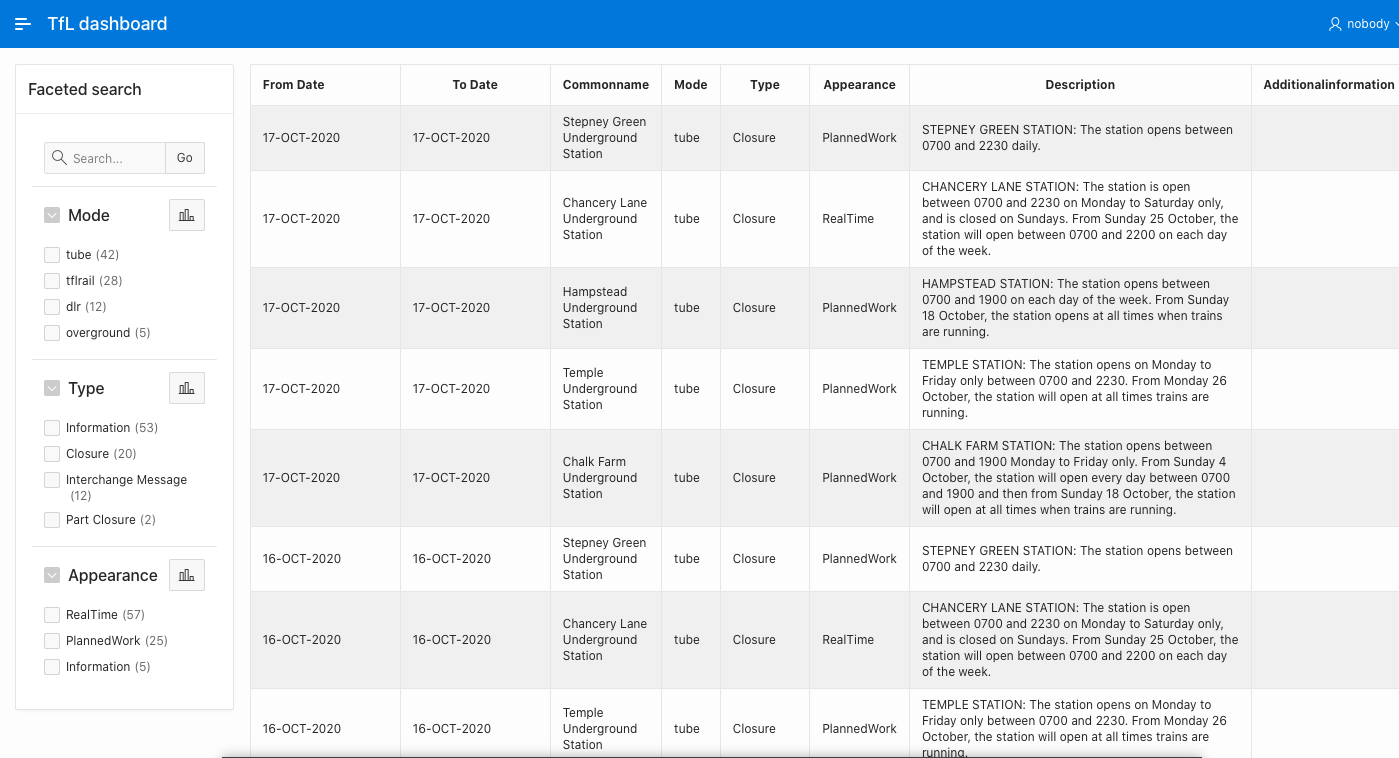
For my experiment I used the London TfL Disruption REST Endpoint from the TfL API which holds data for TfL transportation disruptions. I configured this endpoint to synchronise my database table every day.
I created the Oracle Apex REST Data source inside apex.oracle.com I used the TfL API Dev platform provided key to make the call to the TfL REST endpoint and I am synching it once a day on an Oracle Apex Faceted Search page.
I was able to do all this with zero coding, just pointing the Oracle Apex REST Data Source I created for the TfL API to a table and scheduling the sync. To see the working app go to this link: https://apex.oracle.com/pls/apex/databasesystems/r/tfl-dashboard/home
Wed, 2019-11-13 03:27
In this post I want to show you how I used the Oracle Apex Social Sign in feature for my Oracle Apex app. Try it by visiting my web app beachmap.info. Oracle Apex Social Sign in gives you the ability to use oAuth2 to authenticate and sign in users to your Oracle Apex apps using social media like Google, Facebook and others. Google and Facebook are the prominent authentication methods currently available, others will probably follow. Social sign in is easy to use, you don't need to code, all you have to do is to obtain project credentials from say Google and then pass them to the Oracle Apex framework and put the sign in button to the page which will require authentication and the flow will kick in. I would say at most a 3 step operation. Step by step instructions are available in the blog posts below. Further reading:
Sat, 2019-02-23 17:44
Chasm trap in data modelling in data warehouses occurs when two fact tables converge into single one dimension table. This is a problem which will cause double-counting and other inconsistencies when these tables are joined. SQL and relational databases surprise me every day! Star schemata in data warehouses usually have one fact table and many dimension tables where the fact table joins to it's dimensions tables via foreign keys. But what if you wanted to 'share' the dimension across two or more fact tables, use it commonly, slowly starting to create an intertwined galaxy maybe! For example think of a CUSTOMERS dimension table with the details of the customers and two fact tables SALES and REFUNDS with order and refund transactions as in the data model below.
With data like this in all three tables
Customers
Sales
Refunds The join of the above three tables in SQL shows
Once the database is created and you have some data you can try and run the following query to find out how many refunds and sales a customer made and see the infamous 'Chasm Trap'
What happened? Do you see the duplicates? We joined by the n-1 principle. That is 3 tables 2 join statements on the keys. It seems is impossible to query these two fact tables via their common dimension. So why can't we know how many SALES and REFUNDS a customer did? Strange, why is the query falling into a Cartesian Join when you want to query from two different tables via a common dimension table. Correct solution is a pre-aggregated join of the there tables
ConclusionIf you are going to use one dimension on two fact tables then you must first pre-aggregate and then join to get correct results.
Mon, 2018-11-12 14:00
Do you want a notebook where you can write some SQL queries to a database and see the results either as a chart or table?
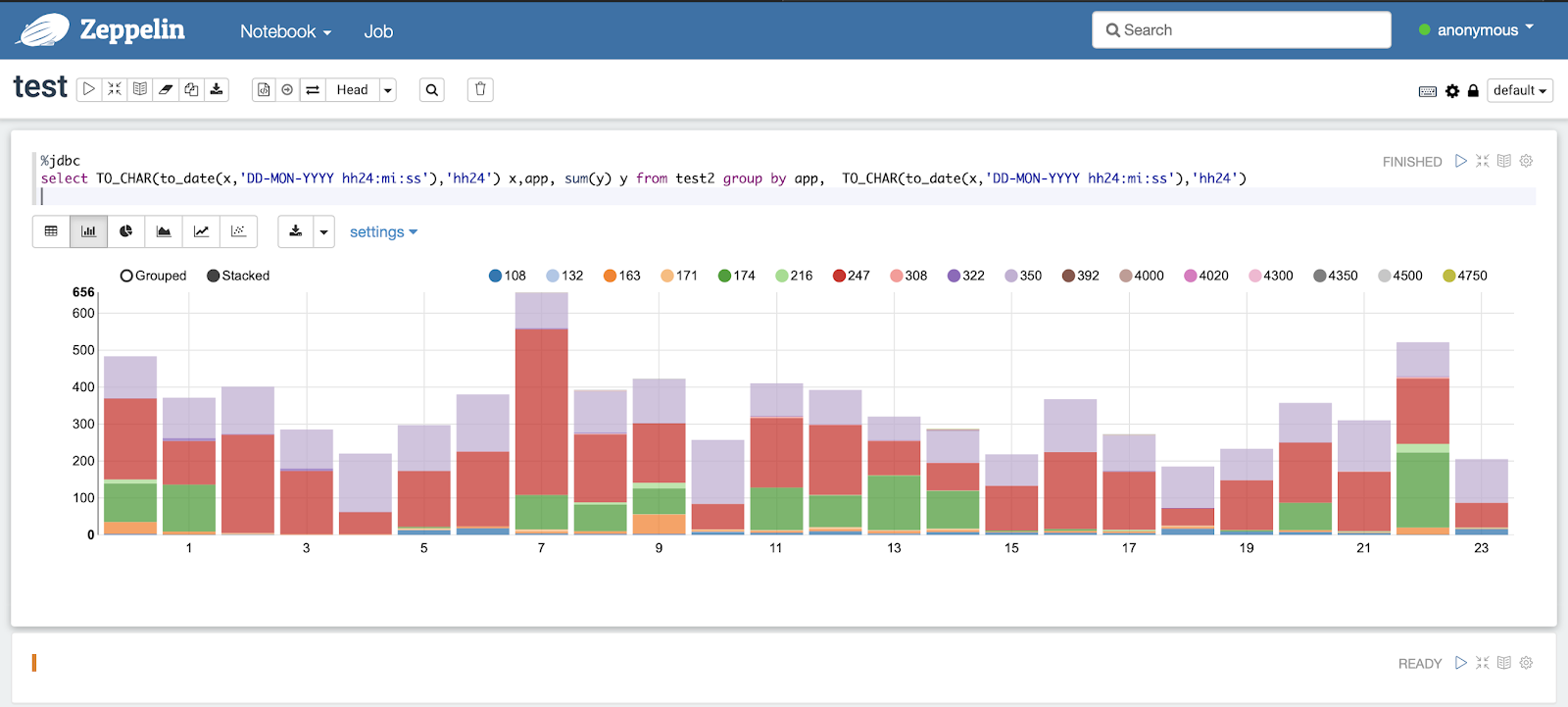
As long as you can connect to the database with a username and have the JDBC driver, no need to transfer data into spreadsheets for analysis, just download (or docker) and use Apache Zeppelin notebook and chart your SQL directly!
I was impressed by the ability of Apache Zeppelin notebook to chart SQL queries directly. To configure this open source tool and start charting your SQL queries just point it your database JDBC endpoint and then start writing some SQL in real time. See below how simple this is, just provide your database credentials and you are ready to go.
The notebook besides JDBC to any database, in my case I used a hosted Oracle cloud account, can also handle interpreters like: angular, Cassandra, neo4j, Python, SAP and many others.
docker run -d -p 8080:8080 -p 8443:8443 -v $PWD/logs:/logs -v $PWD/notebook:/notebook xemuliam/zeppelin
Thu, 2018-05-10 13:35
Have you ever thought how much of your database is actually data? Sometimes you need to ask this most simple question about your database to figure out what the real size of your data is. Databases store loads of auxiliary data such as indexes and materialized views and other structures where the original data is repeated. Many times databases repeat the data in indexes and materialized views for the sake of achieving better performance for the applications they server, and this repetition is legitimate. But should this repetition be measured and counted as database size?To make things worse, many databases due to many updates and deletes, over time create white space in their storage layer. This white space is fragmented free space which can not be re-used by new data entries. Often it might even end up being scanned in full table scans unnecessarily, eating up your resources. But most unfortunate of it all is that it will appear as if it is data in your database size measurements when usually it is not! White space is just void. There are mechanisms in databases which will automatically remedy the white space and reset and re-organise the storage of data. Here is a link which talks about this in length https://oracle-base.com/articles/misc/reclaiming-unused-space
One should be diligent when measuring database sizes, there is loads of data which is repeated and some which is just the blank void due to fragmentation and white-space. So, how do we measure?Below is a database size measuring SQL script which can be used with Oracle to show data (excluding the indexes) in tables and partitions. It also tries to estimate real storage (in the actual_gb column) excluding the whitespace by multiplying the number of rows in a table with the average row size. Replace the '<YOURSCHEMA>' bit with the schema you wish to measure. SELECT
SUM(actual_gb),
SUM(segment_gb)
FROM
(
SELECT
s.owner,
t.table_name,
s.segment_name,
s.segment_type,
t.num_rows,
t.avg_row_len,
t.avg_row_len * t.num_rows / 1024 / 1024 / 1024 actual_gb,
SUM(s.bytes) / 1024 / 1024 / 1024 segment_gb
FROM
dba_segments s,
dba_tables t
WHERE
s.owner = '<YOURSCHEMA>'
AND t.table_name = s.segment_name
AND segment_type IN (
'TABLE'
,'TABLE PARTITION'
,'TABLE SUBPARTITION'
)
GROUP BY
s.owner,
t.table_name,
s.segment_name,
s.segment_type,
t.num_rows,
t.avg_row_len,
t.avg_row_len * t.num_rows / 1024 / 1024 / 1024
);
Sat, 2018-03-03 03:10
Reading about cluster computing developments like Apache Spark and SQL I decided to find out. What I was after was to see how easy is to write SQL in Spark-SQL. In this micro-post I will show you how easy is to SQL a JSON file. For my experiment I will use my chrome_history.json file which you can download from your chrome browser using the extension www.JSON-XLS.com. To run the SQL query on PySpark on my laptop I will use the PyCharm IDE. After little bit of configuration on PyCharm, setting up environments (SPARK_HOME), there it is: It only takes 3 lines to be able SQL query a JSON document in Spark-SQL. (click image to enlarge)Think of the possibilities with SQL, the 'cluster' partitioning and parallelisation you can achieve Links: Apache Spark: https://spark.apache.org/downloads.htmlPyCharm: https://www.jetbrains.com/pycharm/
Sat, 2017-03-04 15:10
One should feel really sorry about anyone who will rely on filtering and making a decision based on bad, bad data. It is going to be a bad decision.
OK, let's say you don't mind the money and have money to burn, how about the implications of using the bad data? As the article hints these could be misinformation, wrong calculations, bad products, weak decisions mind you these will be weak/wrong 'data' driven decisions. Opportunities can be lost here.
So why all this badness, isn't it preventable? Can't we not do something about it?
Here are some options
1) Data Cleansing: This is a reactive solution where you clean, disambiguate, correct, change the bad data and put the right values in the database after you find the bad data. This is something you do when is too late and you have bad data already. Better late than never. A rather expensive and very time consuming solution. Nevermind the chance that you can still get it wrong. There are tools out there which you can buy and can help you do data cleansing. These tools will 'de-dupe' and correct the bad data up to a point. Of course data cleansing tools alone are not enough, you will still need those data engineers and data experts who know your data or who can study your data to guide you. Data cleansing is the damage control option. It is a solution hinted in the article as well.
2) Good Database Design: Use constraints! My favourite option. Constraints are key at the design time of the database, do put native database checks and constraints in the database entities and tables to guarantee the entity integrity and referential integrity of your database schema, validate more! Do not just create plain simple database tables, always think of ways to enforce the integrity of your data. Do not rely only on code. Prevent NULLS or empty strings as much as you can at database design time, put unique indexes and logical check constraints inside the database. Use database tools and features you are already paying for in your database license and already available to you, do not re-invent the wheel, validate your data. This way you will prevent the 'creation' of bad data at the source! Take a proactive approach. In projects don't just skip the database constraints and say I will do it in the app or later. You know you will not, chances are you will forget it in most of the cases. Also apps can change, but databases tend to outlast the apps. Look at a primer on how to do Database Design
My modus operandi is option 2, a Good Database Design and data engineering can save you money, a lot of money, don't rush into projects with neglecting or skipping database tasks, engage the data experts, software engineers with the business find out the requirements, talk about them, ask many questions and do data models. Reverse engineer everything in your database, have a look. Know your data! That's the only way to have good, integral and reliable true data, and it will help you and your customers win.
Fri, 2016-12-23 13:34
Data in the enterprise comes in many forms. Simple flat files, transactional databases, scratch files, complex binary blobs, encrypted files, and whole block devices, and filesystem metadata. Simple flat files, such as documents, images, application and operating system files are by far the easiest to manage. These files can simply be scanned for access time to be sorted and managed for backup and archival. Some systems can even transparently symlink these files to other locations for archival purposes. In general, basic files in this category are opened and closed in rapid succession, and actually rarely change. This makes them ideal for backup as they can be copied as they are, and in the distant past, they were all that there was and that was enough.
Then came multitasking. With the introduction of multiple programs running in a virtual memory space, it became possible that files could be opened by two different applications at once. It became also possible that these locked files could be opened and changed in memory without being synchronized back to disk. So elaborate systems were developed to handle file locks, and buffers that flush their changes back to those files on a periodic or triggered basis. Databases in this space were always open, and could not be backed up as they were. Every transaction was logged to a separate set of files, which could be played back to restore the database to functionality. This is still in use today, as reading the entire database may not be possible, or performant in a production system. This is called a transaction log. Mail servers, database management systems, and networked applications all had to develop software programming interfaces to backup to a single string of files. Essentially this format is called Tape Archive (tar.)
Eventually and quite recently actually, these systems became so large and complex as to require another layer of interface with the whole filesystem, there were certain applications and operating system files that simply were never closed for copy. The concept of Copy on Write was born. The entire filesystem was essentially always closed, and any writes were written as an incremental or completely new file, and the old one was marked for deletion. Filesystems in this modern era progressively implemented more pure copy on write transaction based journaling so files could be assured intact on system failure, and could be read for archival, or multiple application access. Keep in mind this is a one paragraph summation of 25 years of filesystem technology, and not specifically applicable to any single filesystem.
Along with journaling, which allowed a system to retain filesystem integrity, there came an idea that the files could intelligently retain the old copies of these files, and the state of the filesystem itself, as something called a snapshot. All of this stems from the microcosm of databases applied to general filesystems. Again databases still need to be backed up and accessed through controlled methods, but slowly the features of databases find their way into operating systems and filesystems. Modern filesystems use shadow copies and snapshotting to allow rollback of file changes, complete system restore, and undeletion of files as long as the free space hasn’t been reallocated.
Which brings us to my next point which is the difference between a backup or archive, and a snapshot. A snapshot is a picture of what a disk used to be. This picture is kept on the same disk, and in the event of a physical media failure or overuse of the disk itself, is in totality useless. There needs to be sufficient free space on the disk to hold the old snapshots, and if the disk fails, all is still lost. As media redundancy is easily managed to virtually preclude failure, space considerations especially in aged or unmanaged filesystems, can easily get out of hand. The effect of a filesystem growing near to capacity is essentially a limitation of usable features. As time moves on, simple file rollback features will lose all effectiveness, and users will have to go to the backup to find replacements.
There are products and systems to automatically compress and move files that are unlikely to be accessed in the near future. These systems usually create a separate filesystem and replace your files with links to that system. This has the net effect of reducing the primary storage footprint, the backup load, and allowing your filesystem to grow effectively forever. In general, this is not such a good thing as it sounds, as the archive storage may still fill up, and you then have an effective filesystem that is larger than the maximum theoretical size, which will have to be forcibly pruned to ever restore properly. Also, your backup system, if the archive system is not integrated, probably will be unaware of the archive system. This would mean that the archived data would be lost in the event of a disaster or catastrophe.
Which brings about another point, whatever your backup vendor supports, you are effectively bound to use those products for the life of the backup system. This may be ten or more years and may impact business flexibility. Enterprise business systems backup products easily can cost dozens of thousands per year, and however flexible your systems need to be, so your must your backup vendor provide.
Long term planning and backup systems go hand in hand. Ideally, you should be shooting for a 7 or 12-year lifespan for these systems. They should be able to scale in features and load for the predicted curve of growth with a very wide margin for error. Conservatively, you should plan on a 25% data growth rate per year minimum. Generally speaking 50 to 100% is far more likely. Highly integrated backup systems truly are a requirement of Information Services, and while costly, failure to effectively plan for disaster or catastrophe will lead to and end of business continuity, and likely the continuity of your employment.
Tue, 2016-12-13 17:01
It might shock you to hear that managing data has never been more difficult than it is today. Data is growing at the speed of light, while IT budgets are shrinking at a similar pace. All of this growth and change is forcing administrators to find more relevant ways to successfully manage and store data. This is no easy task, as there are many regulatory constraints with respect to data retention, and the business value of the data needs to be considered as well. Those within the IT world likely remember (with fondness) the hierarchical storage management systems (HSM), which have traditionally played a key role in the mainframe information lifecycle management (ILM). Though this was once a reliable and effective way to manage company data, gone are the days when businesses can put full confidence in such a method. The truth of the matter is that things have become much more complicated.
There is a growing need to collect information and data, and the bad news with this is that there is simply not enough money in the budget to handle the huge load. In fact, not only are budgets feeling the growth, but even current systems can’t keep up with the vast pace of the increase in data and its value. It is estimated that global data center traffic will soon triple its numbers from 2013. You can imagine what a tremendous strain this quick growth poses to HSM and ILM. Administrators are left with loads of questions such as how long must data be kept, what data must be stored, what data is safe for deletion, and when it is safe to delete certain data. These questions are simply the tip of the iceberg when it comes to data management. Regulatory requirements, estimated costs, and the issues of backup, recovery and accessibility for critical data are areas of concern that also must be addressed with the changing atmosphere of tremendous data growth.
There is an alluring solution that has come on the scene that might make heads turn with respect to management of stored data. The idea of hybrid cloud storage is making administrators within the IT world and businesses alike think that there might actually be a way to manage this vast amount of data in a cost effective way. So, what would this hybrid cloud look like? Essentially, it would be a combination of capabilities found in both private and public cloud storage solutions. It would combine on-site company data with storage capabilities found on the public cloud. Why would this be a good solution? The reason is because companies are looking for a cost effective way to manage the massive influx of data. This hybrid cloud solution would offer just that. The best part is, users would only need to pay for what they use regarding their storage needs. The goods news is, the options are seemingly unlimited, increasing or decreasing as client needs shift over time. With a virtualized architecture in place, the variety of storage options are endless. Imagine what it would be like to no longer be worried about the provider or the type of storage you are managing. With the hybrid cloud storage system in place, these worries would go out the window. Think of it as commodity storage. Those within the business world understand that this type of storage has proven to work well within their spheres, ultimately offering a limitless capacity to meet all of their data storage needs. What could be better?
In this fast-paced, shifting world, it’s high time relevant solutions come to the forefront that are effective for the growth and change so common in the world of technology today. Keep in mind that the vast influx of data could become a huge problem if solutions such as the hybrid cloud options are not considered. This combination of cloud storage is a great way to lower storage costs as the retention time increases, and the data value decreases. With this solution, policies are respected, flexibility is gained, and costs are cut. When it comes to managing data effectively over time, the hybrid cloud storage system is a solution that almost anyone could get behind!
Tue, 2016-12-13 16:39
Never before has the management of a database been more difficult for those within the IT world. This should not come as a shock to those reading this, especially when you consider how vast the data volumes and streams currently are. The unfortunate news is that these volumes and streams are not shrinking anytime soon, but IT budgets ARE, and so are things such as human resources and technical skills. The question remains...how are businesses supposed to manage these databases in the most effective way? Well, the very factors mentioned above make automation an extremely attractive choice.
Often times, clients have very specific requirements when it comes to automating their IMS systems. Concerns arise such as how to make the most of CPU usage, what capabilities are available, strategic advantages, and how to save with respect to OpEx. These are not simply concerns, but necessities, and factors that almost all clients consider. Generally speaking, these requirements can be streamlined into 2 main categories. The first is how to monitor database exceptions and the second is how to implement conditional reorgs.
Regarding the monitoring of database exceptions, clients must consider how long this process actually takes without automation. Without this tool, it needs to be accomplished manually and requires complicated analysis by staff that is well-experienced in this arena. However, when automation is utilized, policies are the monitors of databases. In this instance, exceptions actually trigger a notification by email which ultimately reports what sort of help is necessary in order to help find a solution to the problem.
Now, don’t hear what we are NOT saying here. Does automation make life easier for everyone? Yes! Is implementing automation an easy and seamless process? No! In fact, automation requires some detailed work prior to setting it up. This work is accomplished so that it is clear what needs to be monitored and how that monitoring should be carried out. Ultimately, a monitor list is created which will help to define and assign various policies. Overall, this list will make clear WHO gets sent a notification in the event of an exception, as well as what type of notification will be sent. Even further, this list will show what the trigger of the exception was, and in the end will assign a notification list to the policy. It may sound like a lot of work up front, but one could argue that it is certainly worth it in the long run.
When it comes to conditional reorgs, automation saves the day once again. Many clients can prove to be quite scattered with respect to their reorg cycle, some even organizing them throughout a spotty 4-week cycle. The issue here is that reorg jobs are scheduled during a particular window of time, without the time or resources even being evaluated. When clients choose to automate a reorg, automation will help determine the necessity of a reorg. The best part of the whole process is that no manual work is needed! In fact, the scheduler will continue to submit the reorg jobs, but execute them only if necessary. Talk about a good use of both time and resources! It ends up being a win-win situation.
Automation often ends up “saving the day” when it comes to meeting and exceeding client goals. Did you know that individual utilities -when teamed with the functionality and the vast capabilities of the automation process- actually improves overall business performance and value? It is true. So, if you are looking for the most cutting edge way to manage your IMS database, looking no further than the process of automation!
Tue, 2016-09-13 15:39
Data has a way of growing so quickly that it can appear unmanageable, but that is where data archiving shines through. The tool of archiving helps users maintain a clear environment on their primary storage drives. It is also an excellent way to keep backup and recovery spheres running smoothly. Mistakes and disasters can and will happen, but with successful archiving, data can be easily recovered so as to successfully avert potential problems. Another benefit to archiving data is that companies are actually saving themselves the very real possibility of a financial headache! In the end, this tool will help to cut costs in relation to effectively storing and protecting your data. Who doesn’t want that? It’s a win-win situation for everyone involved!
When It Comes to Archiving Data for Storage, Where Do I Begin? It may feel stressful at first to implement a data archiving plan into your backup and storage sphere, but don’t be worried! To break it down, data simply needs to go from one place into another. In other words, you are just moving data! Sounds easy enough, right? If things get sticky however, software is available on the market that can help users make better decisions and wise choices when it comes to moving your data. In your preparation to incorporate archiving, you must ask yourself some important questions before you start. This way, companies will be guaranteed to be making choices that meet the demands of their particular IT environment. So, don’t stress-just be well prepared and ask the right questions! Right now, you may be wondering what those questions are. Below you will see a few of them that are most necessary to ask in order to guarantee your archiving success.
What You Should Be Asking:
1. With respect to your data, what type is that you need to store? “Cold” data may not be something you are familiar with, but this is a term used regarding data that has been left untouched for over 6 months. If this is the type of data you are trying to store, good for you! This particular type of data must be kept secure in the event that it is needed for compliance audits or even for a possible legal situation that could come up down the road. At any rate, all data -regardless of why it is being stored- must be taken care of appropriately so as to ensure security and availability over time. You can be assured you have invested in a good archiving system if it is able to show you who viewed the data and at what time the data was viewed.
2. Are you aware of the particular technology you are using? It is essential to realize that data storage is highly dependent upon two factors: the hardware and the media you are using. Keep in mind that interfaces are a very important factor as well, and they must be upgraded from time to time. A point to consider when storing data is that tape has an incredibly long life, and with low usage and proper storage it could potentially last for 100 years! Wow! However, there are arguments over which has the potential to last longer...tape or hard disk. Opponents towards the long life of tape argue that with proper powering down of drives, hard disk will actually outlive tape. Here is where the rubber meets the road to this theory. It has shown to be problematic over time, and can leave users with DUDL (Data Unavailable Data Loss). This problem IS as terrible as it sounds. Regardless of the fact that SSD lack mechanical parts, their electronic functions results in cell degradation, ultimately causing burnout. It is unknown, even to vendors, what the SSD life is, but most say 3 years is what they are guaranteed for. Bear in mind, as man-made creations, these tools will over time die. Whatever your choice in technology, you must be sure to PLAN and TEST. These two things are the most essential tasks to do in keeping data secure over time!
3. Do you know the format of your data? It is important to acknowledge that “bits” have to be well-kept in order to ensure that your stored data will be usable over the long run. Investing in appropriate hardware to accurately read data as well as to interpret it is essential. It is safe to say that investing in such a tool is an absolute MUST in order to ensure successful long-term storage!
4. Is the archive located on the cloud or in your actual location? Did you know this era is one in which storing your data on the cloud is a viable means of long-term archiving? Crazy, isn’t it! Truth be told, access to the cloud has been an incredibly helpful advancement when it comes to storage, but as all man-made inventions prove, problems are unavoidable. Regarding cloud storage, at this point in time, the problems arise with respect to long-term retention. However, many enjoy the simplicity of pay-as-you-go storage options available with the cloud. Users also like relying upon particular providers to assist them with their cloud storage management. In looking to their providers, people are given information such as what the type, age, and interface of their storage devices are. You might be asking yourself why this is so appealing. The answer is simple. Users ultimately gain the comfort of knowing that they can access their data at anytime, and that it will always be accessible. At this point, many are wondering what the downsides are of using the cloud for storage. Obviously, data will grow over time, inevitably causing your cloud to grow which in turn will raise your cloud storage costs. Users will be happy to know however, that cloud storage is actually a more frugal choice than opting to store data in a data center. In the end, the most common compliment regarding cloud storage is the TIME involved in trying to access data in the event of a necessary recovery, restore, or a compliance issue. Often times, these issues are quite sensitive with respect to timing, therefore data must be available quickly in case of a potential disaster.
5. What facts do you know about your particular data? There is often sufficient knowledge of storage capacity, but many are not able to bring to mind how much data is stored per application. Also, many do not know who the owner of particular data is, as well as what age the data may be. The good news is that there is software on the market that helps administrators quickly figure these factors out. This software produces reports with the above information by scanning environments. With the help of these reports, it can be quickly understood what data is needed and in turn, will efficiently archive that data. All it takes is a push of a button to get these clear-cut reports with all the appropriate information on them. What could be better than that? In Closing, Companies MUST Archive!
In a world that can be otherwise confusing, companies must consider the importance of archiving in order to make their data and storage management easier to grasp. Maybe if users understood that archiving is essential in order to preserve the environment of their IT world, more people would quickly jump on board. The best news is that archiving can occur automatically, taking the guesswork out of the process. Archiving is a sure step to keeping systems performing well, budgets in line, and data available and accessible. Be sure to prepare yourself before investing in data archiving by asking the vital questions laid out above. This way, you can be certain you have chosen a system which will fully meet your department needs!
Tue, 2016-09-13 15:37
A common concern among companies is if their resources are being used wisely. Never before has this been more pressing than when considering data storage options. Teams question the inherent worth of their data, and often fall into the trap of viewing it as an expense that weighs too heavily on the budget. This is where wisdom is needed with respect to efficient resource use and the task of successful data storage. Companies must ask themselves how storing particular data will benefit their business overall. Incorporating a data storage plan into a business budget has certainly proven to be easier said than done. Many companies fail at carrying out their desires to store data once they recognize the cost associated with the tools that are needed. You may be wondering why the failure to follow through on these plans is so common. After all, who wouldn’t want to budget in such an important part of company security? The truth of the matter is that it can all be very overwhelming once the VAST amount of data that actually exists is considered, and it can be even more stressful to attempt to manage it all.
When considering what tools to use for management of one’s data, many administrators think about using either the cloud or virtualization. Often times during their research, teams question the ability of these two places to successfully house their data. Truth be told, both the cloud and virtualization are very reliable, but are equally limited with respect to actually managing data well. What companies really need is a system that can effectively manage huge amounts of data, and place it into the right categories. In doing so, the data becomes much more valuable.
Companies must change their mindsets regarding their stored data. It is time to put away the thoughts that data being stored is creating a money pit. Many times, people adopt an “out with the old, in with the new” philosophy, and this is no different with respect to storing old data. The truth is, teams eventually want new projects to work on, especially since some of the old data storage projects can appear to be high maintenance. After all, old data generally needs lots of backups and archiving, and is actually quite needy. These negative thoughts need to fade away however, especially in light of the fact that this data being stored and protected is a staple to company health and security. Did you know that old and tired data actually holds the very heart of a company? It is probable that many forget that fact, since they are so quick to criticize it! Also notable is the fact that this data is the source of a chunk of any given business’s income. Good to know, isn’t it?! Poor management of data would very likely be eradicated if more teams would keep the value of this data on the forefront of their minds. It is clear that the task of managing huge amounts of company data can be intimidating and overwhelming, but with the right attitude and proper focus, it is not impossible.
The best news yet is that there are excellent TOOLS that exist in order to help companies take on the magnanimous task of managing company data. In other words, administrators don’t have to go at it alone! The resources out there will assist users with classifying and organizing data, which is a huge relief NOT to have to do manually. When teams readily combine these tools with their understanding of business, they have a sure recipe for success when it comes to management. To break it down even further, let’s use a more concrete example. Imagine you are attempting to find out information about all the chemical engineers in the world. You must ask yourself how you would go about doing this in the most efficient manner. After all, you would clearly need to narrow down your search since there are more than 7 billion individuals that exist on this planet. Obviously, you wouldn’t need to gather information on every single human being, as this would be a huge time waster. On the contrary, to make things more streamlined, you would likely scope out and filter through various groups of people and categorize them by profession. Maybe you would consider a simple search in engineering graduates. The above example in organizing information is probably the method most people use to organize simple things in their life on a daily basis. Keep in mind, having these tools to help streamline data is one thing, but one must also possess a good understanding of business plans, as this will assist for a better grasp on corporate data. With these things in line, businesses can be assured that their data management systems will be in good hands and running smoothly.
What a great gift to be alive during this time, with the easy access to modern tools which help make management of data much more understandable to those in charge. These valuable resources also help to create confidence in administrators so that they feel well-equipped to navigate the sometimes harsh IT world. For example, during the changes with data types and volumes, these tools assist in helping to lower the storage capacity needs, lower costs on backup and recovery, and aid in the passing of compliance with flying colors. In fact, many in charge can rest their heads at night knowing their companies are totally in line with modern-day regulatory compliance rules.
In the end, the value of wisdom with respect to making various decisions in an IT department is incredibly important. Arguably one of the most areas which this applies to is in the sphere of data management. The truth is, dependence upon tools alone to navigate the sometimes rough waters of the IT world will not be enough to get teams through. As stated above, wisdom and the right attitude regarding data and its importance to company health and security are vital to proper management. In addition, clients ought to be looking for resources to assist them with organizing and classifying their systems of files. The point is clear: intelligence paired with the proper tools will give companies exactly what they need for efficient and effective data management. At the end of the day, users can rest easy with the knowledge that their data -which is the bread and butter of their companies- is in good hands. What more could you ask for?
Pages
|