


Jim Marion

PeopleSoft Reconnect 2025 | Dive Deep
.png)
The premiere PeopleSoft conference, Reconnect | Dive Deep, begins in just a few days. If you are not already registered for this live virtual conference, be sure to do so ASAP. If you are already registered, then be sure to log in to the conference app to build your agenda. Some sessions have capacity limits, and you don't want to miss them!
Here is the list of sessions I am presenting at this year's conference:
Monday- 4:45pm EDT P-051853, PeopleSoft Test Framework: More than Automated End-user Testing
- 11:15 am EDT P-051448, Replacing Customizations with Configurations in Campus Solutions
- 1:45 pm EDT P-051447, Enterprise Components: The "Other" Toolset
- 4:15 pm EDT P-051446, PeopleSoft Fluid Best Practices
- 12:30pm EDT P-051861, What's New in 8.62 for Campus Solutions!
- 12:30 pm EDT P-051442, Getting the Most out of PeopleSoft PeopleTools: Tips and Techniques
- 1:45 pm EDT P-051445, Isolate and Configure: Don't Customize!
As a registered attendee, be sure to check out our virtual booth to watch replays from prior conference sessions. I look forward to seeing you online next week!
Parsing JSON Arrays with PeopleCode
PeopleCode includes built-in support for parsing JSON through a native object called the JsonParser. Let's review a couple of JSON strings and then see how the JsonParser interprets them. First, let's review a JsonObject:
{
  "course": "PT1",
  "description": "PeopleTools",
  "courseType": "T",
  "duration": 4
}
Assuming that the JSON text is in the string variable &jsonStr, then we might parse it with code similar to:
Local JsonParser &p = CreateJsonParser();

If (&p.Parse(&jsonStr)) Then
  REM ** Woo Hoo! It parsed!;
End-If;
Parsing means the JsonParser created an in-memory structure. To leverage the JSON, we need to access that in-memory structure. The JsonParser includes one documented method to access the JSON Structure: GetRootObject(). The GetRootObject method returns a JsonObject. According to the documentation, the following PeopleCode should give us the value of the description attribute from the JSON above:
Local JsonObject &course = &p.GetRootObject();
Local string &descr; = &course.GetString("description");
What about a JSON Array? Here is my concern: There is no GetRootArray method. What if the "root object" is not an "object," but an Array? Here is what a valid JSON Array might look like:
[{
  "course": "PT1",
  "description": "PeopleTools",
  "courseType": "T",
  "duration": 4
}, {
  "course": "PC",
  "description": "PeopleCode",
  "courseType": "T",
  "duration": 5
}]
We would parse it using the same code as above. But how would you access the Array? Since the Parser has a GetRootObject method, let's invoke it, and then ToString the root object to see its JSON output. Here is the PeopleCode:
MessageBox(0, "", 0, 0, "%1", &p.GetRootObject().ToString());
... and here is the JSON:
{[
    {
        "course": "PT1",
        "description": "PeopleTools",
        "courseType": "T",
        "duration": 4
    },
    {
        "course": "PC",
        "description": "PeopleCode",
        "courseType": "T",
        "duration": 5
    }
]}
Do you notice anything unusual about that JSON? Notice the extra curly braces ({}). The "root" object is a JSON object. But here is where it gets interesting. The printed JSON is not valid. An object must have an attribute. The array should be assigned to an attribute. Now, does this matter? I think Oracle is allowed to internally represent JSON any way they desire. You might say that what we did was unexpected. We asked PeopleSoft to print an internal representation, not a true, expected JSON Object. But my question is the same: How do you access the Array that is now inside the root object? Here is the answer:
&p.GetRootObject().GetJsonArray("");The GetJsonArray method expects an attribute name. We don't have one. So we don't give it one. Just use a zero-length string.
Want hands-on experience with REST services and PeopleCode parsing techniques? Join us on Tuesday, September 23, for two hands-on, live virtual workshops focused on integration! Details for the entire September series are available online.
We teach PeopleTools tips like this every week. Check out our website to see what we are offering next. Prefer to learn at your own pace? Our entire catalog is available online.
Five Reasons to Adopt the Application Services Framework
PeopleSoft's Integration Broker has support for REST and JSON. But, it is clear from the metadata, design, and history that Integration Broker favors SOAP and XML (Web Services). Is there a better alternative? YES! As of PeopleTools 8.59, we have a module designed specifically for REST: the Application Services Framework (ASF).
Here are five reasons you should consider ASF for your next integration project:
1. URL DesignREST focuses on objects and data. In an enterprise system, business objects might be Employees, Students, or Vouchers. In ASF, we might call these root resources. Continuing with the Voucher example, we might have the following URLs:
- .../ap/vouchers
- .../ap/vouchers/000000012567
When constructing an Application Service, we would have the "ap" service, which would then have a "vouchers" root resource. We could then define URI templates for:
- vouchers (get a list of all vouchers)
- vouchers/000000012567 (get a specific voucher)
We would further define HTTP methods, such as GET, PUT, PATCH, or POST, to fetch, update, or create business objects within the respective collections.
The Application Services framework helps us design URLs by first thinking about the module → then the collection → and then the specific object (generic to specific).
When we browse the Internet, we expect to find an organized collection of documents (endpoints) conveniently filed in meaningful folders. Computers browse the Internet, and those computers should expect an organized collection of business "documents" as well.
2. 201 Created Success Status CodeWeb Services and SOAP use a protocol within a protocol. The typical Web Service request uses HTTP as the transport protocol and SOAP for the transaction protocol. Therefore, a Web Service might return a 200 HTTP status code to report success even though the SOAP transaction failed.
REST HTTP status codes have meaning. HTTP status codes in the 200 range represent successful responses. The most important HTTP status codes for a PeopleSoft developer are 200, 201, 202, and 204. These are the ONLY HTTP success status codes supported by ASF. Integration Broker REST-based Service Operations, on the other hand, support several other 200-level status codes, but with one critical omission: REST-based Service Operations do not support 201. 201 is the status code for "created." Assuming a PUT or a POST, the proper response may be a 201 - Created. This is critical. If the service handler immediately creates a transaction, then it should return a 201. The Application Services Framework supports this, but traditional REST Service Operations do not.
3. 401 Unauthorized Bad Request Status CodePeopleSoft takes control of the HTTP Authorization header for several reasons. Here are a couple:
- To determine if the requester is authorized to access the requested service.
- To assume the identity of the user making the request, allowing PeopleCode to run as the proper user.
If PeopleSoft determines the requester does not have access (based on roles and permission lists), then PeopleSoft will return the 401 Unauthorized HTTP status code. This happens at the Integration Broker level, and it is fantastic!
But what if your business logic needs to return a 401 Unauthorized? Traditional REST-based Service Operations do not allow this.
Consider the following example. Let's say that a user is authorized for our /ap/vouchers service (the example above). That user might be authorized to access certain vouchers, such as .../ap/vouchers/000000012567, but not .../ap/vouchers/000000012568. This is called row-level security. In this scenario, we should return a 401 - Unauthorized. The user is authorized for the service, but not the data.
Traditional REST-based Service Operations do not allow you to return a 401 Unauthorized EVER. ASF does. 401 is an acceptable failure response from an Application Service.
4. OpenAPIMetaphorically speaking, OpenAPI is the WSDL of REST. ASF generates OpenAPI specifications for us. We can plug these OpenAPI URLs or downloaded descriptors into various consumers, including Oracle Digital Assistant, Oracle Integration Cloud, Oracle Visual Builder, and more!
5. PeopleCodeASF was designed to expose Application Classes as REST services. The framework includes an API designed to construct single-row and multi-row responses. The API was designed for REST with support for HTTP status codes and HTTP methods.
6. (Bonus) Metadata DesignASF metadata consists of:
- Module
- Root Resource
- URI Templates
- Parameters
- Result States
- HTTP Headers
What to learn more? Create a free account at jsmpros.com and explore our free webinar replays to learn the basics of the Application Services Framework. Next, join us for our three-day live virtual Integration Tools Update course. Prefer to learn at your own pace? This same material is available on demand! Watch the videos whenever and wherever you like, and then complete the hands-on activities on your own server.
PTF: Recorder is unable to load... Now What?
I love PTF! With Selective Adoption, Continuous Delivery, and Customization Isolation strategies, PTF is more important than ever. Since Event Mapping, Drop Zones, and Page and Field Configurator don't appear on compare reports (and that is the point), we need a tool like PTF to expose regressions we would have found through the traditional retrofit analysis. The traditional retrofit approach required us to analyze and retrofit every customization. Event Mapping, Drop Zones, and Page and Field Configurator free us to focus on just what broke during the upgrade. And this is why PTF exists. The PTF regression test is how we find what broke. PTF is the linchpin that holds the whole isolated customization strategy together. Without it, we either go live with undiscovered errors or we continue to analyze and retrofit everything.
But what if you launch the PTF recorder and suddenly see this?

What happened? The PTF recorder is a Chrome/Edge plugin. That plugin needs to be loaded for the recorder to function. The PTF application attempts to install this plugin each time it launches the recorder. Depending on your enterprise settings, however, Chrome may deny that request. This is what happened to me. Enterprise customers have been dealing with this since PeopleSoft switched to the Chrome recorder. However, this is what surprised me: I'm simply using a standard Chrome download on an unmanaged server. In fact, PTF used to work just fine on this very server, and this behavior is a recent development. Perhaps Chrome altered its security policy?
Fortunately, this is a known and documented issue. Enterprise customers with highly controlled Chrome environments have been experiencing this issue since PTF switched to the Chrome recorder. Take a look at MOS Doc ID 2922127.1. This document outlines the steps necessary to correct the issue. Following those steps, I launched Chrome as an Administrator by:
- Typing Chrome into the Windows Menu and
- Right-clicking the Google Chrome entry and choosing Run as Administrator from the popup menu
I then navigated to chrome://extensions/ and turned on Developer Mode:

Finally, I dragged the Chrome extension psTstRecCh.crx file onto the Chrome extension window:

But after a restart, it still didn't work. I could now see the extension listed in Chrome, but it was disabled, and no matter how many times I clicked, it wouldn't enable itself!

Even though the extension was installed, Chrome wouldn't trust it. Even as an Administrator, I could not enable the extension. The final step is to override Chrome's behavior by encouraging it to trust Oracle's PTF extension. We do this through the Windows Registry. The appropriate Windows Registry keys are listed in PeopleBooks under Installing a PTF Client > Configuring Browser Settings. Here is the contents of my *.reg file I imported into my Windows Registry.
Windows Registry Editor Version 5.00

[HKEY_LOCAL_MACHINE\SOFTWARE\Policies\Google\Chrome]

[HKEY_LOCAL_MACHINE\SOFTWARE\Policies\Google\Chrome\ExtensionAllowedTypes]
"1"="extension"

[HKEY_LOCAL_MACHINE\SOFTWARE\Policies\Google\Chrome\ExtensionInstallAllowlist]
"1"="boainbfkaibcfobfdncejkcbmfcckljh"

[HKEY_LOCAL_MACHINE\SOFTWARE\Policies\Google\Chrome\ExtensionInstallBlocklist]
"1"="*"
Please note that editing the Windows registry can be risky and potentially cause serious problems, including system instability or even rendering Windows unbootable. Therefore, it's crucial to proceed with extreme caution and only if you are confident in your actions. Always back up the registry before making any changes, and keep detailed records of modifications.
And that was all it took! My PTF recorder is now working as well as ever!
At JSMpros, we teach PeopleSoft tips like this every week. Check out our schedule to see what we are offering next! Have a large group you would like to train? Contact us for scheduling and group pricing.
Have you Considered the Application Services Framework?
We recently asked the PeopleSoft LinkedIn Community:
Which would you choose to expose a PeopleSoft REST endpoint?
Here were the responses:
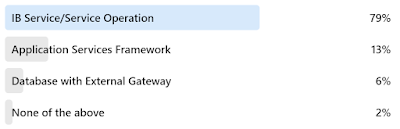
The answers surprised me. On the one hand, the IB Service/Service Operation approach was the only option until PeopleTools 8.59. This makes it familiar. However, the Application Services Framework was specifically created for REST. Unlike traditional IB Services and Service Operations, which were designed for SOAP and Web Services, the Application Services Framework focuses on HTTP concepts, such as URL design, status codes, data structures, and more. Here are some benefits the Application Services Framework offers over traditional IB Service Operations:
- Generates an OpenAPI specification for import by consumer applications.
- Provides additional HTTP status codes.
- Uses a PeopleCode API that aligns more closely with REST service design.
- Eliminates irrelevant metadata creation, such as Message Definitions and Documents.
The Application Services Framework is a REST-specific, REST-focused layer over the top of service-oriented Integration Broker metadata. If you haven't done so already, we recommend reviewing the Application Services Framework. It definitely simplifies REST Service development.
The Application Services Framework is part of our standard Integration Tools training. Join us for our next class to learn more! Already a subscriber? Log in and Get Started!
Blueprint 2025

Education sessions at the premier PeopleSoft conference, Blueprint 4D, officially begin in two weeks! Join us in Las Vegas to learn from Oracle product strategy, strategic partners, and Oracle's customers.
The mobile app and agenda are now live. I am presenting the following three fantastic, fun-filled, and educational sessions!
- Cloud Integration Strategies on Tuesday, June 10 at 5 PM
- Getting the Most out of PeopleSoft PeopleTools: Tips and Techniques on Wednesday, June 11 at 9:00 AM
- PeopleSoft Fluid Best Practices on Thursday, June 12 at 3:00 pm.
When we are not in sessions, you can find us in the exhibition hall.
See you there!
Which Technology Would You Use for JSON?
We asked our LinkedIn audience:
Which Technology Would You Use to Process JSON?And they replied:

These answers are fantastic! Based on performance testing and research, PeopleCode native JSON objects, such as JsonObject and JsonArray, perform much faster than the Documents module or external Java libraries. However, there are times when I might choose an alternative.
Java LibrariesPeopleCode leverages the Java Native Interface to provide bidirectional access to Java. Java classes can interact with PeopleCode functions and objects, and vice versa. In addition to the delivered Java API, PeopleSoft provides several key Java libraries, including the Jakarta JSON library. Jakarta stream processing enables us to process enormous datasets. This stands in contrast to native DOM-based JSON parsing, which is limited by the amount of system memory available.
DocumentsA document structure may generate either XML or JSON, which might simplify solution development when creating APIs that support multiple output types. Likewise, a document structure is required when creating a REST URI template.
Additional Resources- PeopleCode JSON API
- JSON Stream Processing Blog Post
- PeopleSoft Documents module
- Jakarta JSON Processing
Consuming Enormous Datasets with PeopleSoft
Integration Broker is built on the DOM concept, which means it parses data into an in-memory structured document before transforming, processing, or transmitting it. This is fantastic for small and incremental integrations designed to keep two systems synchronized on a per-transaction basis. However, it fails when processing datasets that exceed the amount of available system memory.
An alternative is to use a SAX or stream-based parser that emits events. This type of parser only consumes the memory necessary to emit the next event. Stream-based parsers are highly efficient for one-way, one-time reads through large datasets. Unfortunately, Integration Broker does not support stream-based processing.
While reviewing PeopleSoft's Java class path, I noticed the Jakarta JSON stream-processing Java library. You can find a simple PeopleCode example of processing a JSON file using Jakarta JSON streams in our blog post JSON Stream Processing with PeopleCode. Now that we know how to use Jakarta's stream processing, the next challenge is reading an input stream from an external service. Since Integration Broker does not support streams, we need alternatives. Here are a few Java-based alternatives that readily integrate with PeopleCode through delivered APIs:
- Java Sockets
- Java HttpURLConnection
- Apache HttpClient
Although PeopleCode offers incredible support for Java, the real challenge lies with method and constructor overloading. PeopleCode identifies target Java methods and constructors through parameter count, not parameter type. Java overloading doesn't play well with PeopleCode. The solution I use to overcome method overloading is to leverage Java's support for JavaScript as a translation layer or a "glue." PeopleSoft exposes all functions and objects to Java. Therefore, all PeopleCode functions and objects are also available to JavaScript.
The following is a sample JavaScript that can run from PeopleCode to stream load data into a PeopleSoft table. It uses Jakarta for stream processing and Apache HttpClient to connect to the external service. Both of these external libraries are included with PeopleTools. Notice the use of PeopleCode functions, such as CreateSQL, as well as Java objects such as HttpGet.
I use PeopleCode similar to the following to run JavaScript from PeopleCode. You can find several examples of using Java's ScriptEngineManager on our blog.
Local JavaObject &manager = CreateJavaObject("javax.script.ScriptEngineManager");
Local JavaObject &engine = &manager.getEngineByName("JavaScript");
Local String &script = "JavaScript goes here";
Local Any &result;

&engine.eval(&script);

&result = &engine.get("result");
At JSMpros, we teach PeopleTools and PeopleCode tips like this in every class. Check out our online schedule to see what we're offering next. Would you prefer to learn at your own pace? Purchase a subscription to access all of our on-demand content at discounted rates!
Function Library or Application Class?
When we discover redundancies while writing code, the DRY principle (Don't Repeat Yourself) encourages us to refactor our code into reusable definitions. Reasons cited for writing DRY code include:
- Code that is easier to maintain,
- Code that scales better as system load increases, and
- Reduced redundancies in process logic.
With PeopleCode, we have two reusable options:
- Function Libraries
- Application Classes
We asked our LinkedIn audience which option they would choose.

The poll results show that 76% would choose Application Classes! Wow! 76% will defer to Object-oriented programming. This is one of those questions that has no right or wrong answer. Both are effective. But is there a more correct answer? Is there a time when using one over the other is more appropriate?
Let's consider App Classes first. Every App Class involves object creation overhead, which means using objects has a cost. But there are two features App Classes contain that set them apart from Function Libraries:
- State: App Classes have an internal state. App Classes have private, internal variables that persist beyond method invocation.
- Dynamic Execution: At runtime, we can create objects, set properties, and invoke methods that didn't exist during design time. Function libraries can't do this.
If I know that my solution will require internal state or dynamic execution, I choose App Classes; function libraries are not an option.
Here are a few other reasons people choose Application Classes over Function Libraries:
- To leverage dynamic testing frameworks such as PSUnit.
- Extensible framework development through inheritance and composition.
Is there a place for function libraries in modern PeopleCode? This is an interesting question that I think Oracle answers for us. If you look through Oracle's Fluid-specific PeopleCode, you will see a lot of references to Fluid-specific Function Libraries. Why? If you don't need internal state or dynamic execution, then a Function Library may be the fastest, lightweight option.
Consider the following example (adapted from Base64 Encoding with Emoji):
/****
 * You may find a subset of supported character sets in the Javadoc:
 * https://docs.oracle.com/javase/8/docs/api/java/nio/charset/Charset.html
 */
Function base64_encode(&textToEncode as string, &charSet as string) returns string
   Local JavaObject &encoder = GetJavaClass("java.util.Base64").getEncoder();
   Local JavaObject &bytes = CreateJavaObject("java.lang.String", &textToEncode).getBytes(&charSet);

   return &encoder.encodeToString(&bytes);
End-Function;
Does it make more sense to expose this reusable algorithm as a Function Library or Application Class method? What do you think? If you choose App Classes, why? If you prefer Function Libraries, we would love to hear your reasons!
At JSMpros, we teach PeopleTools and PeopleCode tips like this in every class. Check out our online schedule to see what we're offering next. Would you prefer to learn at your own pace? Purchase a subscription to access all of our on-demand content at discounted rates!
HEUG Alliance 2025!
.jpg)
- Getting the Most out of PeopleSoft PeopleTools: Tips and Techniques
- Date: Monday, March 10, 2025
- Time: 1:30 PM
- Location: Room 265 - PeopleTools Integration Strategies
- Date: Tuesday, March 11, 2025
- Time: 9:45 AM
- Location: Room 265
Page and Field Configurator or Event Mapping?
Which tool would you use if someone asked you to hide a PeopleSoft field? We asked our LinkedIn audience that same question. Here are the results:
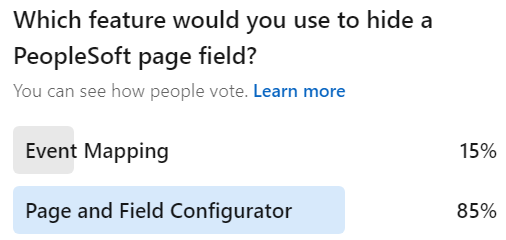
85% of respondents chose Page and Field Configurator, which is fantastic!
Both tools can hide a field, but is one a better option? I use a decision matrix to help me decide which one to use:
.table_component { overflow: auto; width: 100%; } .table_component table { border: 1px solid #dededf; height: 100%; width: 100%; table-layout: auto; border-collapse: collapse; border-spacing: 1px; text-align: left; } .table_component caption { caption-side: top; text-align: left; } .table_component th { border: 1px solid #dededf; background-color: #eceff1; color: #000000; padding: 5px; } .table_component td { border: 1px solid #dededf; background-color: #ffffff; color: #000000; padding: 5px; }Event Mapping PaFC Can the solution be configured with PaFC? ✔ PaFC cannot provide the expected result. ✔
If you can use Page and Field Configurator, then choose it for these two reasons:
- Page and Field Configurator contains a "Validate Configuration" feature to verify the configuration is still relevant after applying maintenance and
- Functional business analysts may manage Page and Field Configurator (Event Mapping is a developer-only solution).
When should you use Event Mapping? For everything else. For example, Page and Field Configurator does not yet work with Group Boxes. Likewise, complex logic may require Event Mapping (or might be easier to read and write if written in Event Mapping).
We teach both topics in our three-day Configure, don't Customize course. Check it out to see when we are offering it next!
Five Ways to Consume a REST Service with PeopleSoft
PeopleSoft includes facilities for providing and consuming REST. A service provider is a listener. A provider waits for requests and responds accordingly. To provide web services, we must register metadata with Integration Broker. The process is pretty well fixed. Consumption, on the other hand, is much more flexible. Consuming a REST service means invoking (or calling) someone else's listener. The consumer initiates the conversation. In a consumption scenario, we might be sending data, receiving data, or both.
Here are five ways a PeopleSoft developer might invoke a REST service:
1. MetadataThis is the traditional PeopleSoft approach and follows the same pattern as providing services through Integration Broker. Here are a few of the metadata items a developer would create:
- Documents,
- Messages,
- Service, and
- Service Operation.
- Create Document structures,
- Invoke the service, and
- Parse the response.
Even though this approach requires the most effort and offers the least reuse, it takes full advantage of Integration Broker's capabilities, including logging, security, etc.
Metadata, in general, offers the following benefits:
- Reuse (ability to use the same definition multiple times),
- Documentation (describes an object),
- Reporting (query and analysis), and
- Transformation (ability to upgrade and transform based on architecture changes).
Pure code solutions are much harder to query and transform. Metadata is what allowed PeopleSoft to switch from a Windows-based Client/Server solution to its Pure Internet Architecture in (mostly) one release. Metadata is what allowed Integration Broker to transform from an XML-focused solution into an SOA solution in one release (the 8.48 transform). If these benefits sound appealing, then metadata may be the right choice for you.
2. Application Services FrameworkCreated initially as a REST provider to support digital assistants, the Application Services Framework can now consume REST services. The Application Services Framework is a developer-friendly configuration layer tightly integrated with Integration Broker metadata. Rather than directly working with SOA-oriented metadata, the Application Services Framework allows developers to create solutions using REST terminology and REST patterns.
To use the Application Services Framework for consumption, a developer would:
- Register the target service with the Application Services Framework, which includes describing the URL, parameters, headers, and payload (both request and response).
- Write PeopleCode to invoke the endpoint service.
If your request is a simple URL with no special headers (request or response headers) and any parameters may be passed through the URL, then this is the most straightforward approach:
Local string &response = %IntBroker.ConnectorRequestURL("http://rest.example.com/endpoint");Unfortunately, this solution offers no logging, header control, or any typical Integration Broker or integration features. It is strictly for the simplest GET requests. Nevertheless, by using URL definitions, this alternative may be one of the better alternatives for cross-environment migrations.
4. Code-onlyThe challenge with the first option, Metadata, is that it requires creating, migrating, and maintaining a significant number of definitions that provide little (if any) value for REST. For example, the URL of a PeopleSoft REST consumer service becomes part of the metadata. If you have different targets between DEV, TEST, and PROD, then you must modify the metadata after every migration. Implementing a true PeopleSoft Metadata-focused solution (such as option 1) may require you to violate development best practices by making changes after each migration.
Since all approaches require PeopleCode, why not skip the Integration Broker metadata in favor of your own reusable best practice-based metadata? You may find an example of this approach in our blog post Simple Code-only REST Request. With this approach, you are responsible for managing URLs, Credentials, etc., but you may store them in a manner that allows for reuse and better migration management. For example, you might create URL definitions that point to different endpoints in DEV, TEST, and PROD.
It is important to note that this approach DOES use metadata, but it reuses generic PeopleTools-delivered definitions, so we don't have to create new definitions.
As mentioned earlier, code doesn't report or transform well, so this alternative may miss out on future automated transforms, such as the 8.48 automated transform. Likewise, integrations launched in this manner won't log details in the Synchronous Service Operation Monitor. Nevertheless, this approach is becoming one of our favorite alternatives to overly complicated metadata.
5. JavaUsing Java allows a PeopleSoft developer to bypass Integration Broker altogether. We put this option last because it should be the choice of last resort. However, it is probably the most flexible option available, allowing for everything from simple low-level sockets to convenient libraries, such as Apache's HttpClient (now included with PeopleTools).
There are many reasons to choose this option, but here are the two most common:
- Processing binary data: Integration Broker is pretty much an XML workhorse. Everything passing through Integration Broker is wrapped in XML at some point. Unfortunately, that might not work well with binary data. Therefore, skipping Integration Broker may be appropriate.
- Processing large amounts of data: Integration Broker works with DOM. It requires all data to be loaded in memory at one time. This makes it a poor choice for handling large datasets. An alternative is to use stream processing with an event-based parser, such as a SAX parser. With Java, you can read bytes, process them through an event-based processor, and then discard the processed bytes.
The following is a sample JavaScript we used at Reconnect 2024 to stream-processed a large amount of JSON data from a REST service.
At JSMpros, we teach all five options in our Integration Tools and Integration Tools Update courses. Check out our website for on-demand and live course offerings. Alternatively, subscribe to gain access to all of our on-demand courses.
How Well Do You Know the PeopleCode Language?
I was reading through some forum threads and saw an interesting question. Let me summarize:
How do I convert from a number to a string so that I get the integer portion of the number? I have 1234 in a number, but when I put it in a string field, I get 1234.00.This is a great question! There are many PeopleCode "casting" functions, such as Number and String. Reading through the thread, I saw some interesting answers. One of them that I liked used Java to do the conversion. What I liked about this idea was the out-of-the-box thinking. But is it necessary? Can you do this with PeopleCode? The answer is YES using the functions NumberToString and NumberToDisplayString. Is there anything wrong with using Java instead? No. I love PeopleCode's ability to leverage the JRE. But there is a cost in context switching, JRE overhead, etc.
Keeping with the number and string scenario, do you really need to "cast" a number to a string? Consider the following code listing:
Local number &anInteger = 1234;

MessageBox(0,"",0,0, &anInteger);
This code would fail because the fifth parameter to MessageBox must be a string. Therefore, it seems we need casting functions. Or do we? Consider the following alternative (notice the string concatenation in the MessageBox function):
Local number &anInteger = 1234;

MessageBox(0,"",0,0, "" | &anInteger);
When we concatenate a number to a string, PeopleCode applies an implicit cast. Interestingly, it only applies an implicit cast if we trick it with a zero-length string. As a side note, the above implicit cast returns the integer portion 1234 without decimals because 1234 has no decimals (which was the original request).
What about conditional logic? Here is one of my favorite examples:
If(PER_ORG_ASGN.POI_TYPE = "00002") Then
   JOB.COMPRATE.Visible = False;
Else
   JOB.COMPRATE.Visible = True;
End-If;
The above conditional code could be rewritten as:
JOB.COMPRATE.Visible = (PER_ORG_ASGN.POI_TYPE = "00002");
With an understanding of the PeopleCode language, we have reduced five lines of code into a single line. This might be considered the Spartan Programming approach. While I love the concept, Spartan Programming claims it "is not directly concerned with readability." Therefore, I prefer a slightly modified, possibly more human-readable alternative:
Local boolean &isVisible = (PER_ORG_ASGN.POI_TYPE = "00002");

JOB.COMPRATE.Visible = &isVisible;
Here is another piece of code I found several years ago:
Local Array of String &arr;

...

REM ** delete all elements from an array;
For &i = 1 to &arr.Len
   &arr.pop();
End-For;
If you look through PeopleBooks, you will see the Array has no clear, empty, deleteAll, or any other method for emptying all elements from an array. So I can see why the author wrote the code above. But the reason the Array object has no method for emptying an array is because it doesn't need one. The Array length is writable. The easiest way to empty an array is:
&arr.Len = 0;
How well do you know the PeopleCode language? Time for a refresher? Check out our on-demand PeopleCode course and advanced PeopleCode Application Classes courses and experience a new side of PeopleCode!
Generating Activity Guide URLs
Creating Activity Guide navigation is challenging for two reasons:
- Simple Fluid Activity Guides all use the same component. This means we can't use a simple content reference. To use security to show or hide an Activity Guide content reference, we must use the URL type of PeopleSoft Generic URL. We must type a PeopleSoft URL fragment rather than leverage the traditional Content Reference fields (menu, component, market).
- Activity Guides with Runtime Context require dynamically generated URLs. These Activity Guides cannot leverage simple content references.
My PeopleCode for launching Activity Guides with Runtime Context usually starts with a GenerateComponentPortalURL to generate the base Activity Guide framework URL and then a bit of URL concatenation to assemble the Runtime context attributes. Here is an App Class I put together to make this easier.

Here is how you would use it:
import JSM_URL_UTIL:ActivityGuideURL;

Local JSM_URL_UTIL:ActivityGuideURL &urlBuilder = create JSM_URL_UTIL:ActivityGuideURL("JSM_AWE_AG");
Local string &url;

&urlBuilder.addContextItem(Field.EOAWPRCS_ID, "FacilityAccessRequest");
&urlBuilder.addContextItem(Field.DESCR, "Facility Access Request");

&url = &urlBuilder.generateFluidURL();
The addContextItem method takes a key/value pair, both of which are strings (they will become part of the URL string). Since context IDs (keys) are fields, then using Field.FIELDNAME syntax is preferred so Edit | Find Definition References will locate your field usage.
We added one more convenience method: generateGenericPeopleSoftFluidURL(). Use this method to help you craft a PeopleSoft Generic URL to a static Activity Guide. This is a one-time-use method you would call at design time to create that static URL fragment required by a Content Reference. If you have a simple, static Activity Guide with no context, then you may want to create a Content Reference. However, typing all of the parameters correctly can be a challenge. Use this helper method to generate the full Generic PeopleSoft URL for you. We invoke this method from a design-time App Engine, but you may want to create a page for it instead.
Are you interested in learning more about PeopleCode Application Classes? Check out our two-day course available live virtual or on-demand!
PeopleSoft Reconnect 2024

- Getting the Most out of PeopleSoft PeopleTools: Tips and Techniques on Monday at 4:45 PM Eastern. During this session, I will share PeopleTools tips to help you become a more productive PeopleSoft developer, including ways to use Java, JavaScript, and Integration to build solutions without customizing Oracle's code. Functional staff and business analysts will benefit from experiencing what is possible with the PeopleSoft platform.
- Isolate and Configure: Don't Customize on Tuesday at 12:00 PM Eastern. With selective adoption and continuous delivery, it is important that we avoid customizing PeopleSoft. The more we customize, the less we adopt new features and apply maintenance. Join this session to understand options to help us isolate and replace customizations. Experience the art of the possible through incredible examples and use cases.
- PeopleSoft Test Framework: Your New Compare Report on Wednesday at 3:45 PM Eastern. Event Mapping, Drop Zones, and Page and Field Configurator allow us to isolate (not eliminate) customizations. A key difference between traditional and isolated customizations is that traditional customizations are listed in a compare report. Isolated customizations are not. However, isolated customizations run the same risk of breaking as traditional customizations. Join me on Wednesday to learn how we can use the PeopleSoft Test Framework to replace the compare report, allowing us to analyze broken customizations rather than the traditional approach of analyzing everything.
- PeopleSoft Fluid Best Practices on Thursday at 1:15 PM Eastern. Fluid is PeopleSoft's strategic direction. But how does it differ from Classic? In this session, I will share with you tips and design patterns to help you build better Fluid solutions faster. Tips will include grid handling, adaptive and responsive design, CSS, and CSS variables.
Finding Tiles
Fluid Homepage Tiles are Content References just like all other content references, with one exception: They are really hard to find! Fluid tile definitions exist in a subfolder of Fluid Structure and Content > Fluid Pages. The question is: Which folder?
PeopleTools 8.60 added a new feature that may help: groupletid. Tile HTML now contains a custom attribute called groupletid. You may read more about this new feature in PeopleSoft PeopleTools 8.60 New Features Overview (Doc ID 2897533.1) on My Oracle Support.
As stated in the support document, the Grouplet ID is the Content Reference ID (CREF ID). Fantastic! What that means is you and I can capture the CREF ID directly from the HTML!

Once I have the CREF ID, I can visit Enterprise Components > Find Object Navigation to find the tile's Portal Registry folder and path.
Are you interested in printing a list of all tile CREFs for a particular user? Fire up your browser's JavaScript console and type (or paste) the following:
document.querySelectorAll("div[groupletid]").forEach(function(el) {
  console.log(el.getAttribute('groupletid'))
});
All tiles from all homepages exist in the HTML as soon as the homepage loads. They are just hidden. Want to just see the tiles for the active homepage? Try this derivative:
document.querySelectorAll(".lptab-cont:not(.psc_invisible) div[groupletid]").forEach(function(el) {
  console.log(el.getAttribute('groupletid'))
});
At JSMpros, we teach PeopleTools tips like this every week! Check out our class schedule to see what we are offering next. Want to learn on your own time? Become a subscriber to access all our courses anytime from anywhere!
Should you use the Override and/or Replace Features?
I absolutely love Isolated Customization strategies such as Event Mapping and App Engine Action Plugins. These strategies allow us to extend Oracle's delivered solution without touching Oracle-delivered code. The benefit is more efficient maintenance cycles because of fewer retrofits.
Both of these features, Event Mapping and App Engine Action Plugins, have one shortcoming: You may not use them to inject code into the middle of an Oracle-delivered code listing. Event Mapping and App Engine Action Plugins only allow code to be inserted before or after an entire listing. What if you need to inject code in the middle? Until recently, the only option was to continue modifying Oracle's delivered code.
Both Event Mapping and App Engine Action Plugins have a feature allowing a developer to replace or override Oracle's delivered code listing with your own. Customers looking for "clean" compare reports may be tempted to copy the Oracle-delivered code into their own code listing, modify it, and then replace/override Oracle's delivered code. The end result is a clean compare report and hopefully less work when applying maintenance.
But does it really work that way? Let's say you take this approach. You clone Oracle's delivered code into your own code listing. You modify your copy. You use Event Mapping or App Engine Action Plugins to replace Oracle's code. Time passes, and you apply maintenance. Since the compare reports show no customizations, you adopt Oracle's changes with no retrofits. You test the system, and because of your overrides, the system continues using your code, not Oracle's code. This is good, right? Isn't this what you want? MAYBE NOT! Oracle delivered maintenance for a reason. Did they patch a security vulnerability? Did they fix a bug? Did they alter the data model or business logic in a manner that renders your clone less effective?
If you use the override/replace in this manner, you have no way of knowing what Oracle "fixed." The only way to know that you are using the latest version of their code is to perform your own manual compare and retrofit outside of PeopleTools. And if you are going to do that, wouldn't it be easier to just modify Oracle-delivered anyway? You know what is worse? Since overridden and replaced code listings don't show on compare reports, your system may be fully patched and still suffer security vulnerabilities in your clones of Oracle-delivered code.
The Override/Replace features are fantastic for REPLACING Oracle's delivered code. In other words, if you don't want Oracle's code to run at all, then override or replace it.
Want to learn more about PeopleTools Event Mapping? Check out our one-day on-demand Event Mapping course! Or even better, subscribe and get a full year of access to the entire JSMpros on-demand PeopleTools training library!
Want to further reduce your maintenance workload? Replace customization analysis and review with PeopleSoft's Automated Testing Tool (PTF). Learn how through our two-day PTF course, which is available on-demand and live!
PeopleSoft Data Masking Options
PeopleSoft customers have several Data Masking options:
- App-specific masking,
- Data Privacy Framework,
- Page and Field Configurator,
- Event Mapping, and
- Bolt-on solutions, such as Pathlock's Security Solution for PeopleSoft.
Let's compare the various options.
Event MappingEvent Mapping is the most flexible option, allowing us to use any masking character, from alpha-numeric to emoji. In fact, you may even combine the space character with custom CSS to leverage any character, including custom Fonts, such as FontAwesome. Relevant PeopleCode functions and methods include:
Field.SetDisplayMask
Field.AddFFClass
AddStylesheet
Check out this video to learn more about Event Mapping for Data Masking:
Page and Field Configurator
Page and Field Configurator is less flexible but easier to apply than Event Mapping. Page and Field Configurator offers a point-click interface to configure masking against page fields. Masking characters are limited to * and x (although this is configurable through masking profiles).
App-specific maskingThe HCM team built its own registry of sensitive fields with a masking utility. You can learn more about this feature in the Quest blog post Maintaining Data Privacy in PeopleSoft HCM. What makes this option compelling is:
- The HCM team wrote all the code. All we have to do is choose our sensitive fields, components, and roles.
- If anything breaks, we file a ticket for the HCM team to fix. This is in contrast to Page and Field Configurator and Event Mapping, which are site-specific isolated customizations and, therefore, the customer's responsibility to fix.
- This solution has broad coverage. If we choose to mask a sensitive field, such as birth date, then all HCM pages and components should mask that field. Event Mapping and Page and Field Configurator, on the other hand, only mask one component. If we used either of those solutions to mask the birth date field, we would need to apply that masking to all components ourselves.
The Data Privacy Framework allows us to apply masking to query results. This is not mutually exclusive. You may choose to apply the Data Privacy Framework along with any of the other options.
Bolt-on SolutionsMy favorite data masking solution is Pathlock's Security Solution for PeopleSoft. Besides the basics of masking, Pathlock's solution also allows us to unmask using a variety of techniques, including:
- Click-to-view (a loggable event) and
- MFA-to-view (also loggable but requiring a second factor to confirm your identity).
Interested in learning more? We teach PeopleTools Tips like this every week at JSMpros! Check out our online schedule to see what we are offering next! Or do you have a specific topic you want to study? Subscribe to gain access to all of our on-demand content at a fraction of the cost!
Is "Restartable" an App Engine Best Practice?
The first thing I do when creating an App Engine is disable restart. Because restartable is the default, it might seem like Restartable is a best practice. But is it?
A restartable App Engine is a batch program that iterates over data and commits changes on an interval. This behavior contrasts with the default behavior, which is to roll back changes on failure. A restartable program restarts at the last checkpoint. Without restart, ALL data must be reprocessed on failure. The obvious benefit is that restartable App Engines don't have to reprocess successful data. This sounds fantastic! But is it?
There are two main data processing strategies:
- Set-based processing
- Row-by-row processing
Set-based processing allows the database to optimize and execute commands at the database. Row-by-row processing, however, requires each row of data to be transferred to the process scheduler server and then processed. Row-by-row processing, therefore, is dramatically slower.
App Engines utilizing either strategy may be restartable, but a restartable set-based program would be rare. Restart is only valuable on failure. Before restarting, we would fix whatever data caused an error so we may reprocess that data. With set-based processing, that error would already be stored in an intermediate downstream processing table. Therefore, row-by-row processing is the only processing method that seems relevant for restart.
Another problem with a Restartable App Engine is that it must commit on intervals to benefit from the restart. What makes this a problem is that databases, such as Oracle, close any open cursors on commits. Therefore, a Restartable App Engine must also re-fetch (close and reopen) SQL cursors on every commit.
What does this mean? A Restartable App Engine may be the slowest, least-performing option available! It is an option we may use when it makes sense, but should it be the default? What do you think?
Ready to take your PeopleTools skills to the next level? Become a subscriber to gain access to our vast library of PeopleTools training courses, hands-on activities, downloads, instruction videos, and more!
HOWTO Override Fluid Component Event Handlers
Oracle's delivered Fluid components use an interesting pattern: App Class Event Handlers. This isn't required. It's just a design decision. Here is how it works: a Fluid page's Component PreBuild usually initializes a component-scoped App Class variable and every subsequent event delegates to a custom App Class method. If done properly, this design decision has the following potential benefits:
- Reusable,
- Unit testable,
- Extensible, and
- It eliminates the "Data Integrity Error" when making changes to Component-specific PeopleCode while a component transaction is in progress.
Unfortunately, to be reusable and testable, App Class code must be context-agnostic. That means it can't leverage component buffer-specific functions, such as GetLevel0, GetRow, and GetRowset; it can't use context-specific variables, such as %Component; and it can't use bare references, such as RECORD.FIELD references.
We discuss these design concepts regularly in our PeopleCode Application Classes two-day course, and we wrote about the extensibility idea in this blog post. In the blog post, we noted that Oracle would need to change the way they load their App Classes in Component PreBuild to make event handlers extensible. But do we need to wait? We came up with an idea that allows us to implement this idea now: we can use Event Mapping to replace Component PreBuild so we can load our own App Class. As long as our new App Class extends the Oracle-delivered App class, all other event PeopleCode will delegate properly. In other words, PeopleSoft will use our code in all other events. What's interesting about this idea is that it may allow you to apply just one Event Mapping service to a component rather than one per event.
As an example, let's extend Direct Deposit by subclassing (overriding) one of its App Classes. Components that apply the event delegation pattern instantiate App Classes in PreBuild. Within the PreBuild of the Direct Deposit component (PY_IC_DIR_DEP_FL), we see the App Class PY_DD_SELFSERVICE:Utilities. That class includes several important methods, including one appropriately named PageActivate. Our goal is to use the PageActivate event to hide the Pay Statement Print Options box. We will accomplish this goal by using Event Mapping to replace PY_DD_SELFSERVICE:Utilities with our own Utilities subclass. Here is the code for the Utilities subclass:
import PY_DD_SELFSERVICE:Utilities;

class CustomUtilities extends PY_DD_SELFSERVICE:Utilities;
   method pageactivate();
   REM ** Add more methods to override mor functionality;
end-class;

method pageactivate
   /+ Extends/implements PY_DD_SELFSERVICE:Utilities.pageactivate +/
   REM ** invoke original pageactivate method since we are just extending, not replacing;
   %Super.pageactivate();
   REM ** The following line doesn't work because later Oracle-delivered code overrides it;
   REM PY_IC_WRK2.PRINT_OPTN.Visible = False
   PY_IC_WRK2.PRINT_OPTN.AddFFClass("psc_hidden");
end-method;
The next step is to apply Event Mapping to override Component PreBuild. Here is our sample code:
import PT_RCF:ServiceInterface;
import PY_DD_SELFSERVICE:Utilities;
import TRN_PY_IC_DIR_DEP_FL_OVRD:CustomUtilities;

class PreBuild extends PT_RCF:ServiceInterface
   method execute();
end-class;

Component PY_DD_SELFSERVICE:Utilities &DDUltities;

method execute
   /+ Extends/implements PT_RCF:ServiceInterface.execute +/

   &DDUltities = create TRN_PY_IC_DIR_DEP_FL_OVRD:CustomUtilities();
end-method;

After applying Event Mapping, the delivered Direct Deposit component will now pass all Utilities requests through our subclass. The standard, delivered &DDUtilities.pageactivate call that is in the middle of the delivered PageActiviate PeopleCode will now invoke our pageactivate method instead.
SummaryThis was an interesting academic exercise with some benefits over Event Mapping:
- This approach allowed me to indirectly inject code into the middle of an Oracle-delivered code listing. The delivered PageActivate event invokes &DDUtilities.pageactivate in the middle. Event Mapping would have required my change to appear at the end or beginning, but not in the middle.
- I only had to configure one Event Mapping, not one for each event I desired to extend.
I also found some challenges that this approach could not solve:
- I wanted to run code at the end of PageActivate, not in the middle. My CustomUtilities code triggers too soon. As you can see from the first code listing, I run Oracle's code through %Super, and then mine. But the actual event code listing has more code that overrides my code. Event Mapping is the only way to make sure your code runs last.
- I would like to mask the routing number within the rows of the Direct Deposit grid. I would use RowInit to apply this masking. The delivered Direct Deposit component does not have code in RowInit. I would, therefore, have to use Event Mapping to apply RowInit code.
This is a pattern I'm going to keep in my toolbox. For this scenario specifically, Event Mapping without overriding was a better solution. But there are times where subclassing a backing App Class may make more sense.
Are you interested in learning more about PeopleTools and PeopleCode? Check out our live virtual and on-demand courses. Or even better, subscribe and get access to all of our content for a full year!