


Dietrich Schroff

Review@amazon: AWS for Solutions Architects
Beginning of 2024 i read the book "AWS for Solutions Architects: The definitive guide to AWS Solutions Architecture for migrating to, building, scaling, and succeeding in the cloud":

The book has 627 pages and consists of 16 chapters.
Due to the number of topics, the author wants to cover (and has to!) the book cannot really go into detail about all the services - but in my opinion that is not necessary. I really liked the network sketches in Chapter 4 and the 6 Pillars in chapter 9. But the rest also fits - there are various keywords or links for each area that provide a good introduction.
For anyone who knows other hyperscalers and is moving to AWS or is having their first contact with the cloud with AWS, this book should be a must-read.
I really liked chapters 9, 14, 15, 16 because they deal with the general topics. Here the author cares more about the reader's knowledge base than about the specific implementation in AWS (and he doesn't leave this out).
Absolute reading recommendation!
For more details please read my review at amazon (this time in german only) :)
(But maybe copilot or any other ChatGPT/OpenAI can translate that.
1 million visitors reached!
After 17 years (!) this blog reached 1.000.000 visitors.

Some more numbers: 591 articles written, 2.200 comments which where
spam, 360 published comments, nearly 200 posts about Linux, 180 posts
about Oracle, nearly 50 reviews on books...

Let's see if the 2mio will be reached in 2040 (omg).
LinkedIn: Lakehouse Analytics - with Microsoft Fabric and Azure Databricks
Today i came across the following in posting in linkedin.com:

The link points to a site, where you can register for the a PDF, which contains 20 pages and 7 chapters.
Chapter one is a very short one (only half of a page): A typical introduction about data, information, analytics and why this is important :)
In chapter 2 the lakehouse architecture is explained. I liked the phrase "It combines [...] traditional data warehouse with the massive scale and flexibility of a data lake". This phrase combined with a very good table of the differences between a data warehouse and a data lake is from my point of view an excellent definition.
"Data management and analytics with Microsoft Fabric and Azure Databricks" is the title of the third chapter. This chapter only emphasizes that Fabris and Databricks can work seamlessly together and Microsoft introduces a OneLake to simplify the integration of these tools.
Chapter 4 i can not really summarize here. But there is really a cool figure in that chapter. Here only a part of that:

The Databricks part is missing and some other parts as well, but in the new Microsoft approach Fabric consists not only of storage - even PowerBI is a part of that new powerful tool. (one subsection is about AI integration)
The next chapter "Code faster with GitHub Copilot, Visual Studio Code, and Azure Databricks" is about the demonstrating "the power of Azure Databricks as a leading platform for data and AI when combined with developer tools such as Visual Studio Code and GitHub Copilot". This is like a small walkthrough how to configure Visual Studio Code.
In the seventh chapter a step by step guide is provided for integrating Databricks with OneLake.
In my eyes chapter 4 is the key of that booklet, for everyone who wants to know, how the terms Fabric, OneLake, Databricks, Lakehouse are related and how the big picture looks like. Anyone who analyzes data with Microsoft should have read this.
Review@amazon: Microsoft Power Platform Enterprise Architecture
This weekend i read the book "Microsoft Power Platform Enterprise Architecture"

Packt.com says about the book:
For forward-looking architects and decision makers who want to craft complex solutions to serve growing business needs, Microsoft Power Platform Enterprise Architecture offers an array of architectural best practices and techniques. With this book, you’ll learn how to design robust software using the tools available in the Power Platform suite and be able to integrate them seamlessly with various Microsoft 365 and Azure components. Unlike most other resources that are overwhelmingly long and unstructured, this book covers essential concepts using concise yet practical examples to help you save time.[...]This is something i fully agree with.
For more details please read my review at amazon :).
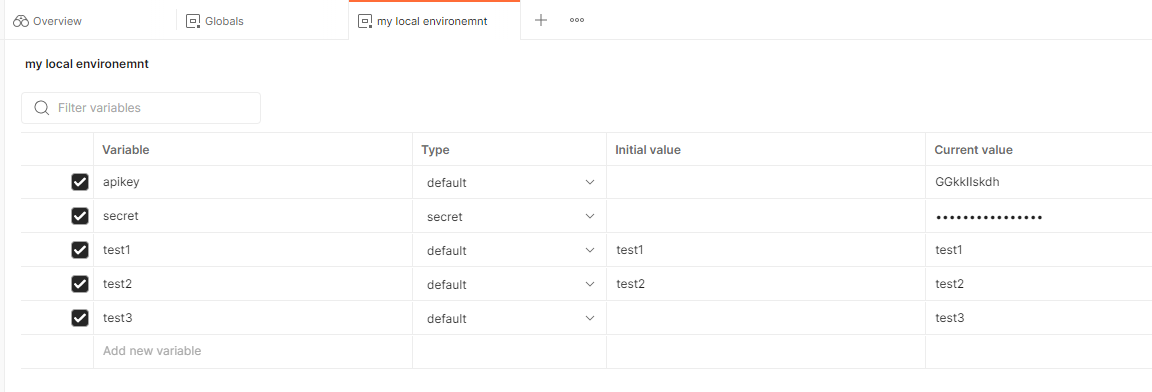
Postman: Scratchpad is end of life - Only cloud based workspaces possible --> How to keep the passwords/secrets secure?


- Check alternatives....
But there is nothing like postman. e.g. the possibility to render the request to a curl, powershell, NodeJS axios, ... call and use this anywhere else.... - Remove all sensitive data from your request
A good step (and just to note: it is bad design, if you ever stored secrets inside the calls :) ) - Now the calls do not work anymore....
:(


LinkedIn: Microsoft 365 Backup for Dummies sponsored by Dummies
This week Veeam published this booklet on linkedin.com for download:

The booklet contains 6 chapter - the last one is a summary "Six takeaways" like always in such "for dummies" books.
From my point of view chapter 1 & 2 can be skipped - this you should really know, if running M365 (motivation for M365 backup).
Chapter 3 is about how the loss of files can be prevented with M365 mechanisms. This is about compliance center, retention policies and labels. But only the keywords are mentioned and no deeper insights are provided.
In chapter 4 many scenarios are described, how you can loose your data on M365. Here a quote:

Chapter 5 opens with a nice term which was new to me: BaaS - Backup as a Service. Never thought about this acronym. Completely clear, that some backups in cloud are done without having purchase storage or servers on premises. Nice thing inside this chapter: a checklist about data source, data properties and some others. Really nice.
Chapter 6 comes up with the takeaways. These are really worth reading.
LinkedIn: A Guide to Data Governance - Building a roadmap for trusted data
On linkedin from "The Cyber Security Hub" shared a nice booklet about data governance:

An like always: It is only a booklet with about 25 pages - so this is not really a deep dive into this topic, but it gives you a good overview and of course a good motivation:
These include the need to governdata to maintain its quality as well as the need to protect it. This entails the prerequisite need to discover data in your organization with cataloguing, scanning, and classifying your data to support this protection.
and if this is to abstract, you should consider the following use case (and i think this use case has to be considered):
However, for AI to become effective, the data it is using must be trusted. Otherwise decision accuracy may be compromised, decisions may be delayed, or actions missed which impacts on the bottom line. Companies do not want ‘garbage in, garbage out’.
The booklet contains the sections "Requirements for governing data in a modern enterprise", "components needed for data governance", "technology needed for end-to-end data governance" and "managing master data". All sections do not provide a walk through for achieving a good data governance, but there are many questions listed, which you should answer for your company and then move forward.
If you already have a data governance in place: This book is a good challenge for your solution. And for sure you will find some points, which are missing :)
LinkedIn Topcs: Why dataverse is for everyone...
Today i got a notification from a Microsoft colleague about the following linkedin posting:

Some weeks ago i started with PowerApps - and there this "dataverse" was mentionend as well.
If you walk through the presentation in this linkedin post, you get an idea what this dataverse can do. I found the following picture @Microsoft learn:

And there are more details, why and how dataverse can be used: https://learn.microsoft.com/en-us/power-apps/maker/data-platform/data-platform-intro#why-use-dataverse
Sounds like a kind of datawarehouse centrally in the cloud. The most interesting point (like always): How to maintain this data, so that it is really usable...
Review: "Cloud Native Infrastructure with Azure" provided by Microsoft
Last week Microsoft published the following linkedin post:

If you are interested you can get it via this link (today this is still working, 12.2.2023): https://azure.microsoft.com/en-us/resources/cloud-native-infrastructure-with-microsoft-azure/
If you are not convinced: Here the table of contents:
- Introduction: Why Cloud Native?
- Infrastructure as Code: Setting Up the Gateway
- Containerizing Your Application: More Than Boxes
- Kubernetes: The Grand Orchestrator
- Creating a Kubernetes Cluster in Azure
- Oberservability: Following the Breadcrumbs
- Service Discovery and Service Mesh: Finding New Territories and Crossing Borders
- Networking and Policy Management: Behold the Gatekeepers
- Distributed Databases and Storage: The Central Bank
- Getting the Message
- Serverless
- Conclusion
Sounds like many topics i want to read about... :)
Openssl: How to automate (without hitting the carriage return many times)

I think nearly everyone, who administers some PCs or servers has used openssl. And almost everything there is straight forward.
To create your own key and certificate, just run:
openssl req -x509 -sha256 -nodes -days 365 -newkey rsa:2048 \
 -keyout privateKey.key -out certificate.crt
............+..+.+.................+............+.+......+........+.+++++++++++++++++++++++++++++++++++++++++++++++++++++++++++++++++*.+....................+......+.+++++++++++++++++++++++++++++++++++++++++++++++++++++++++++++++++*.......+.+.....+...+..........+...............+....................+.+...+..+..........+........+......+.+...+.....+...+.......+..+.+...+...........+....+..+.......+.....+...............+................+......+......+...+......+...+...+..+......+......+.........+....+........+............+..........+.....+...+.......+..+...+.............+...+......+..............+....+...........+....+..+.+..+...+.............+............+...+..+.........+...+...............+...+..........+.........+...+...+...+...............+.........+..+++++++++++++++++++++++++++++++++++++++++++++++++++++++++++++++++But the problem with that approach:
..........+.....+.......+.........+..+.............+.....+++++++++++++++++++++++++++++++++++++++++++++++++++++++++++++++++*.......+.............+.........+..+....+..+...+.+......+...+.....+.........+.+.....+.+.....+...+.+.....+++++++++++++++++++++++++++++++++++++++++++++++++++++++++++++++++*..+......+............................+.....+....+..+++++++++++++++++++++++++++++++++++++++++++++++++++++++++++++++++
-----
You are about to be asked to enter information that will be incorporated
into your certificate request.
What you are about to enter is what is called a Distinguished Name or a DN.
There are quite a few fields but you can leave some blank
For some fields there will be a default value,
If you enter '.', the field will be left blank.
-----
Country Name (2 letter code) [AU]:
State or Province Name (full name) [Some-State]:
Locality Name (eg, city) []:
Organization Name (eg, company) [Internet Widgits Pty Ltd]:
Organizational Unit Name (eg, section) []:
Common Name (e.g. server FQDN or YOUR name) []:
Email Address []:
You have to add the carriage returns for every line after the 5 dashes and then your certificate looks quite ugly (see red colored text):
openssl x509 -text -in certificate.crt -noout
Certificate:
    Data:
        Version: 3 (0x2)
        Serial Number:
            0b:01:9a:aa:f1:59:69:33:84:7e:cf:89:69:0c:d5:80:61:82:b5:28
        Signature Algorithm: sha256WithRSAEncryption
        Issuer: C = AU, ST = Some-State, O = Internet Widgits Pty Ltd
        Validity
            Not Before: Jan 22 15:54:43 2023 GMT
            Not After : Jan 22 15:54:43 2024 GMT
        Subject: C = AU, ST = Some-State, O = Internet Widgits Pty Ltd
        Subject Public Key Info:
            Public Key Algorithm: rsaEncryption
                Public-Key: (2048 bit)
                Modulus:
                    00:c6:7d:5a:9f:97:3d:43:9b:e0:19:2f:46:31:5c:
                    82:f0:42:ac:da:a9:e8:d0:91:e0:01:98:05:52:cf:
                    1c:4e:77:53:1a:96:5c:6a:6f:ca:5c:61:a4:5f:14:
                    12:ed:69:ae:50:bb:99:28:48:df:bc:f6:76:c1:63:
                    2b:51:55:ad:bb:62:9f:3a:2b:1f:e7:c3:fd:bb:45:
                    04:c3:88:ee:b1:ba:c6:e2:f7:f1:80:5b:ef:eb:04:
                    fb:ec:82:89:39:c6:33:68:0d:3e:36:62:36:e0:a0:
                    ff:21:5f:74:ad:d2:4b:d4:5d:c4:67:6b:90:a0:8f:
                    1e:4c:80:31:30:2e:8e:5e:9d:62:8a:1d:45:84:5f:
                    d3:09:46:fe:4f:8d:68:c6:54:e4:51:da:e0:64:f8:
                    5d:af:01:2e:79:0c:fe:0b:0f:d6:2e:1b:e6:eb:09:
                    ca:cc:16:3d:92:53:ae:3b:ad:da:67:a5:ef:69:30:
                    7f:e7:53:7c:dd:23:59:c8:8c:6b:b0:a9:fa:fc:4c:
                    c1:44:cf:3f:2f:91:f4:8c:b6:7c:d9:ae:82:6d:96:
                    aa:bb:51:07:3c:2b:12:24:e4:a3:7d:9b:ee:4b:7e:
                    f4:02:0e:bc:b4:35:bd:73:dc:6b:b4:34:36:57:48:
                    72:f2:91:60:2d:79:d9:44:3c:77:76:eb:c7:8a:00:
                    5f:75
                Exponent: 65537 (0x10001)
        X509v3 extensions:
            X509v3 Subject Key Identifier:
                F1:77:6C:19:76:FB:E4:DD:50:2A:1E:01:BE:A1:5C:48:3D:5A:40:68
            X509v3 Authority Key Identifier:
                F1:77:6C:19:76:FB:E4:DD:50:2A:1E:01:BE:A1:5C:48:3D:5A:40:68
            X509v3 Basic Constraints: critical
                CA:TRUE
    Signature Algorithm: sha256WithRSAEncryption
    Signature Value:
        8a:28:28:12:6c:1e:e5:54:86:9b:6e:90:7a:ca:aa:a7:a1:b3:
        b1:43:02:44:e8:9a:59:b2:d6:6e:36:c6:51:3b:9b:f4:91:47:
        40:6f:cf:6d:de:86:8d:dd:2f:9e:44:4c:f8:d3:5a:d3:3a:ef:
        d5:0d:e1:10:b6:64:34:ee:03:4a:f2:de:ff:da:db:a3:93:20:
        13:85:2a:d6:9b:b2:0e:2c:2e:9c:f9:71:ff:32:3b:c3:6b:0a:
        e7:98:2d:30:c9:a6:47:b7:72:84:bb:52:23:11:d6:b7:90:cb:
        98:cd:59:16:b5:8f:70:46:c1:95:90:01:2f:7f:9c:22:ac:29:
        8d:14:97:76:dd:06:56:f8:22:9d:f4:00:9f:40:3c:fb:c2:95:
        63:48:50:ee:ad:17:1b:54:6b:60:0c:d5:3e:66:3b:00:0e:7a:
        33:99:cc:4a:f6:dc:d1:e3:40:ea:8c:66:df:7e:92:e1:a5:e5:
        72:0e:89:ba:87:43:0c:56:70:8c:f2:9b:77:dd:ca:03:8e:24:
        fd:6b:51:d2:3b:b2:df:e4:ff:c2:3c:cb:ab:2e:cd:82:f4:69:
        ad:a3:81:d7:95:d0:68:e1:3f:fc:50:4d:8b:14:b2:82:8c:19:
        2b:06:8a:0e:ef:21:4b:68:4f:e3:1d:53:64:62:97:c8:35:45:
        01:54:d9:10
To avoid that you have just to expand your command with the following parameters:
openssl req -x509 -sha256 -nodes -days 365 -newkey rsa:2048 \
 -keyout privateKey.key -out certificate.crt \
 -subj "/C=de/CN=schroff.special/OU=MyDepartment"
Typical attributes can be found here:

FritzBox monitoring with telegraf, influx and grafana
On year ago i wrote about adding a FritzBox to my monitoring with grafana and influxdb: https://dietrichschroff.blogspot.com/2021/11/fritzbox-monitoring-with-grafana-influx.html
This was done with collectd.
As i wrote in https://dietrichschroff.blogspot.com/2022/09/ubuntu-raspberry-pi-upgrade-to-2204.html i upgraded my raspberry to 22.04 and along with many minor problems, collectd was gone. (and i think it will not be added anymore.)
All other monitorings use telegraf to get the data.
And there is a solution, which provides that:
https://github.com/Schmidsfeld/TelegrafFritzBox/
You can follow the steps on this page. If you get no data - here is the commandline which you should use to test the connection:
python3 ./TelegrafFritzBox/telegrafFritzBox.py -p xxxxxx -i 192.168.178.1 -u fritz8490
And this should be the command, which you use in
/etc/telegraf/telegraf.d$ cat telegrafFritzBox.conf
The reward is really a very nice dashboard:

Installation and running RaceResult Presenter.exe on Ubuntu
For all who are active in sports and want to run a event with www.raceresult.com:
In our case we have some Linux laptops which we want to use (Windows OS licenses missing).
RaceResult consists some some components
- SEServer2.exe
- Presenter.exe
- CameraServer.exe
- Transponder.exe
- Moderator.exe
- RRWS.exe
We want to run the Presenter.exe on a Linux box. So first step:
Install raceresult software with wine.
Preinstallation step:
winetricks vb6run
Installation step:
wine raceresult_12.4.25.0_386_stable.exe
(the exe is provided by raceresult)
Important thing: to run the Presenter.exe you need the SEServer2.exe running as well. Because RaceResult decided to let this server listen on port 1023, the installation has to be done twice. One with sudo and one without.
For the sudo installation please select all components. For the user installation only the presenter is needed (but you can go with all as well):

Then: start the SEServer
sudo bash
cd /root/.wine/drive_c/Program Files (x86)/race result/race result 11/SEServer2
wine SEServer2.exe
Startup the presenter as well
cd ~/.wine/drive_c/Program Files (x86)/race result/race result 11/Presenter
wine Presenter.exe
Now the next tricky thing: You got a ses file from raceresult (rot.ses). Copy this in both .wine directories to ./wine/drive_c and the open this ses file in the presenter:


Bam done. :)
Ubuntu raspberry pi: upgrade to 22.04...
Ubuntu released version 22.04 so i decided to make an update from
Ubuntu 21.04 (GNU/Linux 5.11.0-1027-raspi aarch64)
to
Ubuntu 22.04.1 LTS (GNU/Linux 5.15.0-1015-raspi aarch64)

But this was not so easy as i thought. Running on my raspberry pi the following services were running:
- influxdb
- collectd
- telegraf
- mosquitto
- zigbee2mqtt
- grafana
Without any problem only grafana was updated.
Collectd failed with this message:
Package 'collectd' has no installation candidate
no chance to fix that :(
With that i had to disable the collectd section in influxdb - with that session it failed with
influxd-systemd-start.sh[2293]: run: open server: open service: Stat(): stat /usr/share/collectd/types.db: no such file or directory
Then zigbee2mqtt was not able to write to mosquitto. This is due a change of the default settings of mosquitto. allow_anonymous false is now default, so i had to add
allow_anonymous true
After that zigbee2mqtt was able to write data to mqtt again.
Last thing: restart of telegraf, because just did not start properly after the first reboot after the upgrade.
Not really a good update - my other raspberry pi will stay on 21.04 for some more months...
Elster.de: To many request for german government portal...
In Germany, the property tax had to be reformed due to a ruling by the Federal Constitutional Court. So this year everybody got a mail with the request to register his property from july 1st up to the end of the year.
This should be done via ELSTER = electronic tax declaration (explanation of the acronym can be found here)

I tried this yesterday and today, but the login page does not respond at all.
Today a message was posted on their website (orange box on the screenshot)
Restrictions when using the ElsterSmart app
It is currently not possible to use Mein ELSTER using the ElsterSmart app if the ElsterSmart app and Mein ELSTER are used on different devices (e.g. if you have installed ElsterSmart on your smartphone or tablet, but Mein ELSTER in the browser on your use PC).
and
Availability Limitations
Due to the enormous interest in the forms for the property tax reform, there are currently restrictions on availability. We are already working intensively on being able to provide you with the usual quality as quickly as possible.
I think just at least 10 million citizens try to follow the request and the on datacenter the servers are on their limit:

Even the status page shows a 404: https://www.elster.de/elsterweb/svs

So let's see if it is possible to follow the request until end of the year or if this deadline gets extended for some years :).
Review: Securing containers & cloud for dummies
Securing containers & cloud (provided by sysdig) is a booklet with 42 pages and 7 chapters. Like most of the "for dummies" series the last chapter is a summary with ten considerations.

But let's start from the beginning:
Chapter one "understanding cloud security" is a really nice abstract. Here some of the topic, which you should be aware of: "overprivileged identites", "visibility over cloud assets", "leaving out IT", "former employees, one-time users and guest accounts that are left active", ... With knowing that the following proposal is made: "to dectect and stop cyber threats [..] first step is to see them". Therefore a singe event store should be used and a open-source validation because of validation an transparency.
The second chapter is named "securing infrastructure as code (IaC). The typical arguments for IaC are speed, scalabilty, resilience, reproducibility but what about security? IaC is created by the developers and this code has to be checked as well as the application sources. And even if IaC is checked, configuration templates in a CI/CD pipeline will suffer from drift. "Policy as code PaC allows you to leverage a shared policy model across multiple IaC, cloud, and Kubernetes environments. Not only does PaC provide consistency and strengthen security, but also it saves time and allows you to scale faster."
"Preventing Vulnerabilites" is the third chapter. Many images in production contain patchable vulnerabilites, which should be patched. So the selecting of container images from every source (including DockerHub) without scanning them is not a good idea. One subsection here is "Automate vulnerability scanning in the CI/CD pipeline". I think this is something you should read in the booklet in detail.
After scanning for threats, the next chapter is about detecting and responding to threats. This chapter is only about 3 pages and it is more an appetizer for Falco, which is a solution from sysdig.
The sixth chapter is named "Targeting monitoring and troubleshooting issues" is is plea for open source. "Avoiding Vendor Lock-In" is key to success at least from the perspective of the authors.
As in the beginning mentioned the last chapter is a ten point summary of the topic. This is a fast checklist, you can use.
All in all a very good high level introduction into "Securing Containers & Cloud". I recommend all DevOps engineers and developers to spend half an hour to read this booklet.
Running a movie on an external DVD drive on a Chromebook (like HP x360)
In a first step this task sounds very easy:
- watch a DVD on a chromebook

But...
What are the problems?
- Using an external drive to access the dvd
- No appropriate app available in play store or chrome web store
There are different solutions out there.
- Convert the DVD to a mp4 and watch this
- Use VLC from play store --> does not recognize the DVD
- Use VLC from chrome web store --> does not start at all
- Use linux development environment
Option 4 seemed to me as the most promising way to go.
Setting up linux is very easy:
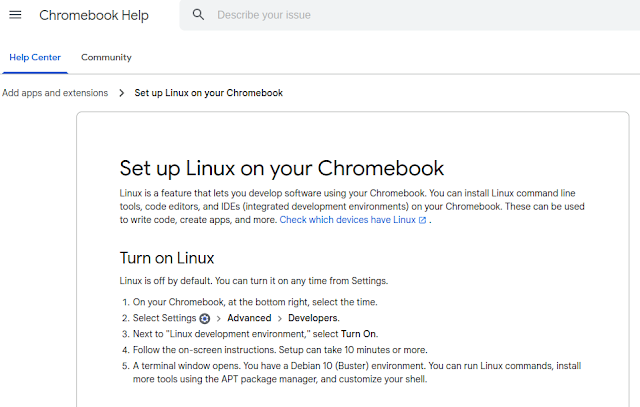
After that you have a debian bullseye running inside a container. Go to /etc/apt/sources.list and add "contrib" after "deb https://debian.org/debian bullseye main " ("sudo bash" to get root). Then
apt update
apt upgrade
apt install vlc libdvd-pkg
dpkg-reconfigure libdvd-pkg
After that vlc is configured including the libdvdcss for the DVD region codes.
One last problem is to access the DVD inside this linux container. This can be done via a double tap inside the file-manager on the chromebook and then you can choose inside the context menu "share with linux (Mit Linux teilen)".
This last step has to be done each time a DVD is inserted.
So watching DVDs on a chromebook is not impossible, but it is not really user friendly...
influxdb: copying data with SELECT INTO - pay attention to the TAGS (or they are transformed to fields)
If you are using influxdb, one usecase could be, copy the data from a measurement ("table") to another.

This can be done with this statement:
select * into testtable2 from testtable1
By the way: the CLI is opened with
In my case (zigbee / mqtt / telegraf) the layout of mqtt_consumer measurement was like this:
> show tag keys from mqtt_consumername: mqtt_consumer
tagKey
------
host
topic
> show field keys from mqtt_consumer
name: mqtt_consumer
fieldKey fieldType
-------- ---------
battery float
contact boolean
current float
...But after copying this to a testtable, the tags where gone and everything was a field.
This is not a big problem - you can work with that data without a problem. BUT if you want to copy it back or merge it to the original table, you will get a table with the additional columns host_1 and topic_1.
This is because for influx you already had a column host. So it added a column field host_1.
If a query in this new table (with host + host_1) spans over a time where both of this columns are in, you only select the data, with the entry host. If the time spans only entries with host_1, it is shown as host and you get your data. Really a unpredictable way to get data.
What is the solution? Easy:
select * into table1 from mqtt_consumer group by host,topic The "group by" does not group anything. It just tells influx: host & topic are tags and not fields. Please do not transform them...Raspberry PI on Ubuntu: yarn: Cannot find module 'worker_threads'
This evening i tried to install a nodejs application with yarn on my raspberry pi. This failed with:
/usr/local/bin/yarn installinternal/modules/cjs/loader.js:638
throw err;
^
Error: Cannot find module 'worker_threads'
at Function.Module._resolveFilename (internal/modules/cjs/loader.js:636:15)
at Function.Module._load (internal/modules/cjs/loader.js:562:25)
at Module.require (internal/modules/cjs/loader.js:692:17)
at require (internal/modules/cjs/helpers.js:25:18)
at /opt/zwavejs2mqtt/.yarn/releases/yarn-3.1.0-rc.8.cjs:287:2642
at Object.<anonymous> (/opt/zwavejs2mqtt/.yarn/releases/yarn-3.1.0-rc.8.cjs:585:7786)
at Module._compile (internal/modules/cjs/loader.js:778:30)
at Object.Module._extensions..js (internal/modules/cjs/loader.js:789:10)
at Module.load (internal/modules/cjs/loader.js:653:32)
at tryModuleLoad (internal/modules/cjs/loader.js:593:12)

This error occurs because the nodejs version which is delivered by ubuntu is version v.10.19.0.
You have to download the armv8 package from https://nodejs.org/en/download/
With version v16.13.0 the error was gone...
AZ-900 achieved: Microsoft Azure Fundamentals
Yesterday evening i passed Microsofts AZ-900 exam:

As examinee you have to start your online session half an hour earlier and this time you really need for the onboarding:
- Download the software to your PC and do some checks (audio, network, ...)
This is an .exe - so only windows PCs are possible - Install the app "Pearson VUE" on your smartphone to provide
- selfie
- passport/driver license/...
- photos of your room
- Talking to an instructor
You are not allowed to wear a headset - even a watch is not allowed
After that the exam is about 40 questions in 45 minutes - quite fair.
The questions are about these topics:
- Describe cloud concepts (20-25%)
- Describe core Azure services (15-20%)
- Describe core solutions and management tools on Azure (10-15%)
- Describe general security and network security features (10-15%)
- Describe identity, governance, privacy, and compliance features (15-20%)
- Describe Azure cost management and Service Level Agreements (10-15%)
More information can be found here: https://query.prod.cms.rt.microsoft.com/cms/api/am/binary/RE3VwUY
If you want to do this exam, start here:

Fritz!Box monitoring with grafana, influx, collectd and fritzcollectd
A nice way to monitor your Fritz!Box is this here:

How can you achieve this:
https://fetzerch.github.io/2014/08/23/fritzcollectd/
and
https://github.com/fetzerch/fritzcollectd
Here a list of the software packages you have to install
apt install -y collectd python3-pip libxml2 libxml2-dev libxslt1-dev influxdb nodejs git make g++ gcc npm net-tools certbot mosquitto mosquitto-clients grafana-server
for grafana-server and influxdb you have to add new repositories, because they are still not included in ubuntu.
To tell collectd, that it shoud write to influxdb, you have to uncomment the following in collectd.conf:
<Plugin network>
Server "localhost" "25826"
</Plugin>
and in influxdb.conf:
[[collectd]]
enabled = true
bind-address = "localhost:25826"
database = "collectd"
retention-policy = ""
typesdb = "/usr/share/collectd/types.db"
parse-multivalue-plugin = "split"
and of course inside collectd.conf you have to add the fritzcollectd config from the github link above.
But with starting collectd you might get the error:
dlopen("/usr/lib/collectd/python.so") failed: /usr/lib/collectd/python.so: undefined symbol: PyFloat_Type
This can be solved with adding into /etc/default/collectd:
LD_PRELOAD=/usr/lib/python3.8/config-3.8-aarch64-linux-gnu/libpython3.8.so
