


William Vambenepe

Big Data in the Cloud at Google I/O
Last week was a great party for the entire Google developer family, including Google Cloud Platform. And within the Cloud Platform, Big Data processing services. Which is where my focus has been in the almost two years I’ve been at Google.
It started with a bang, when our fearless leader Urs unveiled Cloud Dataflow in the keynote. Supported by a very timely demo (streaming analytics for a World Cup game) by my colleague Eric.
After the keynote, we had three live sessions:
In “Big Data, the Cloud Way“, I gave an overview of the main large-scale data processing services on Google Cloud:
- Cloud Pub/Sub, a newly-announced service which provides reliable, many-to-many, asynchronous messaging,
- the aforementioned Cloud Dataflow, to implement data processing pipelines which can run either in streaming or batch mode,
- BigQuery, an existing service for large-scale SQL-based data processing at interactive speed, and
- support for Hadoop and Spark, making it very easy to deploy and use them “the Cloud Way”, well integrated with other storage and processing services of Google Cloud Platform.
The next day, in “The Dawn of Fast Data“, Marwa and Reuven described Cloud Dataflow in a lot more details, including code samples. They showed how to easily construct a streaming pipeline which keeps a constantly-updated lookup table of most popular Twitter hashtags for a given prefix. They also explained how Cloud Dataflow builds on over a decade of data processing innovation at Google to optimize processing pipelines and free users from the burden of deploying, configuring, tuning and managing the needed infrastructure. Just like Cloud Pub/Sub and BigQuery do for event handling and SQL analytics, respectively.
Later that afternoon, Felipe and Jordan showed how to build predictive models in “Predicting the future with the Google Cloud Platform“.
We had also prepared some recorded short presentations. To learn more about how easy and efficient it is to use Hadoop and Spark on Google Cloud Platform, you should listen to Dennis in “Open Source Data Analytics“. To learn more about block storage options (including SSD, both local and remote), listen to Jay in “Optimizing disk I/O in the cloud“.
It was gratifying to see well-informed people recognize the importance of these announcement and partners understand how this will benefit their customers. As well as some good press coverage.
It’s liberating to now be able to talk freely about recent progress on our quest to equip Google Cloud users with easy to use data processing tools. Everyone can benefit from Google’s experience making developers productive while efficiently processing data at large scale. With great power comes great productivity.
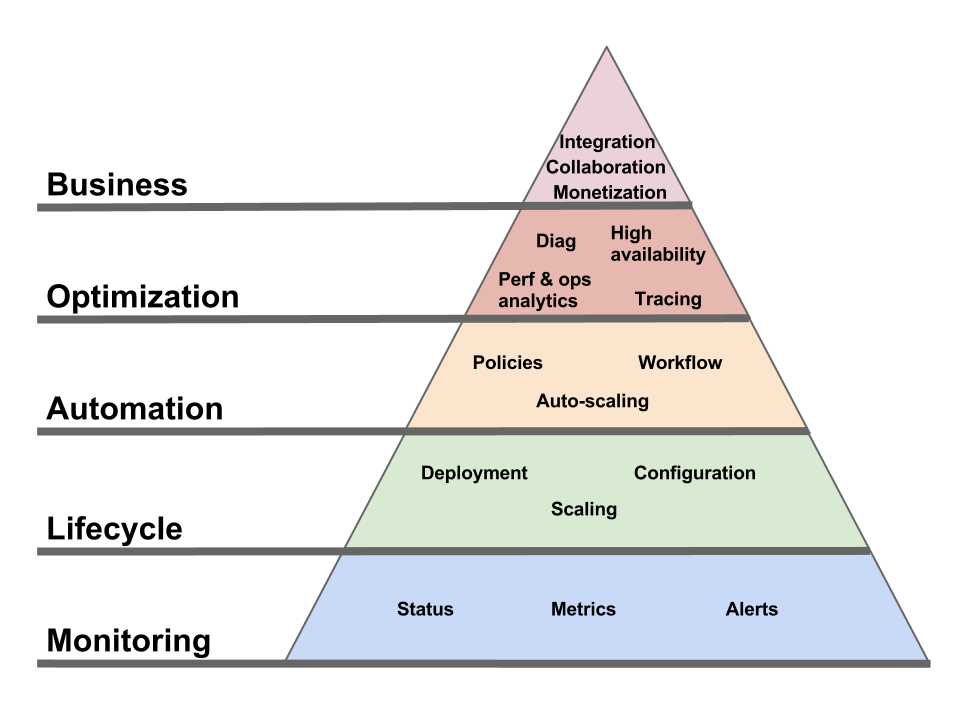
PaaS lets you pick the right tool for the job, without having to worry about the additional operational complexity
In a recent blog post, Dan McKinley explains “Why MongoDB Never Worked Out at Etsy“. In short, the usefulness of using MongoDB in addition to their existing MySQL didn’t justify the additional operational complexity of managing another infrastructure service.
This highlights the least appreciated benefit of PaaS: PaaS lets you pick the right tool for the job, without having to worry about the additional operational complexity.
I tried to explain this a year ago in this InfoQ article. But the title was cringe-worthy and the article was too long.
So this blog will be short. I even made the main point bold; and put it in the title.
Big Data career adviser says you should be a… Big Data analyst
LinkedIn CEO Jeff Weiner wrote an interesting post on “the future of LinkedIn and the economic graph“. There’s a lot to like about his vision. The part about making education and career choices better informed by data especially resonates with me:
With the existence of an economic graph, we could look at where the jobs are in any given locality, identify the fastest growing jobs in that area, the skills required to obtain those jobs, the skills of the existing aggregate workforce there, and then quantify the size of the gap. Even more importantly, we could then provide a feed of that data to local vocational training facilities, junior colleges, etc. so they could develop a just-in-time curriculum that provides local job seekers the skills they need to obtain the jobs that are and will be, and not just the jobs that once were.
I consider myself very lucky. I happened to like computers and enjoy programming them. This eventually lead me to an engineering degree, a specialization in Computer Science and a very enjoyable career in an attractive industry. I could have been similarly attracted by other domains which would have been unlikely to give me such great professional options. Not everyone is so lucky, and better data could help make better career and education choices. The benefits, both at the individual and societal levels, could be immense.
Of course, like for every Big Data example, you can’t expect a crystal ball either. It’s unlikely that the “economic graph” for France in 1994 would have told me: “this would be a good time to install Linux Slackware, learn Python and write your first CGI script”. It’s also debatable whether that “economic graph” would have been able to avoid one of the worst talent waste of recent time, when too many science and engineering graduates went into banking. The “economic graph” might actually have encouraged that.
But, even under moderate expectations, there is a lot of potential for better informed education and career decision (both on the part of the training profession and the students themselves) and I am glad that LinkedIn is going after that. Along with the choice of a life partner (and other companies are after that problem), this is maybe the most important and least informed decision people will make in their lifetime.
Jeff Weiner also made proclamation of openness in that same article:
Once realized, we then want to get out of the way and allow all of the nodes on this network to connect seamlessly by removing as much friction as possible and allowing all forms of capital, e.g. working capital, intellectual capital, and human capital, to flow to where it can best be leveraged.
I’m naturally suspicious of such claims. And a few hours later, I get a nice email from LinkedIn, announcing that as of tomorrow they are dropping the “blog link” application which, as far as I can tell, fetches recent posts form my blog and includes them on my LinkedIn profile. Seems to me that this was a nice and easy way to “allow all of the nodes on this network to connect seamlessly by removing as much friction as possible”…
Ovum on Cloud evolution
By Laurent Lachal:
Two years ago, Ovum expected SaaS to evolve towards business process-as-a-service (BPaaS). The transition has already started. For example, Oracle’s SaaS strategy does not focus on each discrete SaaS application in its portfolio. Instead, Oracle focuses on the integration of its SaaS offering into end-to-end processes such as the “B2C customer experience” process that integrates Oracle WebCenter Sites, Oracle Siebel Marketing, Oracle Endeca, Oracle ATG Commerce, Oracle Financials, Procurement, and Supply Chain, as well as Oracle RightNow CX Cloud Service to achieve a consistent and personalized experience across all channels. Oracle underpins its SaaS-to-BPaaS story with strong iPaaS capabilities. Indeed, iPaaS is to become a key ingredient of the SaaS-to-BPaaS transition.
Remember, the integration is the application.
Are you the dumb money in the Cloud?
Another paper came out measuring the performance diversity of Cloud VMs within the same advertised type. Here’s the paper (PDF), here are the slides (PDF) and here is the video (this was presented back in June but I hadn’t seen it until today’s post in the High Scalability blog). Once again, the research shows a large discrepancy. The authors assert that “by selecting better-performing instances to complete the same task, end-users of Amazon EC2 platform can achieve up to 30% cost saving”.
I’ve heard people describing how they use “instance tasting”. Every time they get a new instance, they run performance tests (either on CPU like this paper, or i/o, or both, depending on how they plan to use the VM). They quickly terminate the instances that don’t perform well, to improve their bang/buck ratio. I don’t know how prevalent that practice is, but clearly the more sophisticated users have ways to game the system optimize their consumption.
But this doesn’t happen in a vacuum. It necessarily increases the likelihood that less sophisticated users will end up with (comparatively over-priced) lower-performing instances. Especially in Clouds with high heterogeneity and which have little unused capacity. It’s like coming to the fruit salad at a buffet and finding all the berries gone. I hope you like watermelon and honeydew.
Wall Street has a term for this. For people who don’t understand the system in details, who don’t have access to insider information and don’t use sophisticated trading technology: the dumb money.
The enterprise Cloud battle will be an integration battle
The real threat the Cloud poses for incumbent enterprise software vendors is not the obvious one. It’s not about hosting. Sure, they would prefer if nothing changed and they could stick to shipping software and letting customers deal with installing, managing and operating it. Those were the good times.
But these days are over; Oracle, SAP and others realize it. They’re too smart to fight for a lost cause and try to stop this change (though of course they wouldn’t mind if it slowed down). They understand that they will have to host and operate their software themselves. Right now, their datacenter operations and software stacks aren’t as optimized for that model as those of native Cloud providers (at least the good ones), but they’ll get there. They have the smarts and the resources. They don’t have to re-invent it either, the skills and techniques needed will spread through the industry. They’ll also make some acquisitions to hurry things up. In the meantime, they’re probably willing to swallow the operational costs of under-optimized operations in order to prevent those of their customers most eager to move to the Cloud from defecting.
That transition, from running on the customer’s machines to running on the software vendor’s machine, while inconvenient for the vendors, is not by itself a fundamental threat.
The scary part, for enterprise software vendors transitioning to the SaaS model, is whether the enterprise application integration model will also change in the process.
[note: I include “customization” in the larger umbrella of “integration”.]
Enterprise software integration is hard and risky. Once you’ve invested in integrating your enterprise applications with one another (and/or with your partners’ applications), that integration becomes the #1 reason why you don’t want to change your applications. Or even upgrade them. That’s because the integration is an extension of the application being integrated. You can’t change the app and keep the integration. SOA didn’t change that. Both from a protocol perspective (the joys of SOAP and WS-* interoperability) and from a model perspective, SOA-type integration projects are still tightly bound to the applications they were designed for.
For all intents and purposes, the integration is subservient to the applications.
The opportunity (or risk, depending on which side you’re on) is if that model flips over as part of the move to Cloud Computing. If the integration become central and the applications become peripheral.
The integration is the application.
Which is really just pushing “the network is the computer” up the stack.
Just like cell phone operators don’t want to be a “dumb pipe”, enterprise software vendors don’t want to become a “dumb endpoint”. They want to own the glue.
That’s why Salesforce built Force.com, acquired Heroku and is now all over “enterprise social networking” (there’s no such thing as “enterprise social networking” by the way, it’s just better groupware, integrated with enterprise applications). That’s why WorkDay’s only acquisition to date, as early as 2008, was an enterprise integration vendor (CapeClear). And why Oracle, in building its public Cloud, is making sure to not just offer its applications as SaaS but also build a portfolio of integration-friendly services (“the technology services are for IT staff and software developers to build and extend business applications”).
How could this be flipped over, freeing the integration from being in the shadow of the application (and running on infrastructure provided by the application vendor)? Architecturally, this looks like a Web integration use case, as Erik Wilde posited. But that’s hard to imagine in practice, when you think of the massive amounts of data and the ever-growing requirements to extract value from it, quickly and at scale. Even if application vendors exposed good HTTP/REST APIs for their data, you don’t want to run Big Data analysis over these remote APIs.
So, how does the integration free itself from being controlled by the SaaS vendor, while retaining high-throughput and low-latency access to the data it requires? And how does the integration get high-throughput/low-latency access to data sets from different applications (by different vendors) at the same time? Well, that’s where the cliffhanger at the end of the previous blog post comes from.
Maybe the solution is to have SaaS applications run on a public Cloud. Or, in the terms used by the previous blog post, to run enterprise Solution Clouds (SaaS) on top of public Deployment Clouds (PaaS and IaaS). Two SaaS applications (by different vendors) which run on the same Deployment Cloud can then, via some level of coordination controlled by the customer, access each other’s data or let an “integration” application access both of their data sets. The customer-controlled coordination (and by “customer” here I mean the enterprise which subscribes to the SaaS apps) is two-fold: ensuring that the two SaaS applications are deployed in close proximity (in the same “Cloud zone” or whatever proximity abstraction the Deployment Cloud provider exposes); and setting appropriate access permission.
Enterprise application vendors will fight to maintain control of application integration. They will have reasons, some of them valid, supporting the case that it’s better if you use them to run your integration. But the most fundamental of these reasons, locality of the data, doesn’t have to be a blocker. That can be bridged by running on a shared public Deployment Cloud.
Remember, the integration is the application.
Will Clouds run on Clouds?
Or, more precisely, will enterprise Solution Clouds run on Deployment Clouds?
I’ve previously made the case that we shouldn’t include SaaS in the “Cloud” (rather, it’s just Web apps). Obvioulsy my guillotine didn’t cut it against the lure of Cloud-branding. Fine, then let’s agree that we have two types of Clouds: Solution Clouds and Deployment Clouds.
Solution Clouds are the same as SaaS (and I’ll use the terms interchangeably). Enterprise Solution Clouds provide common functions like HR, CRM, Financial, Collaboration, etc. Every company needs them and they are similar between companies.
Deployment Clouds are where you deploy applications. That definition covers both IaaS and PaaS, which are part of the same continuum.
You subscribe to a Solution Cloud; you deploy on a Deployment Cloud.
Considering these two types of Clouds separately doesn’t mean they’re not connected. The same providers may offer both, and they may be tightly packaged together. But they’re still different in their nature.
The reason for this little lexicological excursion is to formulate this question: will enterprise Solution Clouds run on Deployment Clouds or on their own infrastructure? Can application-centric ISVs compete, in the enterprise market, by providing a Solution Cloud on top of someone else’s Deployment Cloud? Or will the most successful enterprise Solution Clouds be run by full-stack operators?
Right now, most incumbent enterprise software vendors (Oracle, SAP…), and the Cloud-only enterprise vendors with the most adoption (SalesForce, WorkDay…) offer Cloud services by operating their own infrastructure. On the other hand, there are many successful SaaS vendors targeting smaller companies which run their operations on top of a Deployment Cloud (e.g. the Google Cloud Platform or AWS). That even seems to be the default mode of operation for these vendors. Why not enterprise vendors? Let’s look at the potential reasons for this, in order to divine if it may change in the future.
- It could be that it’s a historical accident, either because the currently successful enterprise providers necessarily started before Deployment Clouds were available (it takes time to build an enterprise Solution Cloud) or they started from existing on-premise software which didn’t lend itself to running on a Deployment Cloud. Or these SaaS providers were simply not culturally or technically ready to use Deployment Clouds.
- It could be that it’s necessary in order to provide the necessary level of security and compliance. Every enterprise SaaS vendor has a “security” whitepaper which plays up the fact that they run their own datacenter, allowing them to ensure that all the guards have a CSSLP, a fifth-degree karate black belt, a scary-looking goatee and that they follow a documented process when they brush their teeth in the morning. If that’s a reason, then it won’t change until Deployment Clouds can offer the same level of compliance (and prove it). Which is happening, BTW.
- It could be that enterprise Solution Clouds are large enough (or have vocation to become large enough) that there are little economies of scale in sharing the infrastructure with other workload.
- It could be that they can optimize the infrastructure to better serve their particular type of workload.
Any other reason? Will enterprise Solution Cloud always run on their own infrastructure? The end result probably hinges a lot on whether, once it fully moves to a Cloud delivery model, the enterprise SaaS landscape is as concentrated as the traditional enterprise application landscape was, or whether the move to Cloud opens the door to a more diverse ecosystem. The answer to this hinges, in turn, on Cloud application integration, which will be the topic of the next post.
Joining Google
Next Monday, I will start at Google, in the Cloud Platform team.
I’ve been watching that platform, and especially Google App Engine (GAE), since it started in 2008. It shaped my thoughts on Cloud Computing and on the tension between PaaS and IaaS. In my first post about GAE, 4.5 years ago, I wrote about that tension:
History is rarely kind to promoters of radical departures. The software industry is especially fond of layering the new on top of the old (a practice that has been enabled by the constant increase in underlying computing capacity). If you are wondering why your command prompt, shell terminal or text editor opens with a default width of 80 characters, take a trip back to 1928, when IBM defined its 80-columns punch card format. Will Google beat the odds or be forced to be more accommodating of existing code?
This debate (which I later characterized as “backward-compatible vs. forward-compatible”) is still ongoing. App Engine has grown a lot and shed its early limitations (I had a lot of fun trying to engineer around them in the early days). Google’s Cloud Platform today is also a lot more than App Engine, with Cloud Storage, Compute Engine, etc. It’s much more welcoming to existing applications.
The core question remains, however. How far, and how quickly will we move from the abstractions inherited from seeing the physical server as the natural unit of computation? What benefits will we derive from this transformation and will they make it worthwhile? Where’s the next point of equilibrium in the storm provoked by these shifts:
- IT management technology was ripe for a change, applying to itself the automation capabilities that it had brought to other domains.
- Software platforms were ripe for a change, as we keep discovering all the Web can be, all the data we can handle, and how best to take advantage of both.
- The business of IT was ripe for a change, having grown too important to escape scrutiny of its inefficiency and sluggishness.
These three transformations didn’t have to take place at the same time. But they are, which leaves us with a fascinating multi-variable equation to optimize. I believe Google is the right place to crack this nut.
This is my view today, looking at the larger Cloud environment and observing Google’s Compute Platform from the outside. In a week’s time, I’ll be looking at it from the inside. October me may scoff at the naïveté of September me; or not. Either way, I’m looking forward to it.
Good-bye Oracle
Tomorrow will be my last day at Oracle. It’s been a great 5 years. By virtue of my position as architect for the Application and Middleware Management part of Oracle Enterprise Manager, I got to work with people all over the Enterprise Manager team as well as many other groups, whose products we are managing: from WebLogic to Fusion Apps, from Exalogic to Oracle’s Public Cloud and many others.
I was hired for, and initially focused on, defining and building Oracle’s application management capabilities. This was done via a mix of organic development and targeted acquisitions (Moniforce, ClearApp, Amberpoint…). The exercise was made even more interesting by acquisitions in other parts of the company (especially BEA) which redefined the scope of what we had to manage.
The second half of my time at Oracle was mostly focused on Cloud Computing. Enterprise Manager Cloud Control 12c, which we released a year ago at Oracle Open World 2011, introduced Private Cloud support with IaaS (including multi-VM assemblies) and DBaaS. Last week, we release EMCC 12c Release 2 which, among other things, adds support for Java PaaS. I was supposed to present on this, and demo the Java service, at Oracle Open World next week. If you’re attending, make sure to hear my friends Dhruv Gupta and Fred Carter deliver that session, titled “Platform as a Service: Taking Enterprise Clouds Beyond Virtualization” on Wednesday October 3 at 3:30 in Moscone West 3018.
I also got to work on the Oracle Public Cloud, in which Enterprise Manager plays a huge role. I was responsible for the integration of new Cloud service types with Enterprise Manager, which gave me a great view of what’s in the Oracle Public Cloud pipeline. Larry Ellison has promised to show a lot more next week at Oracle Open World, stay tuned for that. The breadth and speed with which Oracle has now embraced Cloud (both public and private) is impressive. Part of Oracle’s greatness is how quickly its leadership can steer the giant ship. I am honored to have been part of that, in the context of the move to Cloud Computing, and I will remember fondly my years in Redwood Shores and my friends there.
I am taking next week off. On Monday October 8, I am starting in a new and exciting job, still in the Cloud Computing space. That’s a topic for another post.
Google Compute Engine, the compete engine
Google is going to give Amazon AWS a run for its money. It’s the right move for Google and great news for everyone.
But that wasn’t plan A. Google was way ahead of everybody with a PaaS solution, Google App Engine, which was the embodiment of “forward compatibility” (rather than “backward compatibility”). I’m pretty sure that the plan, when they launched GAE in 2008, didn’t include “and in 2012 we’ll start offering raw VMs”. But GAE (and PaaS in general), while it made some inroads, failed to generate the level of adoption that many of us expected. Google smartly understood that they had to adjust.
“2012 will be the year of PaaS” returns 2,510 search results on Google, while “2012 will be the year of IaaS” returns only 2 results, both of which relate to a quote by Randy Bias which actually expresses quite a different feeling when read in full: “2012 will be the year of IaaS cloud failures”. We all got it wrong about the inexorable rise of PaaS in 2012.
But saying that, in 2012, IaaS still dominates PaaS, while not wrong, is an oversimplification.
At a more fine-grained level, Google Compute Engine is just another proof that the distinction between IaaS and PaaS was always artificial. The idea that you deploy your applications either at the IaaS or at the PaaS level was a fallacy. There is a continuum of application services, including VMs, various forms of storage, various levels of routing, various flavors of code hosting, various API-centric utility functions, etc. You can call one end of the spectrum “IaaS” and the other end “PaaS”, but most Cloud applications live in the continuum, not at either end. Amazon started from the left and moved to the right, Google is doing the opposite. Amazon’s initial approach was more successful at generating adoption. But it’s still early in the game.
As a side note, this is going to be a challenge for the Cloud Foundry ecosystem. To play in that league, Cloud Foundry has to either find a way to cover the full IaaS-to-PaaS continuum or it needs to efficiently integrate with more IaaS-centric Cloud frameworks. That will be a technical challenge, and also a political one. Or Cloud Foundry needs to define a separate space for itself. For example in Clouds which are centered around a strong SaaS offering and mainly work at higher levels of abstraction.
A few more thoughts:
- If people still had lingering doubts about whether Google is serious about being a Cloud provider, the addition of Google Compute Engine (and, earlier, Google Cloud Storage) should put those to rest.
- Here comes yet-another-IaaS API. And potentially a major one.
- It’s quite a testament to what Linux has achieved that Google Compute Engine is Linux-only and nobody even bats an eye.
- In the end, this may well turn into a battle of marketplaces more than a battle of Cloud environment. Just like in mobile.
Podcast with Oracle Cloud experts
A couple of weeks ago, Bob Rhubart (who runs the OTN architect community) assembled four of us who are involved in Oracle’s Cloud efforts, public and private. The conversation turned into a four-part podcast, of which the first part is now available. The participants were James Baty (VP of Global Enterprise Architecture Program), Mark Nelson (lead architect for Oracle’s public Cloud among other responsibilities), Ajay Srivastava (VP of OnDemand platform), and me.
I think the conversation will give a good idea of the many ways in which we think about Cloud at Oracle. Our customers both provide and consume Cloud services. Oracle itself provides both private Cloud systems and a global public Cloud. All these are connected, both in terms of usage patterns (hybrid) and architecture/implementation (via technology sharing between our products and our Cloud services, such as Enterprise Manager’s central role in running the Oracle Cloud).
That makes for many topics and a lively conversation when the four of us get together.
REST + RDF, finally a practical solution?
The W3C has recently approved the creation of the Linked Data Platform (LDP) Working Group. The charter contains its official marching orders. Its co-chair Erik Wilde shared his thoughts on the endeavor.
This is good. Back in 2009, I concluded a series of three blog posts on “REST in practice for IT and Cloud management” with:
I hereby conclude my “REST in practice for IT and Cloud management” series, with the intent to eventually start a “Linked Data in practice for IT and Cloud management” series.
I never wrote that later part, because my work took me away from that pursuit and there wasn’t much point writing down ideas which I hadn’t put to the test. But if this W3C working group is successful, they will give us just that.
That’s a big “if” though. Religious debates and paralyzing disconnects between theorists and practitioners are all-too-common in tech, but REST and Semantic Web (of which RDF is the foundation) are especially vulnerable. Bringing these two together and trying to tame both sets of daemons at the same time is a daring proposition.
On the other hand, there is already a fair amount of relevant real-life experience (e.g. data.gov.uk – read Jeni Tennison on the choice of Linked Data). Plus, Erik is a great pick to lead this effort (I haven’t met his co-chair, IBM’s Arnaud Le Hors). And maybe REST and RDF have reached the mythical point where even the trolls are tired and practicality can prevail. One can always dream.
Here are a few different ways to think about this work:
The “REST doesn’t provide interoperability” perspective
RESTful API authors too often think they can make the economy of a metamodel. Or that a format (like XML or JSON) can be used as a metamodel. Or they punt the problem towards defining a multitude of MIME types. This will never buy you interoperability. Stu explained it before. Most problems I see addressed via RESTful APIs, in the IT/Cloud management realm, are modeling problems first and only secondarily protocol/interaction problems. And their failures are failures of modeling. LDP should bring modeling discipline to REST-land.
The “RDF was too much, too soon” perspective
The RDF stack is mired in complexity. By the time people outside of academia had formed a set of modeling requirements that cried for RDF, the Semantic Web community was already deep in the weeds and had overloaded its basic metamodel with enough classification and inference technology to bury its core value as a simple graph-oriented and web-friendly metamodel. What XSD-fever was to making XML seem overly complex, OWL-fever was to RDF. Tenfold.
Everything that the LDP working group is trying to achieve can be achieved today with existing Semantic Web technologies. Technically speaking, no new work is needed. But only a handful of people understand these technologies enough to know what to use and what to ignore, and as such this application doesn’t have a chance to materialize. Which is why the LDP group is needed. But there’s a reason why its starting point document is called a “profile”. No new technology is needed. Only clarity and agreement.
For the record, I like OWL. It may be the technology that most influenced the way I think about modeling. But the predominance of RDFS and OWL (along with ugly serializations) in Semantic Web discussions kept RDF safely out of sight of those in industry who could have used it. Who knows what would have happened if a graph query language (SPARQL) had been prioritized ahead of inference technology (OWL)?
The Cloud API perspective
The scope of the LDP group is much larger than Cloud APIs, but my interest in it is mostly grounded in Cloud API use cases. And I see no reason why the requirements of Cloud APIs would not be 100% relevant to this effort.
What does this mean for the Cloud API debate? Nothing in the short term, but if this group succeeds, the result will probably be the best technical foundation for large parts of the Cloud management landscape. Which doesn’t mean it will be adopted, of course. The LDP timeline calls for completion in 2014. Who knows what the actual end date will be and what the Cloud API situation will be at that point. AWS APIs might be entrenched de-facto standards, or people may be accustomed to using several APIs (via libraries that abstract them away). Or maybe the industry will be clamoring for reunification and LDP will arrive just on time to underpin it. Though the track record is not good for such “reunifications”.
The “ghost of WS-*” perspective
Look at the 16 “technical issues” in the LCD working group charter. I can map each one to the relevant WS-* specification. E.g. see this as it relates to #8. As I’ve argued many times on this blog, the problems that WSMF/WSDM/WS-Mgmt/WS-RA and friends addressed didn’t go away with the demise of these specifications. Here is yet another attempt to tackle them.
The standards politics perspective
Another “fun” part of WS-*, beyond the joy of wrangling with XSD and dealing with multiple versions of foundational specifications, was the politics. Which mostly articulated around IBM and Microsoft. Well, guess what the primary competition to LDP is? OData, from Microsoft. I don’t know what the dynamics will be this time around, Microsoft and IBM alone don’t command nearly as much influence over the Cloud infrastructure landscape as they did over the XML middleware standardization effort.
And that’s just the corporate politics. The politics between standards organizations (and those who make their living in them) can be just as hairy; you can expect that DMTF will fight W3C, and any other organization which steps up, for control of the “Cloud management” stack. Not to mention the usual coo-petition between de facto and de jure organizations.
The “I told you so” perspective
When CMDBf started, I lobbied hard to base it on RDF. I explained that you could use it as just a graph-based metamodel, that you could ignore the ontology and inference part of the stack. Which is pretty much what LDP is doing today. But I failed to convince the group, so we created our own metamodel (at least we explicitly defined one) and our own graph query language and that became CMDBf v1. Of course it was also SOAP-based.
KISS and markup
In closing, I’ll just make a plea for practicality to drive this effort. It’s OK to break REST orthodoxy. And not everything needs to be in RDF either. An overarching graph model is needed, but the detailed description of the nodes can very well remain in JSON, XML, or whatever format does the job for that node type.
All the best to LDP.
Review of reviews of iPad reviews
Since we’re talking about the third generation of iPads, it seems silly to stop at the “review of reviews” level and we should be meta-to-the-cube. So here’s a review of reviews of iPad reviews. Because no-one asked for it.
Forbes and Barron’s reviews of reviews are pretty much indistinguishable from one another and cover the same original reviews (with the only difference that Forbes adds a quick quote from John Gruber). And of course, since they both cater to people who see significance in daily stock prices, they both end by marveling that the Apple stock flirted today with the $600 mark.
Om Malik’s review of reviews wins the “most obvious laziness” prize (in a category that invites laziness), but if you really want to know ahead of time how many words each review will inflict on you then he’s got the goods.
Daniel Ionescu’s review of reviews for PCWorld is the most readable of the lot and manages to find a narrative flow among the links and quotes.
The CNET review of reviews comes a close second and organizes the piece by feature rather than by reviewer. Which makes it more a “review-based review” than a “review of reviews” if you’re into that kind of distinctions.
The Washington Post’s review of reviews just slaps quote after quote and can be safely avoided.
You know what you have to do now, don’t you? No, I don’t mean write something original, are you crazy? I mean produce a review of reviews of reviews of reviews, of course. This is 2012.
GAE Traffic Splitting
Interesting addition to the Google App Engine (GAE) platform in release 1.6.3: Traffic Splitting lets you run several versions of your application (using a DNS sub-domain for each version) and choose to direct a certain percentage of requests to a specific version. This lets you, among other things, slowly phase in your updates and test the result on a small set of users.
That’s nice, but until I read the documentation for the feature I had assumed (and hoped) it was something else.
Rather than using traffic splitting to test different versions of my app (something which the platform now makes convenient but which I could have implemented on my own), it would be nice if that mechanism could be used to test updates to the GAE platform itself. As described in “Come for the PaaS Functional Model, stay for the Cloud Operational Model“, it’s wishful thinking to assume that changes to the PaaS platform (an update applied by Google admins) cannot have a negative effect on your application. In other words, “When NoOps meets Murphy’s Law, my money is on Murphy“.
What would be nice is if Google could give application owners advanced warning of a platform change and let them use the Traffic Splitting feature to direct a portion of the incoming requests to application instances running on the new platform. And also a way to include the platform version in all log messages.
Here’s the issue as I described it in the aforementioned “Cloud Operational Model” post:
In other words, if a patch or update is worth testing in a staging environment if you were to apply it on-premise, what makes you think that it’s less likely to cause a problem if it’s the Cloud provider who rolls it out? Sure, in most cases it will work just fine and you can sing the praise of “NoOps”. Until the day when things go wrong, your users are affected and you’re taken completely off-guard. Good luck debugging that problem, when you don’t even know that an infrastructure change is being rolled out and when it might not even have been rolled out uniformly across all instances of your application.
How is that handled in your provider’s Operational Model? Do you have visibility into the change schedule? Do you have the option to test your application on the new infrastructure or to at least influence in any way how and when the change gets rolled out to your instances?
Hopefully, the addition of Traffic Splitting to Google App Engine is a step towards addressing that issue.
The war on RSS
If the lords of the Internet have their way, the days of RSS are numbered.
Apple
John Gruber was right, when pointing to Dan Frakes’ review of the Mail app in Mountain Lion, to highlight the fact that the application drops support for RSS (he calls it an “interesting omission”, which is both correct and understated). It is indeed the most interesting aspect of the review, even though it’s buried at the bottom of the article; Along with the mention that RSS support appears to also be removed from Safari.
[side note: here is the correct link for the Safari information; Dan Frakes’ article mistakenly points to a staging server only available to MacWorld employees.]
It’s not just John Gruber and I who think that’s significant. The disappearance of RSS is pretty much the topic of every comment on the two MacWorld articles (for Mail and Safari). That’s heartening. It’s going to take a lot of agitation to reverse the trend for RSS.
The Mountain Lion setback, assuming it’s not reversed before the OS ships, is just the last of many blows to RSS.
Every twitter profile used to exhibit an RSS icon with the URL of a feed containing the user’s tweets. It’s gone. Don’t assume that’s just the result of a minimalist design because (a) the design is not minimalist and (b) the feed URL is also gone from the page metadata.
The RSS feeds still exist (mine is http://twitter.com/statuses/user_timeline/18518601.rss) but to find them you have to know the userid of the user. In other words, knowing that my twitter username is @vambenepe is not sufficient, you have to know that the userid for @vambenepe is 18518601. Which is not something that you can find on my profile page. Unless, that is, you are willing to wade through the HTML source and look for this element:
<div data-user-id="18518601" data-screen-name="vambenepe">
If you know the Twitter API you can retrieve the RSS URL that way, but neither that nor the HTML source method is usable for most people.
That’s too bad. Before I signed up for Twitter, I simply subscribed to the RSS feeds of a few Twitter users. It got me hooked. Obviously, Twitter doesn’t see much value in this anymore. I suspect that they may even see a negative value, a leak in their monetization strategy.
[Updated on 2013/3/1: Unsurprisingly, Twitter is pulling the plug on RSS/Atom entirely.]
Firefox
It used to be that if any page advertised an RSS feed in its metadata, Firefox would show an RSS icon in the address bar to call your attention to it and let you subscribe in your favorite newsreader. At some point, between Firefox 3 and Firefox 10, this disappeared. Now, you have to launch the “view page info” pop-up and click on “feeds” to see them listed. Or look for “subscribe to this page” in the “bookmarks” menu. Neither is hard, but the discoverability of the feeds is diminished. That’s especially unfortunate in the case of sites that don’t look like blogs but go the extra mile of offering relevant feeds. It makes discovering these harder.
Google has done a lot for RSS, but as a result it has put itself in position to kill it, either accidentally or on purpose. Google Reader is a nice tool, but, just like there has not been any new webmail after GMail, there hasn’t been any new hosted feed reader after Google Reader.
If Google closed GMail (or removed email support from it), email would survive as a communication mechanism (removing email from GMail is hard to imagine today, but keep in mind that Google’s survival doesn’t require GMail but they appear to consider it a matter of life or death for Google+ to succeed). If, on the other hand, Google closed Reader, would RSS survive? Doubtful. And Google has already tweaked Reader to benefit Google+. Not, for now, in a way that harms its RSS support. But whatever Google+ needs from Reader, Google+ will get.
[Updated 2013/3/13: Adios Google Reader. But I’m now a Google employee and won’t comment further.]
As far as the Chrome browser is concerned, I can’t find a way to have it acknowledge the presence of feeds in a page at all. Unlike Firefox, not even “view page info” shows them; It appears that the only way is to look for the feed URLs in the HTML source.
I don’t use Facebook, but for the benefit of this blog post I did some actual research and logged into my account there. I looked for a feed on a friend’s page. None in sight. Unlike Twitter, who started with a very open philosophy, I’m guessing Facebook never supported feeds so it’s probably not a regression in their case. Just a confirmation that no help should be expected from that side.
[update: in fact, Facebook used to offer RSS and killed it too.]
Not looking good for RSS
The good news is that there’s at least one thing that Facebook, Apple, Twitter and (to a lesser extent so far) Google seem to agree on. The bad news is that it’s that RSS, one of the beacons of openness on the internet, is the enemy.
[side note: The RSS/Atom question is irrelevant in this context and I purposedly didn’t mention Atom to not confuse things. If anyone who’s shunning RSS tells you that if it wasn’t for the RSS/Atom confusion they’d be happy to use a standard syndication format, they’re pulling your leg; same thing if they say that syndication is “too hard for users”.]
Come for the PaaS Functional Model, stay for the Cloud Operational Model
The Functional Model of PaaS is nice, but the Operational Model matters more.
Let’s first define these terms.
The Functional Model is what the platform does for you. For example, in the case of AWS S3, it means storing objects and making them accessible via HTTP.
The Operational Model is how you consume the platform service. How you request it, how you manage it, how much it costs, basically the total sum of the responsibility you have to accept if you use the features in the Functional Model. In the case of S3, the Operational Model is made of an API/UI to manage it, a bill that comes every month, and a support channel which depends on the contract you bought.
The Operational Model is where the S (“service”) in “PaaS” takes over from the P (“platform”). The Operational Model is not always as glamorous as new runtime features. But it’s what makes Cloud Cloud. If a provider doesn’t offer the specific platform feature your application developers desire, you can work around it. Either by using a slightly-less optimal approach or by building the feature yourself on top of lower-level building blocks (as Netflix did with Cassandra on EC2 before DynamoDB was an option). But if your provider doesn’t offer an Operational Model that supports your processes and business requirements, then you’re getting a hipster’s app server, not a real PaaS. It doesn’t matter how easy it was to put together a proof-of-concept on top of that PaaS if using it in production is playing Russian roulette with your business.
If the Cloud Operational Model is so important, what defines it and what makes a good Operational Model? In short, the Operational Model must be able to integrate with the consumer’s key processes: the business processes, the development processes, the IT processes, the customer support processes, the compliance processes, etc.
To make things more concrete, here are some of the key aspects of the Operational Model.
Deployment / configuration / management
I won’t spend much time on this one, as it’s the most understood aspect. Most Clouds offer both a UI and an API to let you provision and control the artifacts (e.g. VMs, application containers, etc) via which you access the PaaS functional interface. But, while necessary, this API is only a piece of a complete operational interface.
Support
What happens when things go wrong? What support channels do you have access to? Every Cloud provider will show you a list of support options, but what’s really behind these options? And do they have the capability (technical and logistical) to handle all your issues? Do they have deep expertise in all the software components that make up their infrastructure (especially in PaaS) from top to bottom? Do they run their own datacenter or do they themselves rely on a customer support channel for any issue at that level?
SLAs
I personally think discussions around SLAs are overblown (it seems like people try to reduce the entire Cloud Operational Model to a provisioning API plus an SLA, which is comically simplistic). But SLAs are indeed part of the Operational Model.
Infrastructure change management
It’s very nice how, in a PaaS setting, the Cloud provider takes care of all change management tasks (including patching) for the infrastructure. But the fact that your Cloud provider and you agree on this doesn’t neutralize Murphy’s law any more than me wearing Michael Jordan sneakers neutralizes the law of gravity when I (try to) dunk.
In other words, if a patch or update is worth testing in a staging environment if you were to apply it on-premise, what makes you think that it’s less likely to cause a problem if it’s the Cloud provider who rolls it out? Sure, in most cases it will work just fine and you can sing the praise of “NoOps”. Until the day when things go wrong, your users are affected and you’re taken completely off-guard. Good luck debugging that problem, when you don’t even know that an infrastructure change is being rolled out and when it might not even have been rolled out uniformly across all instances of your application.
How is that handled in your provider’s Operational Model? Do you have visibility into the change schedule? Do you have the option to test your application on the new infrastructure or to at least influence in any way how and when the change gets rolled out to your instances?
Note: I’ve covered this in more details before and so has Chris Hoff.
Diagnostic
Developers have assembled a panoply of diagnostic tools (memory/thread analysis, BTM, user experience, logging, tracing…) for the on-premise model. Many of these won’t work in PaaS settings because they require a console on the local machine, or an agent, or a specific port open, or a specific feature enabled in the runtime. But the need doesn’t go away. How does your PaaS Operational Model support that process?
Customer support
You’re a customer of your Cloud, but you have customers of your own and you have to support them. Do you have the tools to react to their issues involving your Cloud-deployed application? Can you link their service requests with the related actions and data exposed via your Cloud’s operational interface?
Security / compliance
Security is part of what a Cloud provider has to worry about. The problem is, it’s a very relative concept. The issue is not what security the Cloud provider needs, it’s what security its customers need. They have requirements. They have mandates. They have regulations and audits. In short, they have their own security processes. The key question, from their perspective, is not whether the provider’s security is “good”, but whether it accommodates their own security process. Which is why security is not a “trust us” black box (I don’t think anyone has coined “NoSec” yet, but it can’t be far behind “NoOps”) but an integral part of the Cloud Operational Model.
Business management
The oft-repeated mantra is that Cloud replaces capital expenses (CapExp) with operational expenses (OpEx). There’s a lot more to it than that, but it surely contributes a lot to OpEx and that needs to be managed. How does the Cloud Operational Model support this? Are buyer-side roles clearly identified (who can create an account, who can deploy a service instance, who can manage a deployed instance, etc) and do they map well to the organizational structure of the consumer organization? Can charges be segmented and attributed to various cost centers? Can quotas be set? Can consumption/cost projections be run?
We all (at least those of us who aren’t accountants) love a great story about how some employee used a credit card to get from the Cloud something that the normal corporate process would not allow (or at too high a cost). These are fun for a while, but it’s not sustainable. This doesn’t mean organizations will not be able to take advantage of the flexibility of Cloud, but they will only be able to do it if the Cloud Operational Model provides the needed support to meet the requirements of internal control processes.
Conclusion
Some of the ways in which the Cloud Operational Model materializes can be unexpected. They can seem old-fashioned. Let’s take Amazon Web Services (AWS) as an example. When they started, ownership of AWS resources was tied to an individual user’s Amazon account. That’s a big Operational Model no-no. They’ve moved past that point. As an illustration of how the Operational Model materializes, here are some of the features that are part of Amazon’s:
- You can Fedex a drive and have Amazon load the data to S3.
- You can optimize your costs for flexible workloads via spot instances.
- The monitoring console (and API) will let you know ahead of time (when possible) which instances need to be rebooted and which will need to be terminated because they run on a soon-to-be-decommissioned server. Now you could argue that it’s a limitation of the AWS platform (lack of live migration) but that’s not the point here. Limitations exists and the role of the Operational Model is to provide the tools to handle them in an acceptable way.
- Amazon has a program to put customers in touch with qualified System Integrators.
- You can use your Amazon support channel for questions related to some 3rd party software (though I don’t know what the depth of that support is).
- To support your security and compliance requirements, AWS support multi-factor authentication and has achieved some certifications and accreditations.
- Instance status checks can help streamline your diagnostic flows.
These Operational Model features don’t generate nearly as much discussion as new Functional Model features (“oh, look, a NoSQL AWS service!”) . That’s OK. The Operational Model doesn’t seek the limelight.
Business applications are involved, in some form, in almost every activity taking place in a company. Those activities take many different forms, from a developer debugging an application to an executive examining operational expenses. The PaaS Operational Model must meet their needs.
Notes from buying a new car online for the second time
In case you’re in the market for a new car, these few data points about a recent on-line buying experience may be of interest.
Here’s an interesting view of Search Engine Optimization (SEO) from the perspective of a car dealership. I mention this for two reasons:
a) The article is from AutoNews, a site which mostly caters to dealers and others in the car business. Its RSS feed is worth subscribing to in the few months that precede a car purchase. It’s a very different perspective from the consumer-oriented car sites out there.
b) I find it hard to reconcile this article with my experience, as I’ll describe in more details below.
To a large extent, car dealers’ interest in SEO is unsurprising. What business doesn’t care about its Google rank? But, having just bought a Toyota Sienna on-line last week, I have a hard time reconciling dealers’ efforts to get shoppers to their site with how bad the experience is once you get there.
Try and find an email address on the site of a Toyota dealership in Silicon Valley. I dare you. So, forget the email blast. Instead, you have to use stupid “contact us” forms in which you have to copy/paste multiple fields to simply describe what car you’re looking for. And they must know you’re copy/pasting, otherwise would they make the “comments” section so ridiculous small? And the phone number is a “required” field? As if.
I understand that it makes it easier for “lead tracking” software if the transaction starts with one of these forms, but after spending money on SEO do you really want to refuse to talk to customers in the way they prefer? Compare this to going to a dealership in person. They’ll talk to you in their office, they’ll talk to in the showroom, they’ll talk to you in the parking lot in the rain and, gender permitting, they’ll probably talk to you in the bathroom.
I know there are sites (including manufacturer sites) which propose to email local dealers for you, but I don’t know what arrangement they have and I don’t want to initiate a price negotiation in which the vendor already owes a few hundred dollars to a referrer if we strike a deal. I want to initiate direct contact.
At least this year I didn’t have to convince vendors to negotiate the price over email; unlike the first time I bought a car in this manner, three years ago, when over half of the dealers I corresponded with had no interest in going beyond an over-inflated introductory quote, followed by efforts to get me to “come talk at the dealership”. With comments such as “if I give you a price, what tells me you’re not going to take it to another dealership to ask them to beat it?”. Well, that’s the whole point, actually. Nowadays (at least among Toyota dealership in the San Francisco Bay Area) they have “internet sales managers” to do just that.
Once you clear the hurdle of contacting vendors on their web sites, the rest of the interaction is quite painless. “Internet sales managers” deserve their title. In my experience, most of them have no problem doing everything over email and respond in a straightforward way as long as you’re specific in your requests. I never once talked to anyone on the phone. And when I came to take delivery of the car, all had been agreed and my entire visit took one hour, most of it spent doing email while they cleaned the car. I don’t know why anyone would buy a car any other way. The total amount of time I spent on the whole process is less than it would have taken me to go to the closest dealership and negotiate one price.
As a side note, I used TrueCar (under a separate email account, of course) to get an idea of the price and I ended up paying $450 less than the TrueCar proposal. When contacted via their web site, that dealer initially gave me the same offer they had submitted via TrueCar, and we went down from there, based on competing offers from other dealers. I never mentioned the TrueCar offer to them.
Another side note: MSRP is actually very useful. Not as a an indication of the price to pay, of course, but as a checksum on the level of equipment of the car. It doesn’t change between dealers and allows you to ensure that you’re comparing cars with the same equipment level. Of course any decent programmer would scream that it’s a very bad checksum, if only because two options could cost the same, but it worked just fine for my purpose.
I still think that the whole third-party-dealership model is fundamentally broken. The on-line buying process doesn’t fix it, it’s just an added layer that hides some of the issues. As we say in computer science, there’s no problem that can’t be solved by adding another level of indirection. We say this tongue-in-cheek because it’s both true (in the short term) and horribly false (in the long term). The same applies to the US car sales process.
As a side note, now that the family is equipped with an admiral ship I have a 2001 VW Golf Turbo (manual transmission) to sell if anyone in the Bay Area is interested…
Puns on demand
The downside of the rise of PaaS is the concomitant rise of bad PaaS puns. I noted a few recent ones (one of which I committed):
- “PaaSive Aggressive” [link]
- “Everything is PaaSible” [link]
- “You bet your PaaS” [link]
- “The PaaSibilities are endless” [link]
- [Added 2012/2/24] “PaaSengers” [link]
And these are just PaaS puns in blog titles, I’ve probably missed a bunch buried inside other entries.
This must stop. It’s time for the people of the Cloud to stand up and say: ¡No PaaSarán!
Whose nonsense exactly?
Completely off-topic, but many people are on holidays, so why not. I tried to fit this into a tweet, but to no avail.
Under the title “That Exact Nonsense”, John Gruber posts a quote from Penn Jillette’s book “God, No!: Signs You May Already Be an Atheist” (I left Gruber’s ID in the Amazon URL since he deserve his cut in this context).
There is no god and that’s the simple truth. If every trace of any single religion died out and nothing were passed on, it would never be created exactly that way again. There might be some other nonsense in its place, but not that exact nonsense. If all of science were wiped out, it would still be true and someone would find a way to figure it all out again.
It’s compelling and I personally believe it’s true. But unfortunately it doesn’t prove anything. Clearly, Jillette doesn’t believe that there was a divine revelation for any of the existing religions, but rather that they emanated from human imagination. If that’s the case then yes, the next time around it will come out somewhat differently. But what if there was a divine revelation? What would stop the deity from repeating it if its message got lost?
Jillette only proves that religion is a human invention (not a revelation of a larger truth) if you accept the hypothesis that it is a human invention.
To be fair, Jillette doesn’t claim it’s a proof, but the way the quote is making the rounds (Gruber credits Kottke for the find who in turn credits mlkshk who got it from imgur) seems to suggest that it’s being heralded as such, rather that as a compelling-sounding tautology.
