


Gerd Volberg

Gerd Volberghttp://www.blogger.com/profile/00634342057996329457noreply@blogger.comBlogger136125
Updated: 16 hours 19 min ago
Forms Community Meeting and questions to Michael Ferrante
Next week at the German Oracle User Group (DOAG) conference, we have a Forms community meeting Tuesday night at 6 pm in the Galileo Lounge.
As a preparation, we would like to ask you to send us questions, so that we get them answered by Michael Ferrante.
We are all looking forward to a great conference. Forms is coming again!
Please send your questions till November, 19th to gerd.volberg@forms12c.de.
See you in Nuremberg
Gerd
As a preparation, we would like to ask you to send us questions, so that we get them answered by Michael Ferrante.
We are all looking forward to a great conference. Forms is coming again!
Please send your questions till November, 19th to gerd.volberg@forms12c.de.
See you in Nuremberg
Gerd
Oracle Forms and Firefox 52
This morning was the last day for Oracle Forms in Firefox, I thought...
At 9:00 AM I had no problems starting my Forms-Runtime. Firefox 51.0 was the actual version at that point.
After lunch and restarting my Firefox I was running 52.0 with the new feature "no JAVA please" :-)
Very bad is, that firefox didn't give you any hint, when starting a Forms-URL. The only thing you see is an empty screen.
If you have this problem, here is the workaround:
Start the URL "about:config" in your Firefox. After the message, that from now on you are responsible for all things you are doing in the settings, you see all Firefox config-parameters.
Here you have to right mouse click and use "New"-"Boolean"

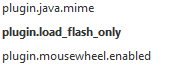
The name of the new parameter is: plugin.load_flash_only
The value of the new parameter is: false
Now you have a new Firefox-parameter, which lets you run Oracle Forms as before!
Have fun
Gerd
At 9:00 AM I had no problems starting my Forms-Runtime. Firefox 51.0 was the actual version at that point.
After lunch and restarting my Firefox I was running 52.0 with the new feature "no JAVA please" :-)
Very bad is, that firefox didn't give you any hint, when starting a Forms-URL. The only thing you see is an empty screen.
If you have this problem, here is the workaround:
Start the URL "about:config" in your Firefox. After the message, that from now on you are responsible for all things you are doing in the settings, you see all Firefox config-parameters.
Here you have to right mouse click and use "New"-"Boolean"
The name of the new parameter is: plugin.load_flash_only
The value of the new parameter is: false
Now you have a new Firefox-parameter, which lets you run Oracle Forms as before!
Have fun
Gerd
The Future of Forms - DOAG Forms Day in Berlin, 18.01.2017
Today, and it's the last day of the old year, I had to announce, that the German Oracle User Group (DOAG) will have a whole day of forms-talks:
DOAG Forms-Day 2017
Come and share your Forms 12c experience with the community.

I wish all of you a good start in the new year
Gerd
DOAG Forms-Day 2017
Come and share your Forms 12c experience with the community.
I wish all of you a good start in the new year
Gerd
The Future of Forms - DOAG Forms Day in Berlin, 18.02.2017
Today, and it's the last day of the old year, I had to announce, that the German Oracle User Group (DOAG) will have a whole day of forms-talks:
DOAG Forms-Day 2017
Come and share your Forms 12c experience with the community.
I wish all of you a good start in the new year
Gerd
DOAG Forms-Day 2017
Come and share your Forms 12c experience with the community.
I wish all of you a good start in the new year
Gerd
What's new in Forms 12c, part 2
Let's now look into the Form Builder and what changes we got there.
First we see the facelift in the Open-Dialog. It's now the typical Windows-Dialog, where you have much more flexibility.

New features in the Convert-Dialog:
Preferences-Dialog, Tab "General":

Tab "Subclass": No changes

Tab "Wizards": No changes

Tab "Runtime":

Have fun
Gerd
First we see the facelift in the Open-Dialog. It's now the typical Windows-Dialog, where you have much more flexibility.

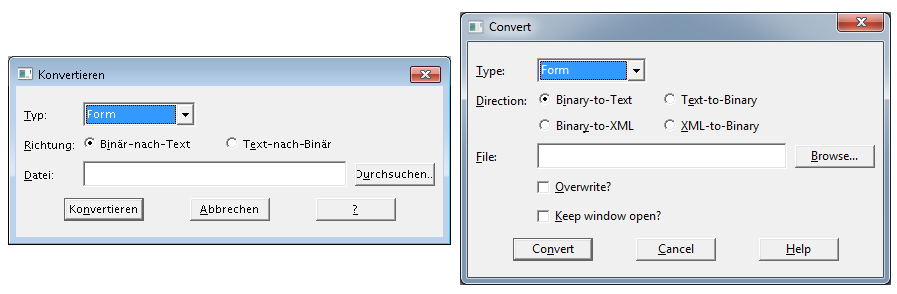
New features in the Convert-Dialog:
- New Feature "Converting to and from XML"
- Checkbox "Overwrite"
- Checkbox "Keep window open", if you have to convert many files at once.
Preferences-Dialog, Tab "General":
- The checkbox "Hide PL/SQL Compile Dialog" is new
- Web Browser location (Forms 11g: Tab "Runtime")
- Compiler Output is new

Tab "Subclass": No changes

Tab "Wizards": No changes

Tab "Runtime":
- The checkbox "Show URL Parameters" is new
- Application Server URL is much bigger!
- The Web Browser location vanished to Tab "General"

Have fun
Gerd
What's new in Forms 12c?
Here are some of the differences which I found in the new Forms 12c version. And some things, that didn't change.
Let's start with the Object Navigator. Left side is Forms 11g, right is Forms 12c.
There are absolutely no changes between the two versions.

Same picture when we look at the menu and toolbar. No changes.

And now we see the big difference between 11g and 12c. The last decades Forms was known as "Forms Builder". And now we have a rebranding to "Form Builder".
 Maybe it is only a typo. Let's wait what name it has in Release 2.
After looking at the layout I searched deeper. The help system! The global Content only changed one thing.

Oracle Forms User Interface was renamed to Oracle Form Builder. In this submenu you can now find Installation and Configuration.

Last but not least I compared the index of both help systems.
New help is available for:

That's it
Gerd
Let's start with the Object Navigator. Left side is Forms 11g, right is Forms 12c.
There are absolutely no changes between the two versions.

Same picture when we look at the menu and toolbar. No changes.

And now we see the big difference between 11g and 12c. The last decades Forms was known as "Forms Builder". And now we have a rebranding to "Form Builder".

After looking at the layout I searched deeper. The help system! The global Content only changed one thing.

Oracle Forms User Interface was renamed to Oracle Form Builder. In this submenu you can now find Installation and Configuration.

Last but not least I compared the index of both help systems.
New help is available for:
- Compiler Output
- Form_Query_Only
- Forms_Abterm_Cleanup
- Forms_C_Stack_Trace_To_File
- Forms_RUEI_Send_Form_Name
- Hide PL/SQL Compile Dialog
- Max_Event_Wait
- Record_Count_Displayed
- Show URL Parameters
- System.Last_Event
- System.Notification_Value
- System.RecMgr_MAlloced
- System.RecMgr_Mapped_In_Use
- System.RecMgr_Mapped_Reserved
- System.RecMgr_Mapped
- System.RecMgr_Written_In_Use
- System.RecMgr_Written
- User_IP_Address

That's it
Gerd
Forms 12c installation
My first installation two days ago wasn't stable. So I had to read the certification matrix to see, what's the problem.
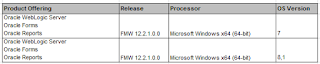
Windows 10 was a little bit to new for my first installation.
So I tried today Windows 8 in a virtual machine. And that's it.
The difference to my first installation is, that the Forms Configuration Manager didn't start.

In Windows 8 the Configuration Manager did start without problems. These steps were shown in the Manager:
1) Instance Configuration
You have to set a Form Builder Instance Path. I created a new directory and wrote it into the path
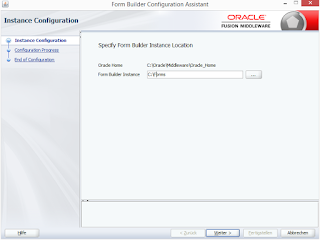
2) Configuration Progress
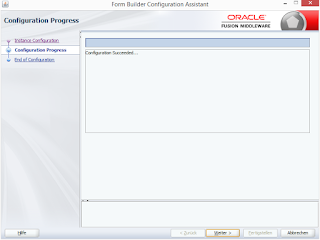
3) End of Configuration
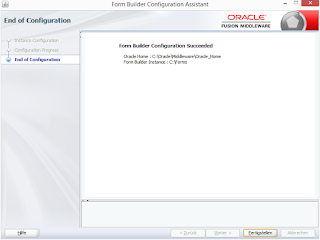
After the configuration you can work with the Form Builder
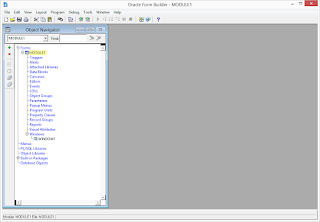
Just use it
Gerd
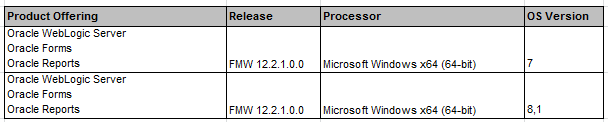
Windows 10 was a little bit to new for my first installation.
So I tried today Windows 8 in a virtual machine. And that's it.
The difference to my first installation is, that the Forms Configuration Manager didn't start.

In Windows 8 the Configuration Manager did start without problems. These steps were shown in the Manager:
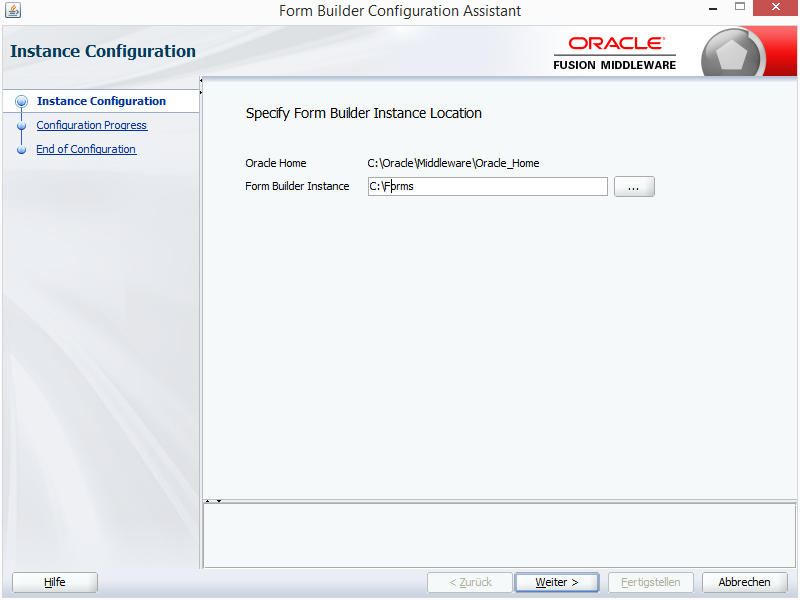
1) Instance Configuration
You have to set a Form Builder Instance Path. I created a new directory and wrote it into the path
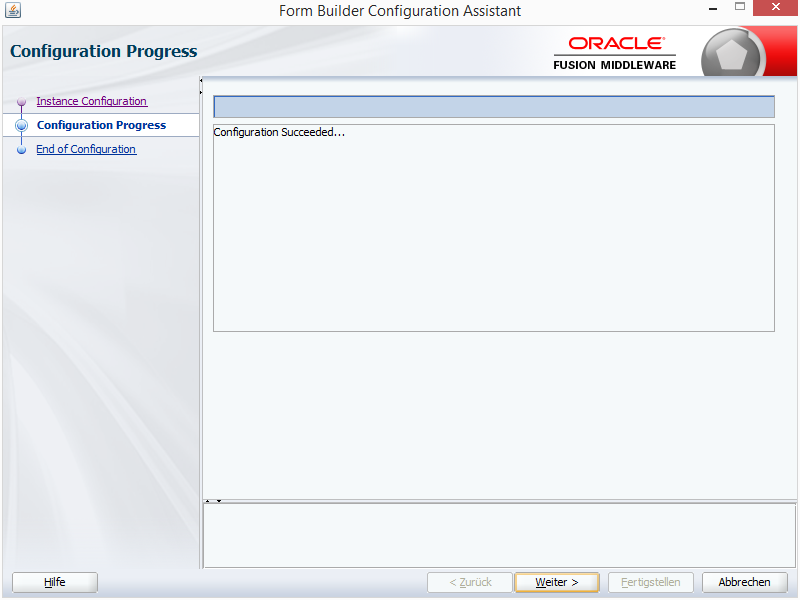
2) Configuration Progress
3) End of Configuration
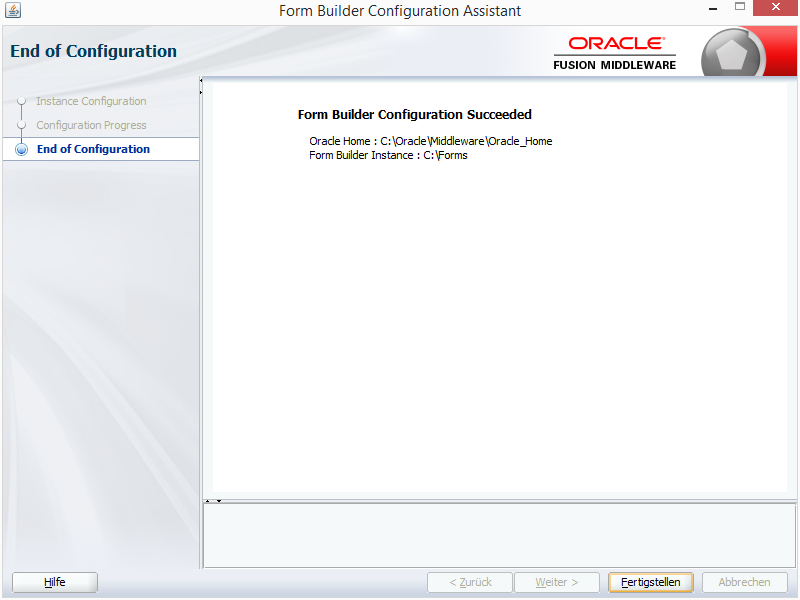
After the configuration you can work with the Form Builder
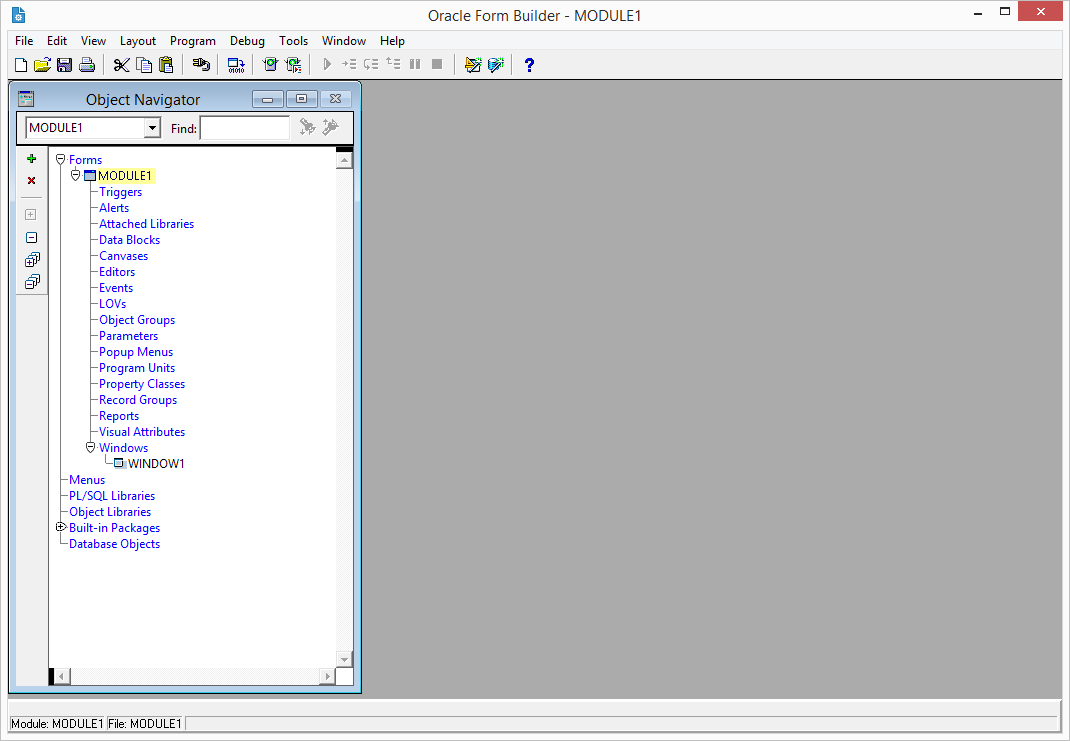
Just use it
Gerd
Forms 12c launched this night
Some hours ago Oracle launched the new release of Oracle Forms.
And here are my first steps installing the new Forms 12c.
The OS, in which I tried the installation was a VMware with Windows 10 on my iMac.
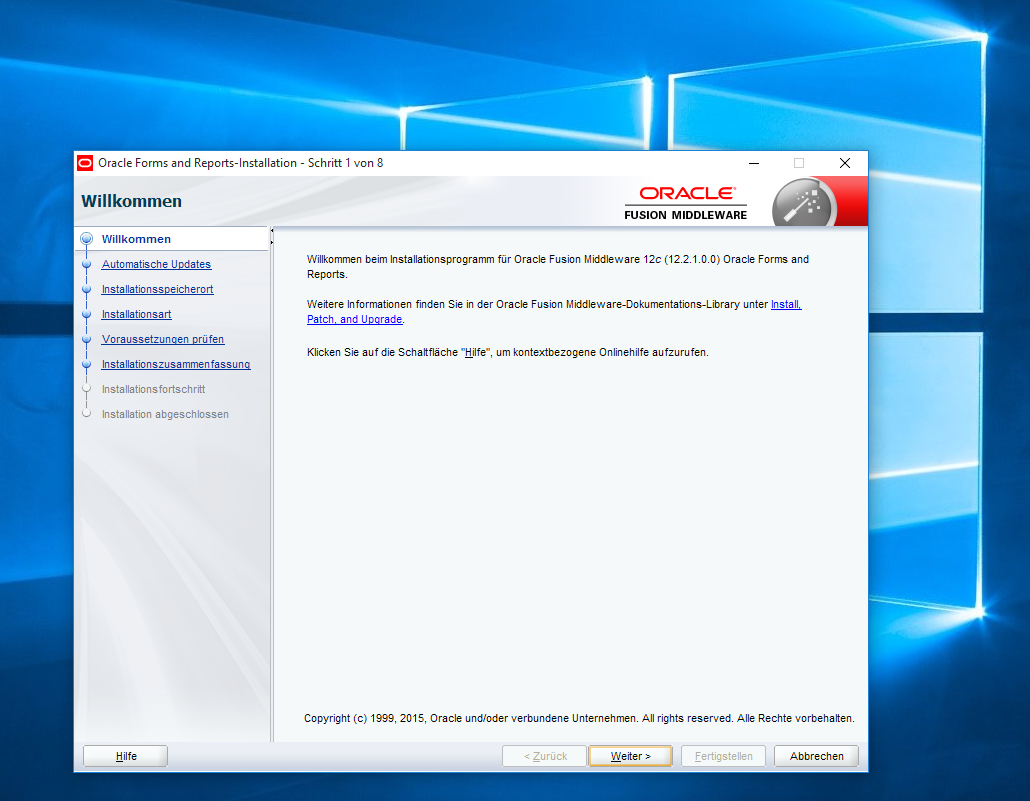
1) Welcome
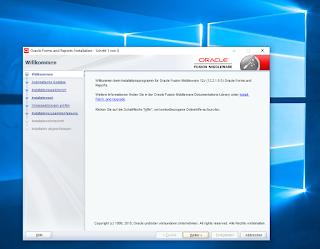
2) Updates

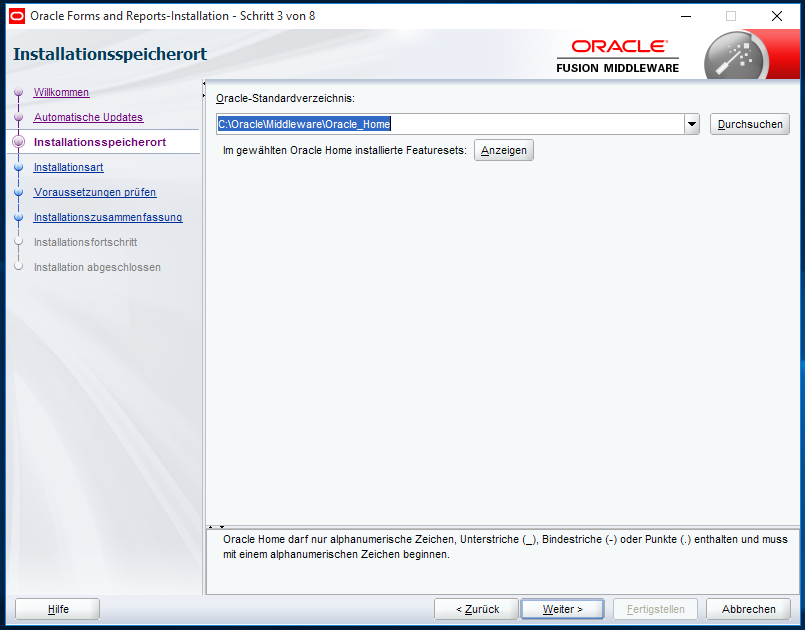
3) Destination
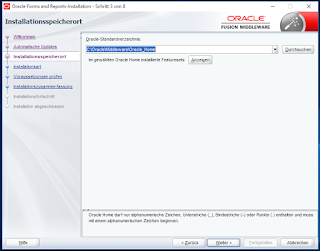
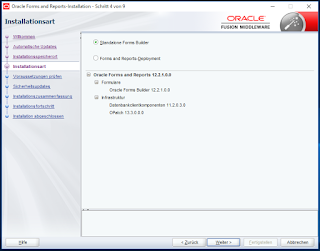
4) Installation-Type
5) Prerequisites

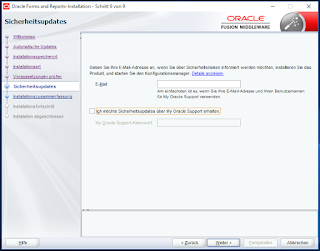
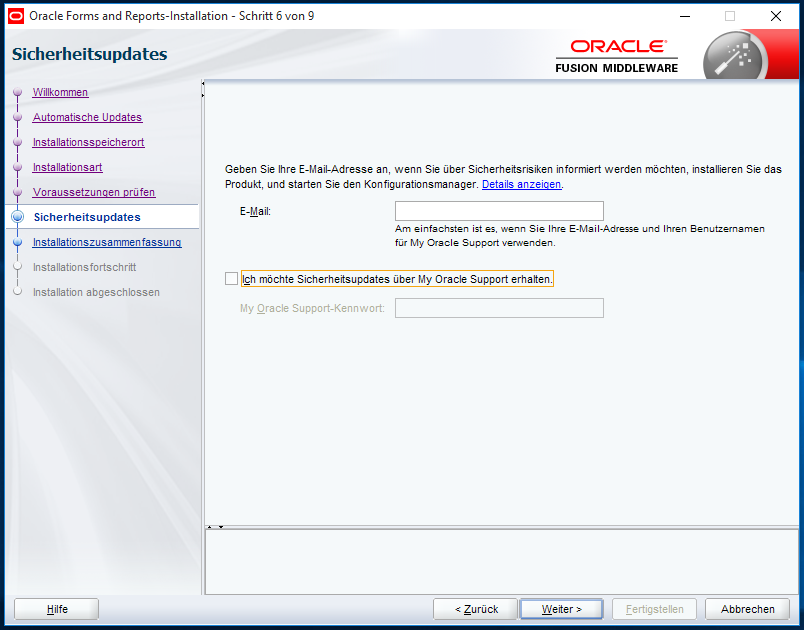
6) Security Updates
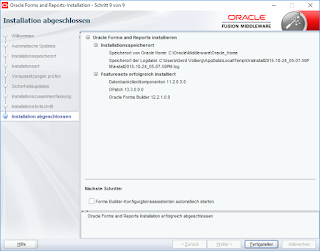
7) Summary

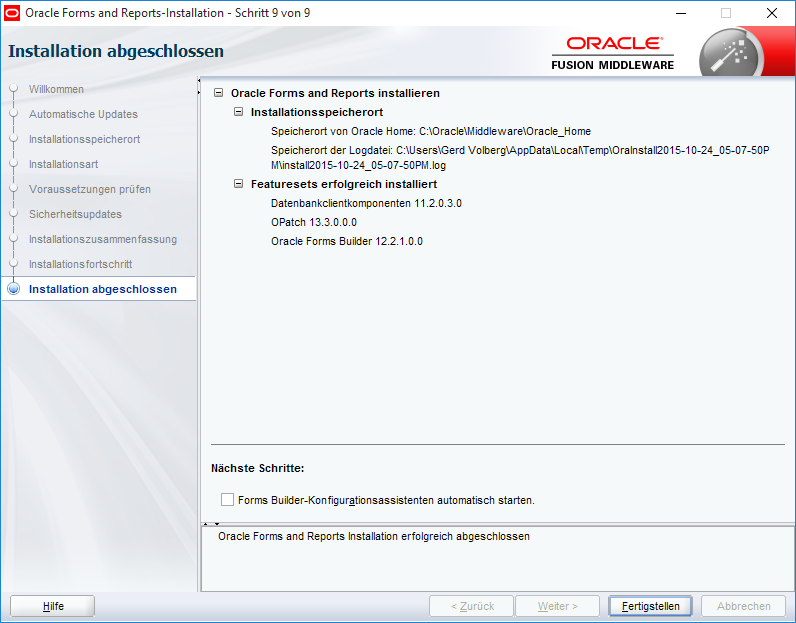
8) The End
After the installation: My first start of the new Forms
More about it in the next days.
Have fun with Forms 12c
Gerd
And here are my first steps installing the new Forms 12c.
The OS, in which I tried the installation was a VMware with Windows 10 on my iMac.
1) Welcome
2) Updates

3) Destination
4) Installation-Type

5) Prerequisites

6) Security Updates
7) Summary

8) The End
After the installation: My first start of the new Forms
More about it in the next days.
Have fun with Forms 12c
Gerd
Easy logging and debugging, version 2.0
Each application needs a simple way to log errors and find them. The following technique can also be used to debug Forms, Reports and PL/SQL. This version 2.0 has an important change. The username ist stored in the debugging-data and the viewname has changed a little bit.
First create the table, sequence and view to store the logging-information:
You need also a package with some functions to start the logging-process
You start a debugging-session with INIT and stop it with DESTROY. Error-Messages are logged using WRITE. For example:
Parts of your debugging can be deactivated with DISABLE and from this point on nothing will be written into the logging-table until you start ENABLE.
The view Logging_DESC_V shows you the debugging-information, group by the newest session-id.
Try it
Gerd
First create the table, sequence and view to store the logging-information:
CREATE TABLE Logging (
  ID                         NUMBER(9) NOT NULL,
  SESSION_ID                 NUMBER(9),
  INSERT_DATE                DATE NOT NULL,
  INSERT_USER                VARCHAR2(30) NOT NULL,
  TEXT                       VARCHAR2(2000) NOT NULL);

CREATE SEQUENCE Logging_SEQ;

CREATE OR REPLACE VIEW Logging_desc_V
         (ID, SESSION_ID, INSERT_DATE, INSERT_USER, TEXT)
AS SELECT ID, SESSION_ID, INSERT_DATE, INSERT_USER, TEXT
     FROM Logging
    ORDER BY SESSION_ID DESC, ID DESC;
You need also a package with some functions to start the logging-process
CREATE OR REPLACE PACKAGE PK_DEBUG IS
  FUNCTION Debug_allowed RETURN BOOLEAN;
  FUNCTION Next_ID       RETURN NUMBER;

  PROCEDURE Disable;
  PROCEDURE Enable;
  PROCEDURE Destroy;
  PROCEDURE Init  (P_Debug_allowed IN BOOLEAN DEFAULT TRUE);
  PROCEDURE Write (P_Text IN VARCHAR2,
                   P_Session_ID IN NUMBER DEFAULT NULL);

  G_Debug_allowed BOOLEAN := TRUE;
  G_Session_ID    NUMBER;
END;
/
CREATE OR REPLACE PACKAGE BODY PK_DEBUG IS
FUNCTION Debug_allowed RETURN BOOLEAN IS
BEGIN
  RETURN (G_Debug_allowed);
END;

FUNCTION Next_ID RETURN NUMBER IS
  V_ID NUMBER;
BEGIN
  SELECT Logging_SEQ.nextval
    INTO V_ID
    FROM DUAL;
  RETURN (V_ID);
END;

PROCEDURE Disable IS
BEGIN
  G_Debug_allowed := FALSE;
END;

PROCEDURE Enable IS
BEGIN
  G_Debug_allowed := TRUE;
END;

PROCEDURE Destroy IS
BEGIN
  Write ('----------------------stopp '
    || to_char (G_Session_ID) || '--');
  G_Session_ID := NULL;
END;

PROCEDURE Init (
  P_Debug_allowed IN BOOLEAN DEFAULT TRUE) IS
BEGIN
  G_Debug_allowed := P_Debug_allowed;
  G_Session_ID := Next_ID;
  Write ('--start ' || to_char (G_Session_ID)
    || '----------------------');
END;

PROCEDURE Write (
  P_Text       IN VARCHAR2,
  P_Session_ID IN NUMBER DEFAULT NULL) IS
  PRAGMA AUTONOMOUS_TRANSACTION;
BEGIN
  IF Debug_allowed THEN
    IF G_Session_ID IS NULL THEN
      Init;
    END IF;
    INSERT INTO Logging (ID,
      Session_ID,
      Insert_Date,
      Insert_User,
      Text)
    VALUES (Next_ID,
      NVL (P_Session_ID, G_Session_ID),
      Sysdate,
      User,
      P_Text);
    COMMIT;
  END IF;
END;
END;
/
You start a debugging-session with INIT and stop it with DESTROY. Error-Messages are logged using WRITE. For example:
pk_Debug.Init;
pk_Debug.Write ('Hello World - ' || V_Test);
pk_Debug.Destroy;
Parts of your debugging can be deactivated with DISABLE and from this point on nothing will be written into the logging-table until you start ENABLE.
The view Logging_DESC_V shows you the debugging-information, group by the newest session-id.
ID Session Insert-Date     Text
============================================
24    21   10.09.-12:38:48 -------stopp 21--
23    21   10.09.-12:38:48 Hello World - 42
22    21   10.09.-12:38:48 --start 21-------
Try it
Gerd
Just found

now I need a floppy drive for 3,5"
:-)
Gerd
Rumors about Oracle Reports 12c
For nearly six weeks, it is rumored that Oracle Reports will not appear in the version 12c.
Since then, I tried to get information on this topic. After a few emails I got the info I needed.
I hope that this cools down the rumor mill a little bit.
Gerd
Since then, I tried to get information on this topic. After a few emails I got the info I needed.
The rumors are definitely wrong and no one at Oracle wants to cancel Reports 12c.
I hope that this cools down the rumor mill a little bit.
Gerd
The German ADF-Community-Book was released today
The German ADF- (and Forms-) Community released their first book.
The "ADF book" is a compilation of German lectures, articles and workshop tutorials in Oracle ADF (some of the contributions are in English!). The authors are members of the German ADF community. The time frame covers the years 2010 to 2014. The project "ADF book" was implemented by a team of staff from partner companies and Oracle.
40 authors wrote 70 contributions on 1400 pages in this book.
It's a 110 MB PDF and can be downloaded for free from the ADF-Community-Page.
My part in the book has the title "Modernizing Oracle Forms" in which I demonstrate, how easy it is to enhance Oracle Forms with modern frameworks like LAF (Look and Feel-Framework from Francois Degrelle) and how to integrate ADF in Oracle Forms via OraFormsFaces (A framework from Wilfred van der Deijl).
Have fun with the book
Gerd
The "ADF book" is a compilation of German lectures, articles and workshop tutorials in Oracle ADF (some of the contributions are in English!). The authors are members of the German ADF community. The time frame covers the years 2010 to 2014. The project "ADF book" was implemented by a team of staff from partner companies and Oracle.
40 authors wrote 70 contributions on 1400 pages in this book.
It's a 110 MB PDF and can be downloaded for free from the ADF-Community-Page.
My part in the book has the title "Modernizing Oracle Forms" in which I demonstrate, how easy it is to enhance Oracle Forms with modern frameworks like LAF (Look and Feel-Framework from Francois Degrelle) and how to integrate ADF in Oracle Forms via OraFormsFaces (A framework from Wilfred van der Deijl).
Have fun with the book
Gerd
Don't use INC and DEC in PL/SQL Libraries
In my oldest PL/SQL-Library in Forms 4 my first procedures were:
Now I found out, that DEC isn't working in newer Oracle Forms versions...
And why? Oracle created in PL/SQL a new SUBTYPE of DECIMAL and it is called "DEC". So you can use it in this way:
All other languages know INC and DEC for incrementing and decrementing. Not Oracle!
Be careful when creating new functions which you want to use for a long time :-)
Gerd
PROCEDURE Inc (P_Number IN OUT NUMBER) ISIn some variations with one or two parameters I used this Increment and Decrement since 20 years! Without having trouble in all the days.
BEGIN
P_Number := P_Number + 1;
END;
PROCEDURE Dec (P_Number IN OUT NUMBER) IS
BEGIN
P_Number := P_Number - 1;
END;
Now I found out, that DEC isn't working in newer Oracle Forms versions...
And why? Oracle created in PL/SQL a new SUBTYPE of DECIMAL and it is called "DEC". So you can use it in this way:
DECLARE
  V_Value   DEC;
BEGIN
...
And this behaviour kills my procedure in the PL/SQL-Library :-(
All other languages know INC and DEC for incrementing and decrementing. Not Oracle!
Be careful when creating new functions which you want to use for a long time :-)
Gerd
New Statement of Direction, September 2013
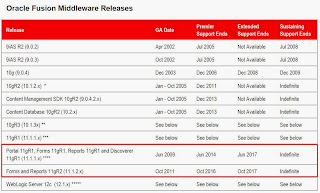
The actual lifetimes of Forms and Reports can be found in this document.
The most important at a glance:
Here are some of my older Statement of Directions private copies:
SoD Oracle Fusion 2013 / 09
SoD Forms 2012 / 03
SoD Oracle Fusion 2010 / 05
SoD Forms 2009 / 07
SoD Forms 2008 / 07
SoD Forms 2007 / 11
SoD Forms 2005 / 09
SoD Forms 2005 / 05
SoD Forms 2005 / 03
SoD Forms 2004 / 06
My previous article on this topic is here
The most important at a glance:

Here are some of my older Statement of Directions private copies:
SoD Oracle Fusion 2013 / 09
SoD Forms 2012 / 03
SoD Oracle Fusion 2010 / 05
SoD Forms 2009 / 07
SoD Forms 2008 / 07
SoD Forms 2007 / 11
SoD Forms 2005 / 09
SoD Forms 2005 / 05
SoD Forms 2005 / 03
SoD Forms 2004 / 06
My previous article on this topic is here
Modernizing Forms Talk
The interview, I wrote about two days ago, was made in cooperation with my presentation "How to modernize Oracle Forms". And here is the video (50 minutes in german):
The link to the slides, used in the presentation, is here. It's german too, but I hope, that chapters like "Installation Look and Feel" are so easy to understand, that nobody has language problems in most parts of the presentation.
Try it
Gerd
The link to the slides, used in the presentation, is here. It's german too, but I hope, that chapters like "Installation Look and Feel" are so easy to understand, that nobody has language problems in most parts of the presentation.
Try it
Gerd
DOAG interview
After my last conference-presentation I was interviewed by the DOAG. The interview is in german only and the topic is "Modernizing Forms".
Content of the interview + YouTube-Info:
Have fun
Gerd
Content of the interview + YouTube-Info:
Manysay about the appearance of Oracle Forms, this is no longer appropriate. Gerd Volberg from Opitz Consulting has looked at the open-source environment and found frameworks with which the Forms world can be spiced up. In an interview with the Head of Development SIG Christian Schwitalla Volberg presents the "Forms Look and Feel Project" by the Oracle Ace Francois Degrelle and the framework "OraFormsFaces" of Wilfred van der Deijl that combines the Forms and ADF world.
Have fun
Gerd
Oracle Forms in the Cloud - the next big thing?
The whole world speaks about working in the cloud. Why not Oracle Forms?
Why not...
Why...
Because: Oracle did it already...

Link zum Webcast
Michael Ferrante and Roger Vidal are explaining in the Webcast, how you can run your application in the cloud with the Web Logic Server and what this means for the future of Oracle Forms.
Grant points to this webcast with the words: "Oracle Forms remains a key technology..."
Have fun listening to Michael and Roger
Gerd
Why not...
Why...
Because: Oracle did it already...

Link zum Webcast
Michael Ferrante and Roger Vidal are explaining in the Webcast, how you can run your application in the cloud with the Web Logic Server and what this means for the future of Oracle Forms.
Grant points to this webcast with the words: "Oracle Forms remains a key technology..."
Have fun listening to Michael and Roger
Gerd
Behavior of Tab Canvases
The behavior of tab canvases ist very interesting, when your form gets more and more tabpages. Let's say, you have only three pages in your tab canvas. (Width Style Property = Fixed)
 Forms automatically renders all three pages in the same size. That's what we expected.
In the next step we create a fourth tab:
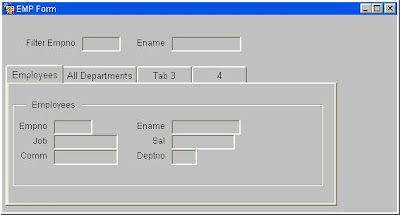
If there is not enough space for all page-labels in the same size, then we see a first kind of resizing. All labels are readable. But the size of some pages is reduced.
If we create more tabpages:
 At one point the label-text shrinks and some letters were exchanged by dots.
And in the last stage:
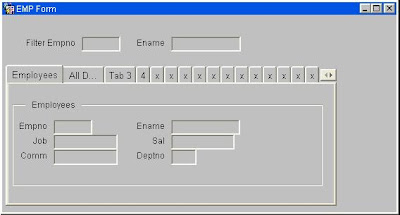
The last type of look and feel is, when we get a horizontal scrollbar. Think on this, when you use many tabpages in your form
Have fun
Gerd

In the next step we create a fourth tab:

If there is not enough space for all page-labels in the same size, then we see a first kind of resizing. All labels are readable. But the size of some pages is reduced.
If we create more tabpages:

And in the last stage:

The last type of look and feel is, when we get a horizontal scrollbar. Think on this, when you use many tabpages in your form
Have fun
Gerd
Forms Presentations at DOAG Conference 2012
And here are some tips for the DOAG Conference in Germany

Jan Peter Timmermann

Wolfgang Kriebel, Christian Kühne

My own presentation :

Perry Pakull

Stephan La Rocca

And in the afternoon we can attend at the Fusion Middleware Panel with Frank Nimphius, Duncan Mills and Jürgen Menge

Gerd

Jan Peter Timmermann

Wolfgang Kriebel, Christian Kühne

My own presentation :

Perry Pakull

Stephan La Rocca

And in the afternoon we can attend at the Fusion Middleware Panel with Frank Nimphius, Duncan Mills and Jürgen Menge

Gerd
Forms Modernization at Oracle Open World
Here are some tips for the Oracle "Forms" Open World 2012
Grant talks about The Future of Oracle Forms :

Lucas presentation is about The Future, too :

Mia and Grant talk together about face-lifting-tips for Forms :

More infos can be found on Grants blog and on Mia's blog
Have fun with it
Gerd
Grant talks about The Future of Oracle Forms :

Lucas presentation is about The Future, too :

Mia and Grant talk together about face-lifting-tips for Forms :

More infos can be found on Grants blog and on Mia's blog
Have fun with it
Gerd