


Duncan Davies


I’m Randy Groncki and this is how I work
Next up in the ‘how I work‘ series is one of the newer batch of PeopleSoft bloggers – Randy Groncki. Randy is the brains behind the PeopleTools Tech Tips blog. It’s a more recent blog – starting in 2020 – however Randy has been working with PeopleSoft since 1996, including a stint working for PeopleSoft itself.

Name: Randy Groncki
Occupation: Independent PeopleSoft Technical Consultant
Location: Northern Virginia, USA
Current computer(s):
- Dell XPS 8930 Desktop (Work/Personal Machine)
- MSI GS60 Laptop (Host PeopleSoft PUM environments)
- Lenovo P50 Laptop (Primary client machine)
- … and several others around the house. They’re like stray cats. I’m not sure if I own all of them or where some of them came from, but they’re here.
Current mobile devices:
- iPhone 6s (The museum wants it back)
- iPad Air 2
- Apple Watch
I work: Pragmatically.
What apps/software/tools can’t you live without?
- Chrome: Because… yeah.
- LastPass: The number and complexity of passwords both work and personal make a password manager essential. I don’t know most of my actual passwords.
- NotePad++: A decent text editor for a coder. It’s just there, open, every day, all day long.
- PeopleTools App Designer: I like a lot of 80s music and movies too.
- SQLDeveloper: Essential tool if working on an Oracle database. No, SQLPlus will not do just as well. SQLDeveloper has improved a lot over the past few years. TOAD is nice, but most enterprises I’ve worked don’t license it.
- Excel: The unsung hero of anyone doing work on a computer. This is Batman’s Utility Belt. He may ditch the Batmobile or Bat Plane, but that utility goes everywhere.
- QuickBooks/Quicken: As an independent consultant, I must stay on top of my finances.
Besides your phone and computer, what gadget can’t you live without?
My Logitech K850 keyboard and M720 mouse. I have three computers at my office that I constantly switch between, all day long. This one keyboard and mouse allows me to easily control them all wirelessly. I don’t want a clunky KVM switch on my desk with the mass of messy cables.
What’s your workspace like?
Comfortable. I’ve been working from home at least a few days a week for several years before COVID. We have a main floor room setup as an office for both me and my wife. I think long hours working from home is worth a modest investment in my workspace to keep productive and healthy. My home office is usually better outfitted than the client sites.
My setup:
- 34” (86.5 cm) Ultrawide Monitor (1440, not 1080)
- Office grade corner desk
- Secret Labs Titan chair

What do you listen to while you work?
Nothing. I have a difficult time tuning out music while I work. I think I use the same part of my brain for coding and music. To me, it feels like trying to engage in two different conversations simultaneously. Ironically, I can easily tune out other people’s activities and conversations. Yes, I can listen to music while I drive.
What PeopleSoft-related productivity apps do you use?
App Designer, SQLDeveloper & Datamover.
Remote Desktop – I think this deserves an honourable mention in our current way of working. It’s rare anymore that I install PeopleTools on my local machine for a client. Having a remote desktop on the client’s servers keeps all the data at the client. Since client data is no longer on my machine, there is much less data risk should my laptop be lost, stolen, or compromised: It’s just a gateway
Do you have a 2-line tip that some others might not know?
I want to have an amazing code snipped that only Dave Duffield and I know, newly shared with everyone. The reality is that I’m an “in the trenches every day” PeopleSoft tech, not that guy spending all my time on R&D and new, cutting edge technology.
Having said that, my “GoTo” table for field reference in SQL is PSRECFIELDDB. This PeopleTools table has all the record fields broke out of the many layers of sub-records on PSRecDefn
SELECT FIELDNAME FROM PSRECFIELDDB
 WHERE RECNAME = '[RECNAME]'
 ORDER BY FIELDNUM;
It’s brilliant that someone in PeopleTools figured out we need an absolute reference for every table instead of resolving sub-records in sub-records every time we need to reference the actual table.
What SQL/Code do you find yourself writing most often?
EFFDT & EFFSEQ Sub-Selects. I think newer PeopleTools coders should learn by coding these out every time, not cut and pasting from a code snippet or PSQuery. These have to be second nature, not lookup or reference.
MessageBox(..) for coding diagnostics
What would be the one item you’d add to PeopleSoft if you could?
I would like a better code editor… Somehow in a viable way.
I’m writing this as of 8.58. Just about any other modern IDE has many practical productivity tools such as code folding, snippets, code completion and parameter hints. I want these in my App Designer too.
The PeopleTools managers have made the valid point that resources spent on improving the editor starves development of other technology keeping PeopleTools current and useful in our quickly changing world. But… how long do we kick this can down the road?
What everyday thing are you better at than anyone else?
I think I’m really good at knowing that I’m not better at things than everyone else. I received a great education early in life that however good you think you are at something, there is someone out there that is much better. The Army is happy to remind you of this as many times as you need it.
Having said that, I think I’m a good generalist and understanding that few things are things in themselves, but systems of other things. When I start understanding the pieces, the bigger picture gets much clearer.
My grandfather was amazing in that he seemed to be able to build/fix anything. This guy would rebuild car engines, diagnose electronics with an oscilloscope and then go to work as handling finances for the county. I hope I got some of his “figure it out-ed-ness”, the broad ability to understand many different ideas. One of the things I’m proud of is my garage workshop… because he had one. His vice is on my workbench. In modern “IT Speak” I’m a “Short/Fat” or “T” shaped tech, not a “Tall Skinny” expert.
How do you keep yourself healthy and happy?
First priority is my family and my home. Time available after that is learning new things, reading Sci-Fi/Fantasy books and watching good movies and shows.
Of course, Computers and Technology has always been a passion and hobby of mine so I’m constantly playing with something new.
I have made a concerted effort to get/stay healthy during COVID. I try to do a workout most days of the week and feel guilty if I miss it. However, my workouts are geared more to staying healthy, mobile and capable. The “Brawny Beach Body” is just not happening. Sometimes, when I get very decadent, I pull up an episode of “Time Team” and play archaeologist for an hour.
What’s the best advice you’ve ever received?
From Life: You Never Know What Someone Is Going Through, So Be Kind
From the Army: Find something to do or someone else will find something to do for you.
How has your work-life changed due to the pandemic?
I’ve been working from home for about a year now. I’m glad I learned to work from home before COVID happened, because it’s now very important. I will not work in my pyjamas all day long. I will shower and dress every morning. It puts me in a work mindset. I never know when a video meeting is coming or who else is going to be on it.
I do notice that I seem to work more now since work is just in the other room. Since no one is at the office, I can get pinged and be on the system in a minute or two most times.
How do you think covid will change the future workplace?
I think more of us will work from home more often. Business are finding out that we have been able to keep productive and supportive even though we aren’t physically at the office. They are re-evaluating the amount of expensive office space that they really need and who really needs to be there all the time.
I think people will choose to live where it’s nice rather than close to work. People will invest in good internet connections and decent home office setups.
I think people are finding out that laptops are great to keep mobile, but there is only so much you can productively do for so long on a 13” screen. I think we are also realizing there are times it truly helps to be in the same room communicating with someone in person, not via Slack, Text or Video. There is a needed place for in person collaboration.
I’m Rob Swailes and this is how I work
It’s long overdue to run a fresh batch of profiles in the ‘how I work‘ series and I’m delighted one of Version 1’s newest PeopleSoft Techs – Rob Swailes – has agreed to be profiled. This is especially good timing as Rob is speaking at the PeopleSoft Innovation Summit that’s running Weds and Thurs this week. Here’s a link to his session and to register if you’ve not already signed up.

Name: Rob Swailes
Occupation: PeopleSoft Lead Technical Consultant at Version 1
Location: York, UK
Current computer: HP EliteBook 840 G5 (Work, underpowered laptop), MSi GS63VR 7RG with 32GB (For the real work!)
Current mobile devices: Samsung Galaxy S9+
I work: Because I need to, although I enjoy what I do and work can even be fun sometimes. I am a creative person at heart and therefore I am under no illusion that if life allowed it, I would be exploring new ideas and innovations rather than building new pages and App Engines. I wouldn’t leave the PeopleSoft arena as I have loads of cool ideas that I just can’t find the time to build.
What apps/software/tools can’t you live without?
- Beyond Compare – What else is there when you are finding those old SQR customisations.
- Oracle Virtualbox – Such a great way to get your own PS environment on my laptop ( I know I should be using cloud!).
- Postman – Brilliant tool for those who wish to experiment in the world of APIs.
- Notepad++ – Because I still code my Java old school.
Besides your phone and computer, what gadget can’t you live without?
Last year I bought a Snapmaker V2.0 all in one 3D printer, laser engraver and CNC. I have to say it is amazing. As a Yorkshireman, (who are known for being tight with their money), I love being able to say, “We don’t need to buy that, I’ll just print one!”. My brain conveniently forgets the initial cost of the printer.
What’s your workspace like?
For 19 years it was mostly at client sites, away from home, but after joining Version 1 the emphasis was a lot more on working remotely from home. Then Covid 19 hit and now I spend most of my life in my office. I tend to have any number of laptops on the desk at one time, with my own, work and usually a client all in use. Add to that the kids’ gadgets constantly being charged and I would say my office gets a little cluttered.

I do have an alternative as just before the pandemic broke out, I built a shed and I spent many weekends fully insulating, carpeting and installing a full off-grid solar generation and heating. So, like all men of a certain age, when life seem a little hectic I can retire to the sanctuary of my shed.

What do you listen to while you work?
I’ve always been a huge fan of R.E.M, growing up with amazing albums such as Out of Time and Automatic for the People. But I am fairly fluid with my listening habits, finding something to suit the way I am feeling each day.
What PeopleSoft-related productivity apps do you use?
I am fairly standard when it comes to PeopleSoft development, but I do think that the browser debuggers are vastly overlooked. I do a lot of coding in Javascript and CSS so the debuggers are really useful, but if you want to just find what that field is on a PeopleSoft page, it’s quicker to use the browser element selection than opening the page in App Designer. I like building out PeopleSoft with APIs so Postman is invaluable. I spent a lot of time connecting PeopleSoft to the OCI APIs and Postman was indispensable there as that is a particularly complex authentication requirement.
Do you have a 2-line tip that some others might not know?
For those that like me use Javascript with their PeopleCode, a great way to communicate from Javascript to PeopleSoft is to use IScripts like a function. Call the IScript from Javascript, then get the IScript to send back the information from PeopleSoft in the Response object. Also the Javascript Fetch function should be your mainstay for calling APIs, it’s an elegant implementation.
fetch(logoutIscriptUrl)
    .then(response =>.text())
    .then(data => { window.top.location = data});
What SQL/Code do you find yourself writing most often?
I’m a developer, so let’s be honest, the most often written code is:
Messagebox(0,””,0,0,”Where is my mistake “| &Here);
What would be the one item you’d add to PeopleSoft if you could?
It’s a little bit strange but I wanted to talk to PeopleSoft, so I have actually implemented this. Hopefully I can show it one day.
What everyday thing are you better at than anyone else?
I am a keen gardener (but no Alan Titchmarsh) and in the summer months we grow a lot of our own produce. It’s a great way to get your mind off work and you get to appreciate the results of your hard work. I’m a firm believer that there is nothing that we cannot do if we set our minds to it and so I always try to do everything myself, be it felling trees or building raised beds.
How do you keep yourself healthy and happy?
My kids keep me fairly active, certainly my son has me playing football on a regular basis. Since the lockdown here in the UK, our garden is more mud than lawn due to the constant pounding of football boots. I mentioned gardening already and building my shed, so anything practical where you get an actual physical result is always satisfying for a coder who builds intangible things all week long.
What’s the best advice you’ve ever received?
I was a keen sprinter at Secondary school and my chemistry teacher, Mr Adams told me, “When things get too much, get out and run. It’s the best way to clear your head”. Who would have known that years later Forrest Gump would get the same advice! I still use the advice today, although I’m a little slower.
PeopleSoft UI Showcase
While commuting this morning I listened to Dan & Kyle’s podcast with Matthew Haavisto and they discussed that fact that the Fluid UI has been around for a while (since Tools 8.54, which was more than 5 years ago). It struck me that most clients will have adopted Fluid by now and branding is getting easier so there should be lots of good examples out there.
My mind drifted back to the company I worked for previously where we had a ‘UI Showcase’ of PeopleSoft branding eye-candy to drop into presentations to get people dreaming of the ‘art of the possible’.
The UI Showcase really started when we wanted to share the work we did for Pret a Manger, the high-street retailer. It looks really dated now, but back in 2009 it was pretty exciting.
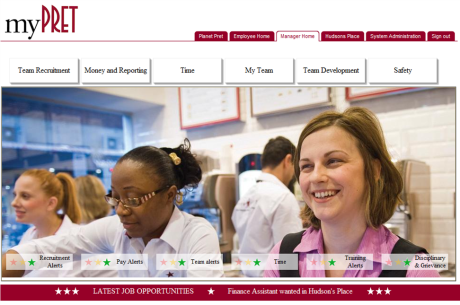
The burgundy tabs across the top were role-based homepages, the chunky white buttons at the top were tiles that accessed Nav Collections and the semi-transparent alert boxes over the lower section of the image were alerts where the stars changed depending upon different PS query thresholds. Much of this has parallels to the Fluid UI we have today.
On the Podcast, Matthew said that he’d seen some pretty creative uses of Fluid UI but I’m not sure many of those customers who’ve really pushed the boundaries have shared their work publicly. I’d really like to see them, and I bet many others would too. Maybe we could do something similar to a PS UI Showcase again, but on a wider scale?
I thought perhaps I’d start a series of posts, each highlighting a customer who has done something impressive and eye-catching with Fluid might be fun. Then the community would have something to flick through for inspiration when designing your latest refresh. Get in touch (duncan@peoplesofttipster.com) if you’re proud of your Fluid deployment – it can be anything, a cool tile, a great overall design, etc – and we’ll sort out how to feature you.
I’m Kyle Benson and this is how I work
I’ve not blogged on this site for a while so it takes a special post to break the hiatus. I’m delighted to finally be able to share the “How I Work” entry for Kyle Benson, one half of the all-conquering PSAdmin.io duo. Kyle and Dan are super-busy, splitting their time between PeopleSoft consulting and the PSAdmin.io slack community, their Podcast, their conference and their website. I’m thrilled that he has added his profile to our ‘How I Work‘ series.

Name: Kyle Benson
Occupation: Independent PeopleSoft Consultant and Co-owner of psadmin.io
Location: Minneapolis, MN
Current computer: Dell Precision 5510
Current mobile devices: Pixel 2
I work: To keep from getting bored. I have a ton of fun solving tough problems and optimizing things.
What apps/software/tools can’t you live without?
- Beyond Compare
- Virtual Desktops
- Phire
- psadmin-plus
- My own .bash_profile
Besides your phone and computer, what gadget can’t you live without?
Saying I “can’t live without” this is overstating it, but I love my home automation gadgets. I have been slowly adding more and more to my home. Lately my pace has slowed down so my family can keep up with my craziness. I’m currently using a SmartThing Gen. 1 HUB and I’m liking the ecosystem. That reminds me, time to upgrade!
What’s your workspace like?
I split time between client sites and my home office. I like to use a standing desk and keep it rather tidy. I love my ultrawide monitor and have a “studio” step for creating psadmin.io content.

What do you listen to while you work?
I love to put on mellow, ambient, downtempo style music. I often listen to the same playlist on repeat for months. Something about the relaxing, repetitive sounds helps get me in “flow” faster. The artist Blackmill really started me down this road. The current playlists I’m listening to on Spotify are ‘Atmospheric Calm’ and ‘Soundscapes For Gaming’.
What PeopleSoft-related productivity apps do you use?
I love Phire for development and git for DPK/admin scripts. Having the history and flexibility to migrate is so nice. Using psadmin-plus helps a lot, too!
Do you have a 2-line tip that some others might not know?
Make sure you are using aliases so you aren’t wasting time typing! Here is a short list of aliases I use often, mostly related to changing directories.
- cddpk
- Change to the DPK base directory
- cdcfg
- When using multiple $PS_CFG_HOMEs on a server, change to the config homes base directory
- cdweb $domain_name
- Change to the PORTAL.war directory of a domain
- pupapp $environment
- Run puppet apply for an $environment (ie. production)
What SQL/Code do you find yourself writing most often?
Currently I’ve found myself living in the browser development tools. I’ve been exploring some of the new JavaScript that Fluid and Unified Navigation introduces. I do a lot of debugging, playing in console, etc to find out how some of these features work. This is all pretty complex stuff and you can really get lost down the rabbit hole.
What would be the one item you’d add to PeopleSoft if you could?
Current CPU archives in DPK.
What everyday thing are you better at than anyone else?
I love riddles and puzzles. I’ve been really into escape rooms this past year, too.
How do you keep yourself healthy and happy?
Getting outside with the family year round is key. Living in a place like Minnesota, you learn a lack of vitamin D and cabin fever is no joke. Walking, hiking, biking in the summer. Biking and cross country skiing in the winter. Also, the family heads up to the North Shore of Lake Superior every few months. These weekend getaways are always a great recharge.
What’s the best advice you’ve ever received?
Find a job you enjoy doing, and you will never have to work a day in your life.
Fusion and in-app Guides
I’ve heard a couple of clients recently mentioning that they’d like to have some kind of in-app guide setup to walk their self-service users through common tasks in Fusion, so I thought I’d investigate.
There are quite a few companies that operate in the same area, here are the ones that I found with a short googling session:
ServiceCostAppcuesVariesIridizeAcquired by Oracle, now known as Oracle Guided LearningMyGuide$1-3/user/monthPendoVariesToonimoRequest a QuoteUserlaneRequest a QuoteWalkMeRequest a QuoteWhatfixRequest a QuoteThere are also a couple of Open Source alternatives Joyride and Bootstrap Tour. Although they’re free to use, you’re going to need to code to get anything up and running so they’d be significantly higher maintenance.
Over the next few weeks I’ll investigate some of these options and post the results.
I’m Brad Carlson and this is how I work
This week we’re featuring another of the mainstays from the PSAdmin.io slack community – Brad Carlson. He is a regular in the community and another member of the seemingly endless ‘PeopleSoft Minnesota Mafia’. Brad is a frequent guest on their PodCast talking about his IB Monitor tool and discussing the highly efficient application of CPU patches. I’m thrilled that he has added his profile to our ‘How I Work‘ series.

Name: Brad Carlson
Occupation: Oracle DBA/PeopleSoft Admin
Location: Lino Lakes, MN
Current computer:
At work:
Microsoft Surface Pro 4: Core i7, 16GB RAM, 256GB SSD with 24” and 17” Dell Monitors
At home:
Macbook Air 13”, Core i5, 8GB RAM, 128GB SSD, and
AMD Ryzen 1600x, 8GB RAM, 256GB/4TB (Media PC)
Current mobile devices: Samsung Galaxy s5. Yes, it’s old, but it still works.
I work: Intently
What apps/software/tools can’t you live without?
- TOAD and SQLDeveloper for sure. Each has their strengths.
- UltraEdit/UltraCompare
- Visio
- PowerPoint
Besides your phone and computer, what gadget can’t you live without?
Probably our Keurig.
What’s your workspace like?
It’s nothing fancy, but it works for me. I’ve got a space for my Surface, a 24” Dell monitor as my primary screen, and a 10+ year old 17” Dell monitor to the side which hasn’t been turned on in a very long time. My cube walls are plastered with pictures of my wife and son, along with various artwork my son has produced over the years (DD: plus a picture of Bill Murray, it seems!). It’s a bit cluttered at times, but I try not to let it get too out of hand before I straighten things up.

What do you listen to while you work?
Almost anything, except Country. I have playlists that range from Bach to Fleetwood Mac to Slayer, sometimes even in that order. You’ll find lots of Metal (Megadeth, Metallica, Slayer, Linkin Park, etc) and Industrial (Ministry, NIN, etc) bands in my music collection, and I find those keep me energized at work.
I’m also a big fan of Rob Scallon’s unique covers, and will stream some of those from YouTube periodically.
What PeopleSoft-related productivity apps do you use?
Honestly, I am not in App Designer much anymore. I still use Change Assistant and Data Mover occasionally.
Most of my admin work would be more on the server side, so psadmin is a frequent tool. When I wear my DBA hat, I spend most of my time in TOAD, SQLDeveloper, and OEM.
Do you have a 2-line tip that some others might not know?
PS SQL:
Do not ignore Set ID
Or Business Unit.
Sorry… I guess a Haiku is 3 lines.
What SQL/Code do you find yourself writing most often?
It might sound crazy, but I love tuning SQL. If we have performance issues with code, I’m usually game for taking a look.
I enjoy writing SQL/scripts to automate common tasks. We’re really into automation here at the University of Minnesota. A personal favorite was building a process to refresh a full PeopleSoft environment by issuing a single command.
I also try to find time to build tools, like the IB Monitor, to help the teams here. I tend to gravitate to Java for those.
What would be the one item you’d add to PeopleSoft if you could?
Even though I don’t use the tools much anymore, I’ve been wondering why PeopleSoft hasn’t moved the Application Designer functions into the online application.
What everyday thing are you better at than anyone else?
Being me. Hands down. It’s not as easy as it might look.
How do you keep yourself healthy and happy?
I still play hockey twice a week (all year) as a goalie.
I also enjoy bowhunting and going to the archery range with my son. In fact, it’s that passion which led to my writing an application for hunters (GameTracker: The Hunting App on Android and iOS). Developing that was a fun learning experience.
Travel with my wife and son also keeps me pretty happy. We typically do a vacation each year, and it usually involves the outdoors/hiking.
At home, we have a koi pond in our back yard. The sound of the waterfall, and the tranquillity of the pond are very relaxing.
What’s the best advice you’ve ever received?
My dad always told me, “Work with your brain, not your back”.
I’m Charlie Sinks and this is how I work
This week we’re featuring another of the mainstays from the PSAdmin.io slack community – Charlie Sinks. He is a regular in the community and a frequent guest on their PodCast giving UMRUG recaps and discussing automation. He also presented at the inaugural PSAdmin.conf on Implementing Rundeck with PeopleSoft (the recording is available here and is well worth an hour of your time). I’m thrilled that he has added his profile to our ‘How I Work‘ series.

Name: Charlie Sinks
Occupation: Sr. Software Engineer and PeopleSoft Admin at Andersen Windows
Location: Oak Park Heights, MN
Current computer:
At work: Dell Latitude E7470 laptop running Windows 10.
At home: a PC that I built from bits and pieces currently running Windows 7 and Ubuntu Linux
Current mobile devices: Motorola Moto G4 Plus and a cheap Timex wristwatch
I work: Fervently
What apps/software/tools can’t you live without?
- PeopleSoft Deployment Packages (DPKs) and Puppet – I can’t even imagine deploying PeopleSoft environments and maintenance the old way anymore. It’s easy to get hung on the things we wish the DPK did better, but it really opened the door to automation in the PS Admin world for those of us who weren’t already using Puppet, Ansible, etc.
- Rundeck – the ability to execute tasks – from simple commands to complex orchestration – on any number of remote servers has helped us go a long way towards automation. For example: single-click CPU patching on all of our non-Production servers at the same time. Even for simple service restarts, it’s so much easier to do it from a dashboard in Rundeck.
- BeyondCompare – It’s crazy how many file formats this thing can compare. Best compare utility I’ve come across.
- Password Safe – Way better than remembering a hundred passwords, and way WAY better than keeping them all in a spreadsheet. Also, using a password manager encourages me to use very long, complex passwords since I’ll never have to remember or retype them. Password Safe is great at storing passwords for all kinds of accounts, but doesn’t have good web browser integration for website accounts. So for that I use…
- Dashlane – password manager with great browser integration for website accounts. Not as great for any other type of account. For that, see above.
- Notepad++ / Visual Studio Code – For years I swore by Notepad++ because of its great plugins, macros, and language support. I still think it’s great, but I just discovered Visual Studio Code. That has everything I like about NP++ plus more. Much more streamlined extension and language support, themes, and its integration with Git is phenomenal. And it lets me turn on Vim keymapping with a single keystroke! I have a new favorite now.
- MobaXterm – a nice upgrade from using a terminal like PuTTY for administering Linux servers. I haven’t begun to use all of the features this tool has, but I was quick to discover that it comes with a suite of simple games. I’m not really sure why… but it’s best not to question some things.
Besides your phone and computer, what gadget can’t you live without?
My coffee-maker. I use an Aeropress at home, and a French press at work. I always have a coffee mug in my hand. I may have a problem.
What’s your workspace like?
If I’m being honest, a bit messy with Post-It notes all over the place and the occasional coffee-mug ring décor. I write Post-It notes to remind myself of all sorts of things and try to put them in obnoxious places where I can’t ignore them. Yet I still manage to ignore most of them… I guess I’m so good at tuning things out that I can’t even trick myself.
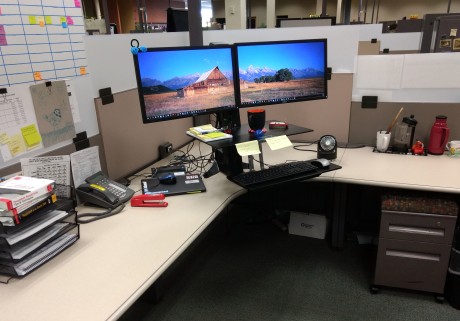
What do you listen to while you work?
Blues, jazz, electronica, old-school hip-hop, skiffle – it really depends on my mood and what type of work I’m doing. A lot of Tom Waits lately.
What PeopleSoft-related productivity apps do you use?
Change Assistant (for our internal releases in addition to the rest of it), DPKs, and puppet. I also like the Chrome extensions PS Utilities and PSChrome.
Do you have a 2-line tip that some others might not know?
When you’re developing or testing, instead of clearing your cache hit Ctrl+Shift+N in Chrome to open Incognito mode.
That was one line, can I do another one? If you’re newly upgrading to PeopleSoft 9.2, take some time to build out some navigation collections and homepage tiles. It’s really easy, will make your life easier, and will impress your end-users. It’ll also limit how often you have to use the new Nav menu… ick.
What SQL/Code do you find yourself writing most often?
Effective Date joins. Amiright?
What would be the one item you’d add to PeopleSoft if you could?
Open-source development! At least for the DPKs. Come on, Oracle. Let us fix the things we complain about so we can stop bothering you about it.
What everyday thing are you better at than anyone else?
No matter how good you are at something, there’s always somebody who’s better at it… so this is hard to answer. I do have a really high tolerance for eating extremely spicy food.
How do you keep yourself healthy and happy?
Spending time with my wife and three kids, reading, and getting out in nature.
What’s the best advice you’ve ever received?
Treat others as you would like to be treated, and always consider the other person’s point of view. Along those lines is my favorite Jack Handey quote: “Before you criticize someone, walk a mile in their shoes. That way, you’ll be a mile from them, and you’ll have their shoes.”
I’m Wayne Fuller and this is how I work
This week we’re featuring another of the ‘leading lights’ from the PSAdmin.io slack community – Wayne Fuller. He is a regular in the community and a frequent guest on their PodCast discussing running large scale PeopleSoft while at Wells Fargo (amongst other places). He also presented at the inaugural PSAdmin.conf on The Future of PeopleSoft Administration (the recording is available and is well worth 30 minutes of your time). I’m thrilled that he has added his profile to our ‘How I Work‘ series.

Name: Wayne Fuller
Occupation: Application Engineer
Location: Minneapolis
Current computer: HP EliteBook
Current mobile devices: Nexus 5X
I work: Proactively
What apps/software/tools can’t you live without?
Any app that I can learn quickly that saves me time, i.e. Beyond Compare etc.
Besides your phone and computer, what gadget can’t you live without?
My refrigerator. It keeps the beer cold. Also my Kindle because you have to have something to read while you are sipping a beer.
What’s your workspace like?
Just a small open cube when I actually go into work. Since I am part time I don’t have a permanent workspace. When I work from home I sit at the kitchen counter.

What do you listen to while you work?
Other people whine.
What PeopleSoft-related productivity apps do you use?
Is Change Assistant a productivity app? How about the images? Integration Broker? I know, event mapping.
Do you have a 2-line tip that some others might not know?
MOS actually can answer questions. Sometimes you just have to read between the lines.
What SQL/Code do you find yourself writing most often?
Code to query PeopleTools tables to discover where and how some of the new objects are stored. Useful for behind the scenes compares.
What would be the one item you’d add to PeopleSoft if you could?
A guarantee of longevity.
What everyday thing are you better at than anyone else?
Pretending that I am good at troubleshooting by using Google search.
How do you keep yourself healthy and happy?
I work 2 days a week and don’t think about work when I am at home.
What’s the best advice you’ve ever received?
Never be afraid to give your opinion on something you are expert in. You likely know better than your boss as you are the one who works with the stuff daily. He should value, nay require your opinion on things that you do.
I’m Jason Fletcher and this is how I work
To anyone who frequents the PSAdmin.io slack community (and that’s almost 500 people) the name Jason Fletcher (or fl3tchr) will be one that’s instantly familiar. He is not only seemingly ever-present, but also dishes out rapid-fire PeopleSoft advice, humour, gifs and good-natured sarcasm in more-or-less equal measure. I’m thrilled that he has added his profile to our ‘How I Work‘ series.

Name: Jason Fletcher
Occupation: It breaks, I fix. (AKA administrator for the City of Albuqerque)
Location: Albuquerque, NM
Current computer: My workstation is a HP ZBook 15″
Current mobile devices: iPhone 6s Plus (gotta have the larger screen for when I have to RDP into work)
I work: Humorously
What apps/software/tools can’t you live without?
1) Beyond Compare – So much better than Compare Reports. So much.
2) EditPad Pro – It’s been my text editor for over a decade. Handles gig sized files without much issue.
Besides your phone and computer, what gadget can’t you live without?
None. I’ve been accused of loving my computer more than my wife.
What’s your workspace like?
Workstation is an i7 with 8 GB RAM and docked to 2×24” monitors. Yes, it is a nice view.

What do you listen to while you work?
Depends on the intensity of the concentration. Routine work is subject to podcasts (a large amount of the TWiT network & Tom Merritt) followed by rock and instrumental music. Concentration requires instrumental or even white noise. (SimplyRain is a great app for rain noise. Which I don’t hear much of in the high desert.)
What PeopleSoft-related productivity apps do you use?
1) Slack – psadmin.io. It’s like a responsive MOS.
2) SQL Developer is my go-to SQL client.
3) Oracle Enterprise Manager for troubleshooting database performance.
Do you have a 2-line tip that some others might not know?
I’ve put this one in psadmin’s slack: in Windows Explorer, typing cmd (or powershell) in the address bar opens a command prompt at that location.
What SQL/Code do you find yourself writing most often?
A lot of effdt/seq SQL or SQL that joins psoprdefn & psroleuser.
What would be the one item you’d add to PeopleSoft if you could?
git or some other integrated versioning system.
What everyday thing are you better at than anyone else?
Beats me.
How do you keep yourself healthy and happy?
I’m currently a 1 gup in taekwondo (red belt with black stripe), which is the first rank below a 1st degree black belt. The outdoors are great in New Mexico most of the year so I do quite a bit of hiking. At nights I spend a lot of time playing Overwatch.
What’s the best advice you’ve ever received?
Love the Lord God with all your heart and soul and love your neighbour as yourself.
Larry’s Keynote – The World’s 1st Autonomous Database
Larry Elison came on stage last night to pumping rock music and laid out the details on Oracle’s latest big product unveilings – Oracle Autonomous Database and Highly Automated Cyber Security. Wearing a black polo shirt, faded blue jeans and a pair of ASICS running shoes he was relaxed and candid, obviously talking in an area that is comfortable for him.

This session was mostly on the Autonomous Database, however Larry spent some time striving to convince us all that the safest place to store your data is in an Oracle database – where they do everything they can to prevent human intervention, and therefore the risk of human error. The upcoming Cyber Security product – the subject of his Tuesday keynote – is designed to detect threats when they first occur, and then handover to the database to automatically apply patches rather than wait for humans to notice the breach, schedule downtime and then implement new security measures or patches. He made the point that the worst security breaches in history were made after the patches to fix the vulnerability being exploited were available – the issue was that the patches weren’t applied.
Much of what he said must be ringing in the ears of Deloittes after their cyber leak– where the breach went unnoticed for months and lax security processes allowed hackers to easily access customer data.
It seems that much of the cleverness behind these advances is machine learning, where the system watches events and looks for patterns that do not fit normal usage – e.g. someone logging in through an IP address on the TOR network, or from an unusual country.
Autonomous DatabaseLarry claims that the new 18c Autonomous Database reduces 100% of the human labour needed to run a database – it automatically provisions, upgrades, patches and tunes itself while running. The SLA guarantee is 99.995% – meaning less than 30 minutes downtime a year (planned and unplanned).
Adding to this, he added that it would run at 50% of the cost of Amazon and that Oracle would write that into your contract. The database is called 18c due to the calendar year, however the data warehouse version will be available in Dec 2017, with the OLTP database coming in June 2018.

Larry then continued with several examples of Oracle pricing being cheaper than AWS due to Oracle’s faster processing (both Oracle on Oracle Public Cloud vs Oracle on AWS and Amazon’s DB on AWS)… “If you want the extra security, if you want the extra automation that Oracle provides, you’ve got to be prepared to pay less.” Of course vendor produced comparisons should always be treated with a level of scepticism, however if Oracle are willing to write the savings into your contract then that does underline their claim.


Interesting PS Roadshow / Exec Dinner Snippets
We recently held the annual PeopleSoft Roadshow and Executive Dinner (summary here) and I wanted to highlight a couple of observations that I think are important enough to be revisited:
Fantastic UIWhile Marc was demoing some new functionality it struck me how big a stride the PeopleSoft UI has taken over the last few years.

If you’d shown me this picture a few years ago I’d have refused to believe that it was PeopleSoft. Very few applications can boast a UI as attractive as this.
Selective Adoption is being Aggressively AdoptedJulie Alonso showed this slide, detailing how many customers are really making the most of Selective Adoption.
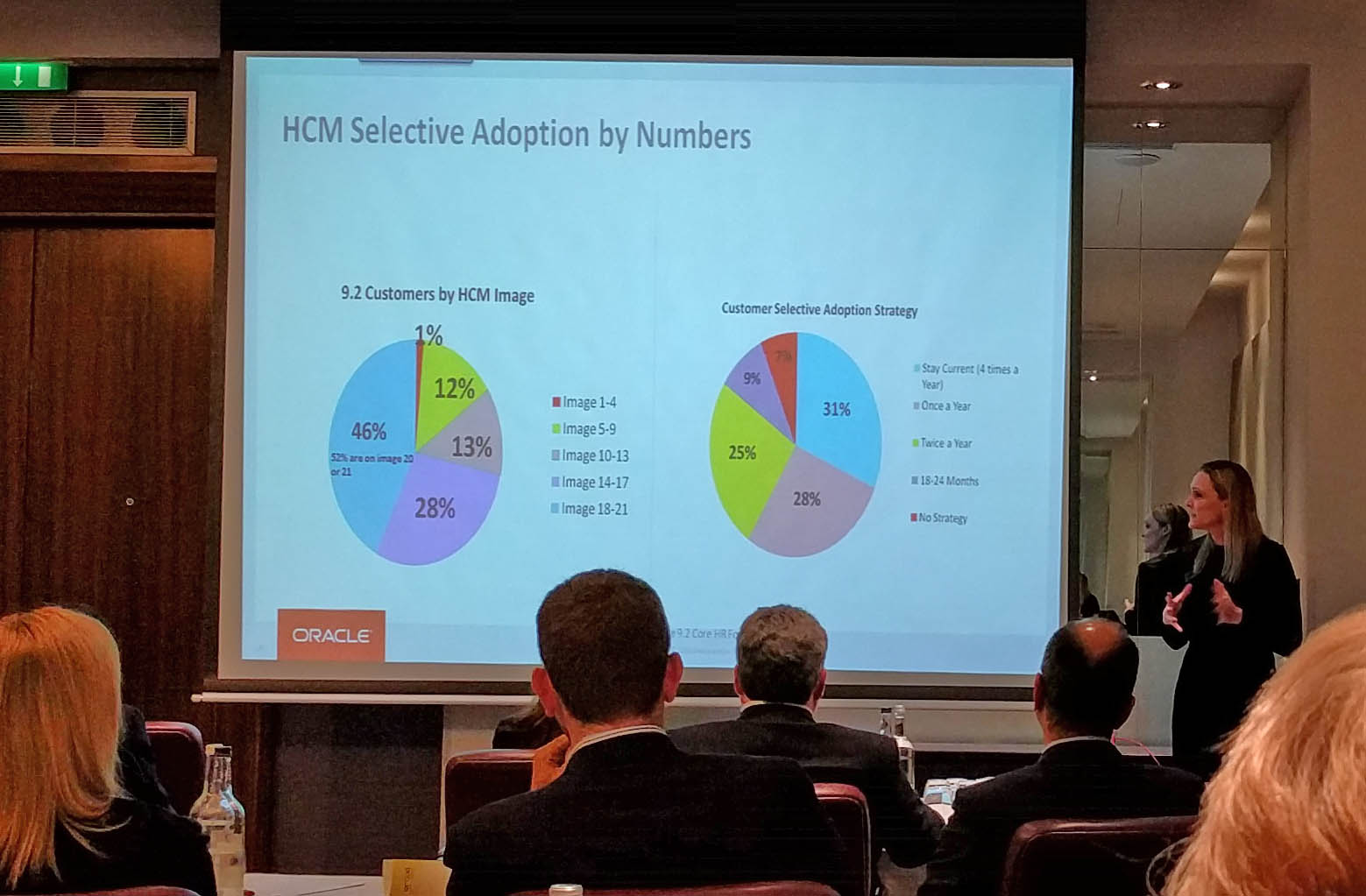
You might need to click these to see full-size, but let me highlight the key point. The right-hand pie-chart shows that 31% of customers are ‘staying current’ – i.e. doing a get current 4 times a year! A further 25% are getting current twice a year. So more than half of customers are getting current at least twice annually. I think this is really tremendous take-up of the benefits of Selective Adoption – and the PeopleSoft team must be delighted. I had fully expected most customers to lapse into an annual update.


PeopleSoft Roadshow and Executive Dinner
Two great events took place at the end of April – the UKOUG PeopleSoft Roadshow and the annual Cedar PeopleSoft Executive Dinner. Marc Weintraub and Julie Alonso spoke at both events so I’ve combined the highlights into a single post covering PeopleSoft improvements (including the new Onboarding module), PeopleSoft customer numbers looking strong, extension to the Support end date and more.
The full post can be found on the Cedar Consulting blog, here.


Come to the UKOUG PeopleSoft Roadshow
The UK Oracle User Group PeopleSoft Roadshow is nearly upon us. It’s my favourite PeopleSoft event in the UK’s calendar as you know that everyone there has a focus on PeopleSoft and the agenda is always really strong.
It’s 26th April (yes, a week today!) in the Crowne Plaza, London – the same as last time, which was a great venue.
Oracle US SpeakersIn terms of Oracle speakers, we’re spoiled this year with both Marc Weintraub and Julie Alonso presenting.
 Marc Weintraub
Pretty much everyone should know Marc by now, and he’s always good value. He’s giving multiple sessions including a PeopleSoft Update, Modernising with Fluid, Fully Executing on Selective Adoption and PeopleSoft in the Cloud.
Julie Alonso A new speaker to those who’ve only attended UK PeopleSoft events is Julie Alonso. She is Product Management Director within PeopleSoft HCM Strategy and the brains behind the monthly PeopleSoft HR Newsletter (if you don’t know what this is, either see Julie on the day or drop me a mail and I’ll link you up). Julie is presenting on The Power of PeopleSoft HCM.
It’s great that Oracle are supporting the event with two such speakers, and it’s wonderful to see a new face on the circuit.
Cedar SpeakersWe’ve also got a couple of speakers from Cedar on the agenda.
Graham Smith As with Marc, everyone should know Graham by now. He’s a rare blend of techie that’s been around PeopleSoft for long enough to know the history behind just about everything, but has such fantastic enthusiasm that he’s always trying the latest tools and techniques. Graham is talking about Selective Adoption and the Oracle Cloud.
 For those with excellent memories, Sarah has spoken at a PeopleSoft conference before (on a custom recruitment front-end that Cedar built for a client) however that was a few years back. Sarah has been busy managing some of Cedar’s PeopleSoft projects in the interim and is giving learnings from a Fluid implementation for a client – Fluid Development – Getting to Grips with a Different Skill Set.
Check out the agenda for the full listings, but in addition to the above we’ve got Paul Smit from Oracle Netherlands, Malcolm Hewlett from Excel4Apps and Ken de Landro talking about Hays’ automated PeopleSoft testing investigations.
If the above sounds like the sort of content that would interest you – and there’s something there for pretty much everyone – it’d be great to see you there. Book here.


I’m Colton Fischer and this is how I work
The next profile in our ‘How I Work‘ series is Colton Fischer. Colton is one of the crop of new PeopleSoft bloggers bursting on the scene during 2016. His PeopleSoft Mods blog is a treasure trove of great content and if you’ve not been there before it’s worth scrolling back through Colton’s historical posts – as he doesn’t just look at existing delivered functionality but extends PeopleSoft in ways that it’s clear to see the business benefit, frequently explaining how you can get the same results.

Name: Colton Fischer
Occupation: Application Developer at the University of Houston
Location: Houston, Texas, USA
Current computer: My desktop is a Dell Optiplex 9020 and my laptop is a Dell Precision 3510
Current mobile devices: Samsung Galaxy S5
I work: Eagerly
What apps/software/tools can’t you live without?
Snipping Tool – Helpful tool for when I need a quick screenshot to document or demonstrate something
VPN Client and Remote Desktop – I don’t work from home too much, but this is a lifesaver when I forget some files on my machine at the office
YouTube Mobile App – I am more of a visual learner, so I enjoy watching educational YouTube videos on my phone when I have some down time
ESPN Mobile App – Allows me keep up with collegiate and professional sports
Besides your phone and computer, what gadget can’t you live without?
I’d have to say my coffee maker. That thing gets me through each morning because I don’t know what I would do if I didn’t have my coffee.
What’s your workspace like?
I would say that my workspace is pretty basic. I will admit that it is not normally as clean as it is in this picture. Most of the work I do happens on my desktop computer. I use my laptop for running personal demo systems to do “experimental” development on. I also use the systems on my laptop when I do development that requires constant app and web server bounces so that I don’t bother anyone else.

What do you listen to while you work?
I enjoy most all genres of music, but what I listen to while I work relies heavily on the type of work that I am doing. If I am doing something that requires me to think hard, I listen to soft acoustic guitar songs. If I don’t need to think too hard, then I mostly find myself listening to metal rock, punk rock, and occasionally dubstep.
What PeopleSoft-related productivity apps do you use?
I have App Designer, SQL Developer, and Chrome windows open at all times. I like to use Chrome add-ons or other web-based productivity apps. I use Advanced REST client for Chrome when I need to work with web services. When I need to quickly view some unformatted XML, I use an online XML viewer to format it for me. I often work with base64 encoded values, so I use an online base64 decoder to obtain the decoded values. I also use the Chrome DevTools to view the source behind fields on PeopleSoft pages.
Do you have a 2-line tip that some others might not know?
I am not sure how well-known this is, but I recently discovered that meta-HTML can be used in the message catalog. Using meta-HTML (or even regular HTML) in messages can allow for some cool configuration-based functionality.
What SQL/Code do you find yourself writing most often?
I usually write queries on the security tables that deal with roles and permission lists. However, here lately I have been writing some queries on the PSACCESSLOG and PSPTLOGINAUDIT tables. There is some really interesting information in these tables from a security perspective.
What would be the one item you’d add to PeopleSoft if you could?
I would like to see some built-in functionality to make it easier to identify sensitive data (bank account numbers, SSNs, etc.) fields in PeopleSoft. It would be nice if the field definitions that are used to store\display sensitive data would have a setting to distinguish the level of sensitivity. Having this information stored in the meta-data tables would allow for the ability to easily write queries to determine where in the application sensitive data is being exposed. This would, in- turn allow for PeopleSoft security administrators to more effectively secure their PeopleSoft applications.
What everyday thing are you better at than anyone else?
I am not sure if I am better than anyone at this, but I am good at time management and not procrastinating.
What’s the best advice you’ve ever received?
I enjoy playing golf and tennis when I have someone available to play with. When I am solo and I want to do something physical, I usually go skateboarding. Something else that keeps me happy (but not so healthy) is playing Xbox.
What’s the best advice you’ve ever received?
The best piece of advice I’ve received is to start each day fresh and with a clean slate regardless of how the previous day went. It’s easy to carry struggles and frustrations with us from day to day, but it only hinders your productivity and outlook.


Paco on Continuing Investment in PeopleSoft
There’s a great episode of Marc Weintraub’s PeopleSoft Talk interview series, featuring a 30 minute discussion with Paco Aubrejuan. There’ll be some great points for everyone to take away from it, however here are my highlights:
On the current Support End date of December 2027:There’s no plan on ending support for PeopleSoft then, it’s actually not that important a date. It happens to be the date right now that our lifetime support goes to … that probably won’t be the case and as we get closer to that date the plan is to move those dates out.
On Continued Investment:For me investment and support are one and the same. It’s hard to support applications without continuing to enhance them as well. We’re planning to support and enhance them through that date.
On Fluid Adoption:We have 2-300 customers who are live on it, and many of whom aren’t live with just a few applications but with Fluid across the board. We’ve got to that hockey stick period in terms of adoption where the majority of our customers who are doing projects or upgrades are deploying Fluid.
On replacing SES with Elasticsearch:“it’s easier, cheaper, faster, better for customers to run Elasticsearch versus SES”
plus lots more on Cloud, Fluid Approvals and Selective Adoption. It’s well worth a watch:


PeopleSoft – What Does The Future Hold?
In an earlier post titled Banishing PeopleSoft Myths I shared my perspective of the current state of the PeopleSoft product and marketplace. I thought it’d be an interesting exercise to try to look forwards and to define what I think the future might hold for the product line. Some of this might be a little off-target, some might be a mile off target and some I might have changed my mind on if you ask me next week, but hopefully it starts some discussions.
PeopleSoft Moves to The CloudAn easy one first. There’s a strong push to move to The Cloud and that should be apparent to pretty much everyone. There are some compelling success stories for PeopleSoft in the Cloud, customers have gained huge performance  increases and flexibility in infrastructure, as well as saving money. So far these success stories have been on AWS, and – to a lesser extent – on Azure, however Oracle wants a piece of that pie now. The Oracle Compute Cloud should be an option whenever there’s a discussion on Cloud hosting (and this discussion should be held before any hardware refresh or major upgrade/get current).
Oracle is also making it easier for customers to move to The Cloud. The PeopleSoft Cloud Architecture is a set of functionality and tools that eases the transition, and it will be enhanced in future PeopleTools versions.
The PeopleSoft Marketplace Remains BuoyantCedar’s current experience is that there is a lot of activity in the market. Through the coming years we shouldn’t expect a huge number of net-new clients buying PeopleSoft, however existing clients are very loyal to the product and will continue to take advantage of the new features that are added to the product. It’s easy to imagine that over the coming years there will be widescale adoption of Fluid and Cloud Architecture.
More PeopleSoft HostingIt’s becoming easier for customers to outsource the care of their PeopleSoft systems to partners – or, in the future, maybe even Oracle themselves. The Cloud makes the infrastructure significantly cheaper, and the PeopleSoft Cloud Architecture will make the administration simpler too. The PeopleSoft application will simply be provided to the client as a service, with all the hardware, DBA services and patc hing performed by the partner for a flat monthly fee. PeopleSoft updates could also be rolled into this as Selective Adoption forms a key piece of the application maintenance model and lends itself very well to the Cloud hosting model.
There have been other advances in PeopleTools too that make it easier to reduce customisations – thereby making it easier for organisations to host multiple customer environments. The new related content event mapping functionality enables you to replace (some) customised code, and I’m sure the PSAdmin.io guys mentioned a technique for adding fields to a page via config instead of customisation (but I can’t find a link for it). The closer you are to vanilla the easier it is keep your application updated with the latest security, product fixes and new features.
Will Oracle provide “PeopleSoft as a Service”? Currently the answer – at least publicly – is ‘No’ however that might change over time. Oracle are moving their OnDemand offering over from physical hardware to Cloud infrastructure so they will host the servers and provide maintenance resources for clients.
PeopleSoft and ContainersThe next evolution on from Virtual Machines is the use of ‘container’ technology. The problem with having a server containing multiple VMs is that each VM needs to have its own Operating System installed, kept patched and kept in sync. This – and the other software that could be shared – introduces a lot of duplication. Containers are like cut-down VMs, there is no OS within the container, just the application itself. Each of the containers shares the OS that’s installed on the host. There’s a
good intro to containers here.
Vendors have started to adopt this container technology – Docker is by far the most widely known – and it’d be no surprise if PeopleSoft starts to do the same. It’d be great to be able to drop in another App Server container without having to mess around with building one. The DPKs get us part way there, but this could be the next progression. First we’ll need to wait for Oracle Compute Cloud support for Docker first (or whatever snappy name Oracle gives to their Docker equivalent … maybe the ‘Oracle Enterprise Container Management Service’?)
Greater Fluid AdoptionSomewhere between 50-60% of customers are on v9.2, which means they’re either using or preparing to use Selective Adoption. Once a customer starts on the Selective Adoption path, they’ll find that the Fluid UI is the interface that updates and fixes will be delivered on. This will drive Fluid adoption. This is good for Self Service users as they’d typically benefit the most from a Fluid roll-out.
Although there is some pain involved in getting Fluid up and running all of the feedback that we’ve heard to date is that those who’ve made the jump are very happy with the results. Self Service users stand to gain the most as Fluid really makes PeopleSoft a lot more accessible to infrequent users.
The role of SysAdmin is ChangingThe role of the PeopleSoft SysAdmin is dramatically different than it was 5 years ago. The advent of PUM, Selective Adoption, DPKs, Puppet and SES, and the imminent adoption of the Cloud Delivery Architecture and Elasticsearch have all shifted the landscape significantly.
Much of this is good news. For instance, Selective Adoption and DPKs have both made the SysAdmin’s life easier (once the toolset has been learnt). The future sounds like this trend will continue as Cloud Manager will allow one-click provisioning and refreshes of environments, and Elasticsearch promises to alleviate some of the SES headaches.
This greater functionality does come at a cost for the SysAdmin, and that is that there is a wider breadth to the set of tools that they are required to master. The days where the SysAdmin just needed to do installs and tuning have passed. This increased automation brings the requirement for DevOps SysAdmins – i.e. SysAdmins who are able to cut some code.
The role of Developer is ChangingDevelopers too are finding that the goalposts are moving. Developers who’ve only just recovered from swapping out their FuncLibs for App Packages are now reeling from the news that there is even more to learn. Fluid brings a requirement to know much more HTML, CSS and some JavaScript. Having seen a recent demo where Jim Marion completely re-laid out a Fluid page using the Chrome Developer console rather than PeopleCode really brought this home. The next tech coming over the hill at Deve
lopers is Oracle JET – a collection of the most useful JavaScript frameworks.
I felt I should end with a real ‘out there’ prediction. With Elasticsearch we can see that Oracle are open to including a new 3rd party product as part of the stack (previously it seemed like 3rd party tools were slowly being phased out) so what other new products or tools might be included? Elasticsearch is made by a company called Elastic, but they have other offerings in addition to their core Search product. The one that looks the most appealing from a PeopleSoft point-of-view is LogStash. I’ve looked at it a number of times over the years but its lack of Windows support was always a barrier for me, however now it’s available on Windows. LogStash is a log file aggregation tool, it takes all of the entries in all of your log files spread across all of your servers and makes them available for searching in one central repository. It’s easy to see how that might be incredibly useful in a PeopleSoft context. There are alternative tools that perform a similar role – Splunk for example – however I think LogStash is the most obvious selection.
UPDATE: The PSAdmin.io guys discussed Splunk and LogStash in their latest Podcast.
So, there are 8 predictions for the coming years. Have I missed anything glaring? Have I got one of them wrong?


PeopleSoft Partner of the Year
I would like to borrow a few minutes of your time to ask a quick favour. If you haven’t already, could you please vote ‘Gold’ for Cedar in the UK PeopleSoft Partner of the Year competition.
http://pya.ukoug.org/index.php/survey/index
Here’s why I believe we’re worth your vote:
- We’ve been serving PeopleSoft customers for 20+ years, and in each of the last few years we’ve worked with more than 40 clients
- We’re active members of UKOUG, with multiple employees dedicating time to its committees – quite an investment for a company our size
- We’re active in the PeopleSoft community, with multiple blogs and free newsletters
- We share knowledge freely, with multiple speakers at UKOUG’s Apps15 and Oracle OpenWorld last year
- We host our own knowledge sharing events, enabling the PeopleSoft community to network and exchange ideas, whilst Cedar experts and customers share success stories
- We’re on the cutting edge, if you want to know about Oracle Public Cloud, Fluid UI or Selective Adoption, we’re the people to speak to
I hope that’s enough to convince you. If you’ve voted for us please let me know. If you need more persuasion, please do get in touch.


I’m Logesh Balasubramaniam and this is how I work
The next profile in our ‘How I Work‘ series is Logesh Balasubramaniam. Logesh is one of the newer bloggers – posting on his LeanIT Designs site – however he provides great content and is usually one of the first to tackle new functionality. He has sometimes even managed to blog about new features before Oracle’s official post.
If you’re a fan of Logesh’s work it looks like he’s been selected to present at OOW this year, alongside his colleague Chamanthi Weerasinghe, on “Bang for Your Buck: A Practical Approach to Optimize Your Selective Adoption”.

Name: Logesh Balasubramaniam
Occupation: PeopleSoft Consultant at Presence Of IT, Australia.
Location: Auckland, New Zealand.
Current computer: Lenovo Thinkpad T440s
Current mobile devices: Samsung Galaxy S3 & iPad Mini 2
I work: To achieve best possible outcome in the realms of Scope, Time & Cost
What apps/software/tools can’t you live without?
Apps – Kindle, linkedin, Keeper(Passwords), doubleTwist
Desktop essentials: MS office, Outlook, Notepad++, Snipping Tool
What’s your workspace like?
I am minimalist by nature and my workplace will reflect it. I don’t tend to carry any baggage(both hard & soft) and have a compulsion to get rid of anything after its purpose.

What do you listen to while you work?
Silence, help me to focus. Leave my windows open and let in everything that my surroundings offer.
What PeopleSoft-related productivity apps do you use?
Browsers: Chrome & Firefox, Developer tools in both browsers, Extensions – Wizdler for chrome, HTTPFox for Firefox
PeopleTools – Whole suite of development tools and occasionally administration utilities
SOAPUI – Everything integration related
SQL Developer and SQL Server management studio
Do you have a 2-line tip that some others might not know?
I find ‘My Oracle Support Community (MOSC)’ to be very active and useful in PeopleSoft application space. Especially for those working on new features in recent product versions, post your queries and you will get immediate help with Oracle specialists. I also find Red Papers released on various topics by Oracle to be a very valuable resource to design solutions especially in integration, security and performance areas.
What SQL/Code do you find yourself writing most often?
Having spent most of my time in HCM application, subquery to get MAX(EFFDT), tops my list.
What would be the one item you’d add to PeopleSoft if you could?
Support/implement SAML based identity federation.
What everyday thing are you better at than anyone else?
Starting every day with the same eagerness, desire and will I had on my first day at work.
What’s the best advice you’ve ever received?
Nothing specific from a person, but an elementary quote that I find most relevant in our profession is “A stitch in time save nine”. As remote work culture and diverse work teams become ubiquitous, proactive communication is key to successful collaboration.


Hit by the ‘Tech Support’ Scammers
I got a call earlier today from the Tech Support Scammers. You’ve probably heard of this horribly unethical practice already, but the premise is that they cold-call seemingly randomly and try to convince you that there is a problem with your PC/router, and then attempt to get you to allow them remote access to your PC to ‘fix it’. Some then claim problems are due to expired warranties on the computer and demand payment, others setup a boot password and demand money for unlocking it. Either way, it’s a nasty thing to do and is taking advantage of people while pretending to help.
So, I thought I’d play along and see what they’d do.
The call appeared to come from a UK number, however it clearly originated from an offshore data centre. They introduced themselves as calling from my ISP and said that they’d detected a problem and needed to fix it on my PC. They could show me some symptoms to reassure me that they were legitimate. I asked them “who is my ISP?” as I wasn’t sure whether they’d know, however they were able to accurately answer.
The nice lady then got me to open Event Viewer and tell me how many errors and warnings were listed.

I’d wager that most computers have a heap of entries here, but when I said that there was over 8,000 she did some great play-acting that 8-10 is a typical number, feigning shock and how this proves the appalling state of my laptop.
Next, she asked me to open a command-prompt and run the ASSOC command. This lists all the file associations on my laptop, and she read out a string and asked me to verify that it matched the CLSID below.

This, of course, proves nothing as it would be the same on all versions of Windows. However, she said that CLSID stands for “Computer Licence Security ID” and that by knowing this code it proved her authenticity.
At this point she asked me to visit http://www.support.me, which forwards to LogMeIn – a remote control system – and said she was going to pass me over to a technical colleague called ‘David’.
When David came on the line I said I’d used the lengthy delay to google what had happened and found out what they were doing. He then swore at me and hung up.
I feel sorry for the poor people that fall victim to these horrible practices and wish there was some way of stopping them preying on the innocent.


Banishing some PeopleSoft Myths
There seems to be quite a bit of uncertainty and misinformation in the PeopleSoft marketplace currently, so I thought it might be time to banish a few myths:
1. PeopleSoft isn’t being improved/getting investment
There are those with vested interests or other biases that will always deny this regardless of the evidence put in front of them, but PeopleSoft is improving in leaps and bounds. In the last couple of years PeopleSoft has been moving at an increasing speed, and one of the biggest questions on many client’s minds right now is “how do I keep up”. My Cedar colleague Graham Smith has a long list of recent new features in his PeopleSoft Predictions 2016 post, but if you just counted Fluid, Selective Adoption and Cloud Delivery Architecture I don’t think there’s ever been a time in which PeopleSoft has improved so much in a short space of time, pre or post-acquisition. Paco has repeatedly committed to keeping PeopleSoft around until at least 2027, and using the last few years as evidence I’m inclined to believe him.
2. PeopleSoft is Legacy/Old Fashioned
PeopleSoft is certainly very well established, with a long history and a wide customer base, that much is true. This can be a good thing, in that much of the system is tried and tested with the wrinkles ironed out. It is also true that some aspects of PeopleSoft do things the ‘old way’. The majority of deployments are on-premises, without the flexibility and efficiency that cloud deployment and automation can bring. You also pay for PeopleSoft up-front, rather than monthly. It doesn’t have to be this way, however. PeopleSoft can be deployed in an agile and efficient manner, taking advantage of some of the new technology available to us now, and the new enhancements within the product.
3. To be a future-proof system it needs to be SaaS
This is tricky as different people hold varying ideas about what constitutes SaaS, however PeopleSoft does get regular updates containing new functionality from the vendor (every ~10 weeks), can be deployed in the Cloud (to gain auto-scaling/elasticity of resources, a predictable monthly subscription and theoretically even multi-tenancy – at least above the database-level, if it was something that clients wanted). Furthermore, the application of the updates and the management of the cloud architecture can be handed over to a friendly partner in order to get even closer to purists’ definitions of what SaaS entails – if that is important to you.
4. PeopleSoft’s UI is out-dated
Up until a few years ago there wasn’t the focus on ‘consumer grade UI’ that there is now. In that era, PeopleSoft’s UI measured up pretty well. It was certainly more attractive than SAP and/or E-Business Suite. Recently this greater focus on the User Interface has introduced new competitors but PeopleSoft still keeps up well. Of course you can compare an old version of PeopleSoft with the latest from a competitor and it will appear dated in comparison, however if you use the latest PeopleSoft UI in the comparison it’ll fare rather better. The Fluid UI is (at least) the equal of anything out there, regardless of which device you view it on.
5. The PeopleSoft Market is Quiet
From what I can see there are fewer green-field implementations than 5 years ago, but there is a lot more upgrade activity. Clients are moving to 9.2 at a far greater rate than for 9.0 or 9.1, and then starting initiatives to really get value from the software once they get there. As a company I’m not sure Cedar has ever been busier.
So, now I’ve got that off my chest, I might do some predictions like Graham next …

